AJAX + Java 打造搜尋自動完成(Suggest)功能
編輯:關於JavaScript
百度的搜尋建議省下不少打字功夫——你還沒打完,它已經猜到。這類功能靠 AJAX 實作,但要做得快速、穩定、可移植並不容易。網上現成的範例多是 ASP 或 PHP,Java 版本的說明又偏少,於是有了自己動手做一輪的動機。
整體流程
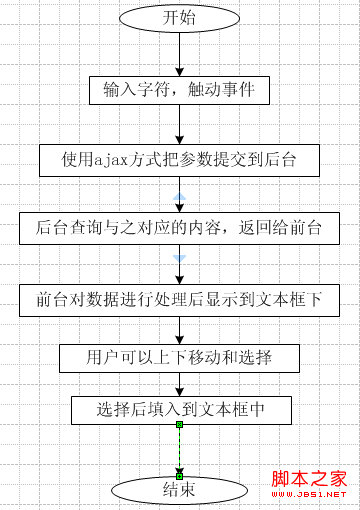
使用者在輸入框打字 → 前端對參數編碼後送出 GET 請求 → 後端做模糊比對並回傳 XML → 前端解析後動態組出提示表格 → 使用者用滑鼠或方向鍵選取,把值寫回輸入框。
前端:JavaScript
var xmlHttpRequest;
var table, tbody, div, input;
var curIndex;
var size;
var r_userId;

function createXMLHttpRequest() {
    if (window.ActiveXObject) {
        xmlHttpRequest = new ActiveXObject("Microsoft.XMLHTTP");
    } else if (window.XMLHttpRequest) {
        xmlHttpRequest = new XMLHttpRequest();
    }
}

// 送出請求
function findNames() {
    // 上下方向鍵(40 / 38)不觸發查詢
    if (event.keyCode == 38 || event.keyCode == 40) {
    } else {
        if (input.value.length > 0) {
            createXMLHttpRequest();
            // 參數需編碼兩次,後端也要解碼兩次
            var url = encodeURI(encodeURI(
                "/jforum.html?module=posts&action=findDept&names=" + input.value));
            xmlHttpRequest.open("GET", url, true);
            xmlHttpRequest.onreadystatechange = processMatchResponse;
            xmlHttpRequest.send(null);
        } else {
            clearNames();
        }
    }
}

// 回呼
function processMatchResponse() {
    if (xmlHttpRequest.readyState == 4) {
        if (xmlHttpRequest.status == 200) {
            var dept = xmlHttpRequest.responseXML.getElementsByTagName("dept");
            var id   = xmlHttpRequest.responseXML.getElementsByTagName("id");
            setNames(dept, id);
        } else {
            window.alert("您請求的頁面發生異常!");
        }
    }
}
把結果排成表格
function setNames(depts, ids) {
    clearNames();
    size = depts.length;
    if (size > 0) {
        div.style.visibility = "visible";
        var row, col1, col2, span;

        for (var i = 0; i < size; i++) {
            row  = document.createElement("tr");

            col1 = document.createElement("td");
            col1.innerText = depts[i].firstChild.data;

            col2 = document.createElement("td");
            col2.setAttribute("align", "right");
            col2.setAttribute("id", "col2");
            col2.setAttribute("width", "5%");
            span = document.createElement("span");
            span.innerText = ids[i].firstChild.data;
            span.style.display = "none";      // id 藏起來,選取時才讀
            col2.appendChild(span);

            row.appendChild(col1);
            row.appendChild(col2);

            row.onmouseout = function () { this.className = 'mouseOut'; };
            row.onmouseover = function () {
                clearSelected();
                this.className = 'mouseOver';
                curIndex = this.rowIndex;
            };
            row.onclick = function () {
                input.value = this.cells[0].innerText;
                r_userId.value = table.rows[curIndex].cells[1].innerText;
                clearNames();
            };
            tbody.appendChild(row);
        }

        // 最後加一列「關閉」
        row  = document.createElement("tr");
        col1 = document.createElement("td");
        col2 = document.createElement("td");
        col2.setAttribute("align", "right");
        var link = document.createElement("a");
        link.href = "javascript:clearNames();";
        link.innerHTML = "關閉";
        col1.appendChild(link);
        row.appendChild(col1);
        row.appendChild(col2);
        tbody.appendChild(row);
    }
}
定位提示層與鍵盤操作
function setPosition() {
    input    = document.getElementById("names");
    r_userId = document.getElementById("r_userId");
    table    = document.getElementById("table");
    div      = document.getElementById("div");
    tbody    = document.getElementById("tbody");

    div.style.width  = input.offsetWidth - 2;
    div.style.border = "gray 1px solid";
    div.style.left   = getLeft(input);
    div.style.top    = getTop(input) + input.offsetHeight + 6;

    curIndex = -1;
    input.focus();
}

function clearNames() {
    var ind = tbody.childNodes.length;
    for (var i = ind - 1; i >= 0; i--) {
        tbody.removeChild(tbody.childNodes[i]);
    }
    div.style.visibility = "hidden";
    curIndex = -1;
}

function clearSelected() {
    var ind = tbody.childNodes.length;
    for (var i = ind - 1; i >= 0; i--) {
        tbody.childNodes[i].className = "mouseOut";
    }
}

function keyDown() {
    if (div.style.visibility == "visible") {
        if (event.keyCode == 38) {                    // 上
            if (curIndex >= 0) {
                table.rows[curIndex].className = 'mouseOut';
                curIndex--;
                if (curIndex >= 0) {
                    table.rows[curIndex].className = 'mouseOver';
                    input.value    = table.rows[curIndex].cells[0].innerText;
                    r_userId.value = table.rows[curIndex].cells[1].innerText;
                }
            }
        }
        if (event.keyCode == 40) {                    // 下
            if (curIndex < size - 1) {
                if (curIndex >= 0) { table.rows[curIndex].className = 'mouseOut'; }
                curIndex++;
                table.rows[curIndex].className = 'mouseOver';
                input.value    = table.rows[curIndex].cells[0].innerText;
                r_userId.value = table.rows[curIndex].cells[1].innerText;
            } else {
                table.rows[curIndex].className = 'mouseOut';
                curIndex = -1;
            }
        }
    }
}

// 取得元素相對於頁面的絕對座標
function getTop(e) {
    var offset = e.offsetTop;
    if (e.offsetParent != null) offset += getTop(e.offsetParent);
    return offset;
}
function getLeft(e) {
    var offset = e.offsetLeft;
    if (e.offsetParent != null) offset += getLeft(e.offsetParent);
    return offset;
}
後端:Java
public void findDept() throws IOException {
    String partDeptName = this.request.getParameter("names");
    partDeptName = java.net.URLDecoder.decode(partDeptName, "UTF-8");

    Map<String, String> userMap = DataAccessDriver.getInstance()
        .newUserDAO().getDeptByPart("%" + partDeptName + "%");

    this.response.setContentType("text/xml;charset=UTF-8");
    this.response.setHeader("Cache-Control", "no-cache");

    ServletOutputStream pw = this.response.getOutputStream();
    OutputStreamWriter out = new OutputStreamWriter(pw, "UTF-8");

    out.write("<res>");
    Iterator<Map.Entry<String, String>> it = userMap.entrySet().iterator();
    while (it.hasNext()) {
        Map.Entry<String, String> entry = it.next();
        out.write("<id>"   + entry.getKey()   + "</id>");
        out.write("<dept>" + entry.getValue() + "</dept>");
    }
    out.write("</res>");

    out.flush();
    out.close();
}
幾個關鍵點
- 編碼要對稱。 前端
encodeURI兩次,後端就得解碼兩次,對不上就是亂碼。 - 查詢用模糊比對。
"%" + 關鍵字 + "%"是基本做法;資料量大時應改為前綴比對並配合索引,或導入全文搜尋。 - 回傳格式。 這裡用 XML,也可改 JSON——資料量小、解析方便,是現在的常態選擇。
- 輸出串流。 範例用
response.getOutputStream()搭配OutputStreamWriter是受限於既有框架;純 Servlet 可以直接response.getWriter()再用println(),依自己的框架調整即可。
現代寫法建議
這份程式碼刻意不用 jQuery,但仍有幾處值得更新:innerText 在 Firefox 早期版本不支援,應改用 textContent;提示層的無障礙性需要補上 role="listbox"、role="option" 與 aria-activedescendant,並處理 Enter/Esc 鍵;每次按鍵都發請求會造成大量無效查詢,實務上一定要加 debounce(例如停止打字 250ms 後才送出),並對 URL 做快取,避免重複請求。