dotopAlert:提示使用者安裝播放器的彈出視窗實作
編輯:關於JavaScript
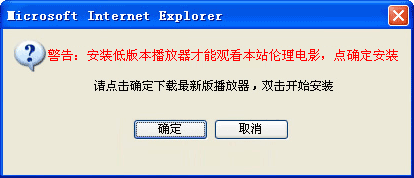
這是一個判斷本機播放器版本、版本過舊時才跳出提示視窗的完整範例。它會用 Cookie 記錄提示過的次數與冷卻時間,避免反覆打擾使用者。
var _WName = 'dotopAlert';    // 視窗 ID
var _Lastver = 1;             // 遠端要求的最低版本
var _Timespan = 1;            // Cookie 有效時間(小時)
var _Alertimg = "https://www.**.com/js/ads/alert.png";   // 圖片
var _WUrl = 'https://**.com/**.exe';                     // 下載位址

function $(id){
    return "string" == typeof id ? document.getElementById(id) : id;
}

var dCookie = {};
dCookie.set = function(name, value, expiresd, path, domain, secure) {
    var expdate = new Date();
    var expires = arguments[2] || null;
    var path    = arguments[3] || "/";
    var domain  = arguments[4] || null;
    var secure  = arguments[5] || false;
    if (expires) expdate.setMinutes(expdate.getMinutes() + parseInt(expires));
    var cookietemp = escape(name) + '=' + escape(value)
        + (expires ? '; expires=' + expdate.toGMTString() : '')
        + (path    ? '; path=' + path : '')
        + (domain  ? '; domain=' + domain : '')
        + (secure  ? '; secure' : '');
    document.cookie = cookietemp;
}
dCookie.get = function(name) {
    var arr, reg = new RegExp("(^| )" + name + "=([^;]*)(;|$)");
    if (arr = document.cookie.match(reg)) {
        return unescape(arr[2]);
    } else {
        return null;
    }
}
接著是視窗的定位與開關:
function __showNotice() {
    var dWidth  = $(_WName).scrollWidth,
        dHeight = $(_WName).scrollHeight;
    var dLeft = Math.floor((document.documentElement.clientWidth - dWidth - 414) / 2)
              + (document.documentElement.scrollLeft || document.body.scrollLeft);
    var dTop  = Math.floor((document.documentElement.clientHeight - dHeight - 178) / 2)
              + (document.documentElement.scrollTop || document.body.scrollTop);
    $(_WName).style.display = '';
    $(_WName).style.left = dLeft + "px";
    $(_WName).style.top  = (dTop - 40) + "px";
}
function dotopClose() { $(_WName).style.display = 'none'; }
function dotopOK() {
    dCookie.set('dNotices', 1, 60 * _Timespan, '/');   // 記住已提示
    $(_WName).style.display = 'none';
}
function dotopNO() { $(_WName).style.display = 'none'; }
版本偵測靠 ActiveX 元件,並做降級嘗試:
function getChaosuV() {
    var version = "0.0";
    try {
        var c = new ActiveXObject("WebProxy.CChaosuInfo");
        version = c.GetVersion(0);
    } catch (e) {
        try {
            var c = new ActiveXObject("chaosuProxy.CChaosuInfo");
            version = c.GetVersion(0);
        } catch (e) {}
    }
    version = "" + version;
    var index = version.indexOf('.');
    if (index == -1) version = "2." + version;
    return parseFloat(version);
}
最後用 document.write 組出視窗結構,並依 Cookie 與版本判斷是否顯示:
function __createNotice() {
    document.write("<div id='" + _WName + "' style='display:none;position:absolute;z-index:999;width:414px;height:178px;background:url(" + _Alertimg + ") no-repeat'>"
        + "<i style='display:block;width:21px;height:21px;position:absolute;right:5px;top:5px;cursor:pointer' onclick='dotopClose()'></i>"
        + "<a style='display:block;position:absolute;cursor:pointer;width:73px;height:19px;top:120px;left:134px' onclick='dotopOK()' target='_blank' href='" + _WUrl + "'></a>"
        + "<i style='display:block;width:73px;height:19px;position:absolute;cursor:pointer;top:120px;left:215px;' onclick='dotopNO()'></i>"
        + "</div>");
    __showNotice();
}

var iNum = parseInt(dCookie.get("dNoticeNum"));
iNum = isNaN(iNum) ? 0 : iNum;
var iAllow = parseInt(dCookie.get("dNotices"));
iAllow = isNaN(iAllow) ? 0 : iAllow;
if (iAllow == 0 && getChaosuV() < _Lastver) {
    if (iNum > 2) {                       // 提示超過 3 次就不再打擾
        dCookie.set('dNoticeNum', 0, 60 * _Timespan, '/');
        dCookie.set('dNotices', 1, 60 * _Timespan, '/');
    } else {
        iNum++;
        dCookie.set('dNoticeNum', iNum, 60 * _Timespan, '/');
        __createNotice();
    }
}
值得注意的地方有兩個:一是用 Cookie 的 dNotices 旗標確保使用者按下「確定」後不再跳;二是 dNoticeNum 計數上限,避免同一段時間內連續彈窗。定位計算之所以要扣掉 414 與 178,是為了讓視窗在視覺上略偏上置中,同時把捲動距離加回去,才能在使用者捲動過的頁面上正確對位。
- 上一篇文章: 用 JavaScript 取出實際套用於元素上的樣式屬性
- 下一篇文章: JS 函式引用與記憶體開銷:迴圈內定義函式的隱藏成本
相關文章
-
Ajax 跨域請求時 Cookie 帶不上的完整解法 Ajax 跨網域 Cookie 遺失的處理方式 JavaScript 操作 Cookie:讀取、寫入與刪除的完整封裝 用 Cookie 做記事提醒:把「行事曆」塞進瀏覽器裡 用 Cookie 與 DOM 實作網頁換膚 HTML5 WebStorage:全面解析本地儲存方案 深入對比 Cookie、LocalStorage 與 SessionStorage JavaScript BOM 全解析:window、location、history、screen 與 Cookie 刷新頁面後讓 select 與 radio 的選取值保持不變 瀏覽器客戶端資料儲存:Cookie、IE 使用者資料與 Web Storage