jQuery實現的placeholder效果完整實例
編輯:關於JavaScript
本文實例講述了jQuery實現的placeholder效果。分享給大家供大家參考,具體如下:
運行效果截圖如下:
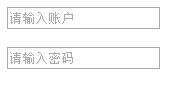
具體代碼如下:
<!DOCTYPE html>
<html xmlns="http://www.w3.org/1999/xhtml">
<head>
  <meta http-equiv="Content-Type" content="text/html; charset=utf-8" />
  <title>jQuery實現placeholder效果</title>
  <script src="jquery-1.7.2.min.js"></script>
  <script>
    $(function () {
      initEvent();
    });
    //初始化提示內容的顏色
    function initEvent() {
      $('input.holder').each(function () {
        var $this = $(this), holder = $this.data('holder');
        if (holder) {
          $this.css('color', '#a9a9a9').val(holder);
        }
      });
      //獲取焦點時設置內容的顏色和值為空
      $(document).off('focus', 'input.holder').on('focus', 'input.holder', function () {
        var $this = $(this);
        if ($this.val() === $this.data('holder')) {
          $this.css('color', 'black').val('');
        }
      });
      //失去焦點後還原提示內容
      $(document).off('focusout', 'input.holder').on('focusout', 'input.holder', function () {
        var $this = $(this);
        if ($.trim($this.val()) === '') {
          $this.css('color', '#a9a9a9').val($this.data('holder'));
        }
      });
    }
  </script>
</head>
<body>
  <input type="text" class="holder" name="name" value="" data-holder="請輸入賬戶" /><br><br>
  <input type="text" class="holder" name="name" value="" data-holder="請輸入密碼" />
</body>
</html>
小編推薦
熱門推薦