很多公司到了年底都會做一些抽獎活動來刺激、吸引、粘住客戶,比如抽獎轉盤活動。
前幾天用一個jqueryRotate插件實現了轉盤的效果。比起那些很炫麗的flash是稍遜點,但也基本實現了需求
效果圖:
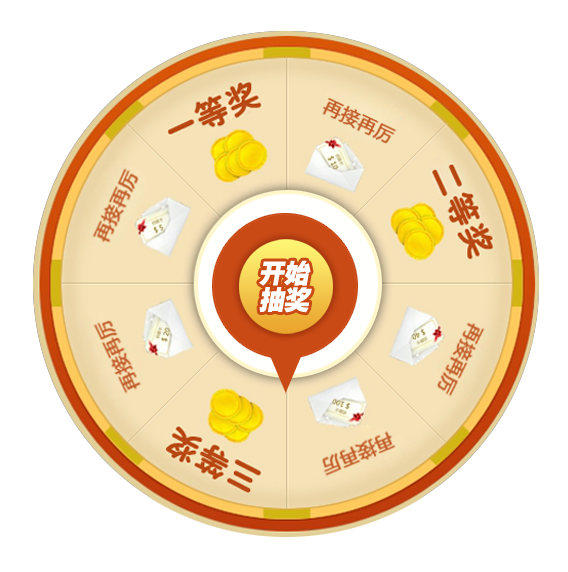
實現這個其實蠻簡單的,轉動的效果用的jqueryRotate插件,所以只要判斷每個獎薦對應的角度,然後設置指針的轉動角度就可以了。比如關鍵的是jqueryRotate這個插件的用法。
jqueryRotate的資料:
支持Internet Explorer 6.0+ 、Firefox 2.0 、Safari 3 、Opera 9 、Google Chrome,高級浏覽器下使用Transform,低版本ie使用VML實現
google code地址:http://code.google.com/p/jqueryrotate/
調用和方法:
$(el).rotate({
    angle:0, //起始角度
     animateTo:180, //結束的角度
     duration:500, //轉動時間
     callback:function(){}, //回調函數
     easing: $.easing.easeInOutExpo //定義運動的效果,需要引用jquery.easing.min.js的文件
  })
$(el).rotate(45); //直接這樣子調用的話就是變換角度
$(el).getRotateAngle(); //返回對象當前的角度
$(el).stopRotare(); //停止旋轉動畫
另外可以更方便的通過調用$(el).rotateRight()和$(el).rotateLeft()來分別向右旋轉90度和向左旋轉90度。
很簡單吧,各種example可以看這裡:http://code.google.com/p/jqueryrotate/wiki/Examples
下面是用jqueryRotate實現的抽獎轉盤頁面:
<!doctype html>
<html>
<head>
<meta charset="utf-8">
<title>轉盤</title>
<style>
 *{padding:0;margin:0}
 body{
  text-align:center
 }
 .ly-plate{
  position:relative;
  width:509px;
  height:509px;
  margin: 50px auto;
 }
 .rotate-bg{
  width:509px;
  height:509px;
  background:url(ly-plate.png);
  position:absolute;
  top:0;
  left:0
 }
 .ly-plate div.lottery-star{
  width:214px;
  height:214px;
  position:absolute;
  top:150px;
  left:147px;
  /*text-indent:-999em;
  overflow:hidden;
  background:url(rotate-static.png);
  -webkit-transform:rotate(0deg);*/
  outline:none
 }
 .ly-plate div.lottery-star #lotteryBtn{
  cursor: pointer;
  position: absolute;
  top:0;
  left:0;
  *left:-107px
 }
</style>
</head>
<body>
 <div class="ly-plate">
  <div class="rotate-bg"></div>
  <div class="lottery-star"><img src="rotate-static.png" id="lotteryBtn"></div>
 </div>
</body>
<script src="jquery-1.7.2.min.js"></script>
<script src="jQueryRotate.2.2.js"></script>

<script>
$(function(){
 var timeOut = function(){ //超時函數
  $("#lotteryBtn").rotate({
   angle:0,
   duration: 10000,
   animateTo: 2160, //這裡是設置請求超時後返回的角度,所以應該還是回到最原始的位置,2160是因為我要讓它轉6圈,就是360*6得來的
   callback:function(){
    alert('網絡超時')
   }
  });
 };
 var rotateFunc = function(awards,angle,text){ //awards:獎項,angle:獎項對應的角度,text:提示文字
  $('#lotteryBtn').stopRotate();
  $("#lotteryBtn").rotate({
   angle:0,
   duration: 5000,
   animateTo: angle+1440, //angle是圖片上各獎項對應的角度,1440是我要讓指針旋轉4圈。所以最後的結束的角度就是這樣子^^
   callback:function(){
    alert(text)
   }
  });
 };

 $("#lotteryBtn").rotate({
  bind:
   {
   click: function(){
    var time = [0,1];
     time = time[Math.floor(Math.random()*time.length)];
    if(time==0){
     timeOut(); //網絡超時
    }
    if(time==1){
     var data = [1,2,3,0]; //返回的數組
      data = data[Math.floor(Math.random()*data.length)];
     if(data==1){
      rotateFunc(1,157,'恭喜您抽中的一等獎')
     }
     if(data==2){
      rotateFunc(2,247,'恭喜您抽中的二等獎')
     }
     if(data==3){
      rotateFunc(3,22,'恭喜您抽中的三等獎')
     }
     if(data==0){
      var angle = [67,112,202,292,337];
       angle = angle[Math.floor(Math.random()*angle.length)]
      rotateFunc(0,angle,'很遺憾,這次您未抽中獎')
     }
    }
   }
   }

 });

})
</script>
</html>
這裡的time跟data是要從後台獲取的,但這裡只是靜態頁面,所以我就利用了random隨機數來盡量模擬抽獎的過程了。
time參數表示從後台請求是否成功,0是請求超時,1是請求成功(成功後再判斷返回的值是什麼樣);
data就是請求返回的數據,1,2,3表示一二三等獎,0是不中獎,根據返回的數據,再去設置指針旋轉的角度。
因為這個圖片上的角度無法用公式計算出來,所以只能這樣子計算出來後定死。
如果比較規則的話,應該可以用公式計算。
其實難得不在前台,別人寫好的插件,我們拿來用就好,真正難的是在後台,定一個什麼樣的規則,搞一個什麼樣的算法,大家去思考去吧~~呵呵~~
點擊下載完整DEMO