詳解AngularJS 模態對話框
編輯:關於JavaScript
在涉及GUI程序開發的過程中,常常有模態對話框以及非模態對話框的概念
模態對話框:在子界面活動期間,父窗口是無法進行消息響應。獨占用戶輸入
非模態對話框:各窗口之間不影響
主要區別:非模態對話框與APP共用消息循環,不會獨占用戶。
模態對話框獨占用戶輸入,其他界面無法響應
本文內容
Angular JS 實現模式對話框。基於 AngularJS v1.5.3 和 Bootstrap v3.3.6。
項目結構
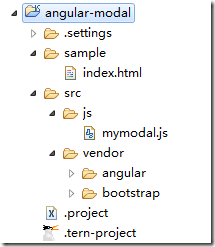
圖 1 項目結構
運行結果
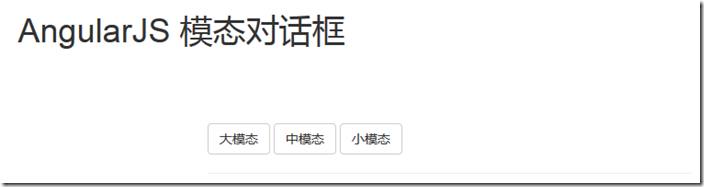
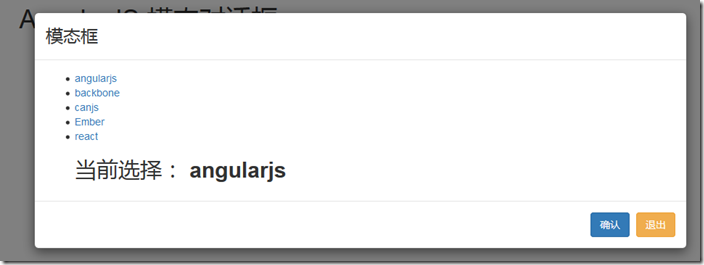
圖 1 運行結果:大模態
index.html
<!DOCTYPE html>
<!--[if lt IE 7]>
<html class="no-js lt-ie9 lt-ie8 lt-ie7">
<![endif]--><!--[if IE 7]>
<html class="no-js lt-ie9 lt-ie8">
<![endif]--><!--[if IE 8]>
<html class="no-js lt-ie9">
<![endif]--><!--[if gt IE 8]><!--><html class="no-js"><!--<![endif]--><head>
<meta charset="UTF-8"><meta http-equiv="X-UA-Compatible" content="IE=edge,chrome=1"><meta name="viewport" content="width=device-width"><title>AngularJS 模態對話框</title><link rel="stylesheet"
href="../src/vendor/bootstrap/dist/css/bootstrap.css">
</head>
<body ng-app="myApp" class="body">
<!-- modal template -->
<script type="text/ng-template" id="myModelContent.html">
<div class="modal-header">
<h3 class="modal-title">模態框</h3>
</div>
<div class="modal-body">
<ul>
<li ng-repeat="item in items">
<a ng-click="selected.item = item">{{item}}</a>
</li>
<div class="h2">當前選擇:
<b>{{selected.item}}</b></div>
</ul>
</div>
<div class="modal-footer">
<button class="btn btn-primary" ng-click="ok()">
確認
</button>
<button class="btn btn-warning" ng-click="cancel()">退出</button>
</div>
</script>
<div class="container h1">AngularJS 模態對話框</div>
<section class="row">
<section ng-controller="modalDemo" class="col-md-6"
style="margin: 40px auto; float: none; background: #fff; padding: 30px;">
<button class="btn btn-default" ng-click="open('lg')">大模態</button>
<button class="btn btn-default" ng-click="open()">中模態</button>
<button class="btn btn-default" ng-click="open('sm')">小模態</button>
<hr>
<div class="h1" ng-show="selected">當前選擇:{{selected}}</div>
</section>
</section>
<!-- load js -->
<script src="../src/vendor/angular/angular.js">
</script>
<script
src="http://cdn.bootcss.com/angular-ui-bootstrap/0.11.2/ui-bootstrap-tpls.js">
</script>
<script src="../src/js/mymodal.js">
</script>
</body>
</html>
mymodal.js
/** * */angular.module('myApp',
[ 'ui.bootstrap' ])
// demo controller.controller('modalDemo', function($scope, $modal, $log)
{
// list
$scope.items = [ 'angularjs', 'backbone', 'canjs', 'Ember', 'react' ];
// open click
$scope.open = function(size)
{
var modalInstance = $modal.open({
templateUrl : 'myModelContent.html',
controller : 'ModalInstanceCtrl', // specify controller for modal
size : size,
resolve : {
items : function()
{
return $scope.items;
}
}
});
// modal return result
modalInstance.result.then(function(selectedItem)
{
$scope.selected = selectedItem;
}, function()
{
$log.info('Modal dismissed at: ' + new Date())
});
}})// modal controller.controller('ModalInstanceCtrl', function($scope, $modalInstance, items)
{
$scope.items = items;
$scope.selected =
{
item : $scope.items[0]
};
// ok click
$scope.ok = function()
{
$modalInstance.close($scope.selected.item);
};
// cancel click
$scope.cancel = function()
{
$modalInstance.dismiss('cancel');
}});
以上內容是小編給大家介紹的AngularJS 模態對話框 ,希望對大家有所幫助!
小編推薦
熱門推薦