一、前言
文件上傳是一個比較常見的功能,傳統的選擇方式的上傳比較麻煩,需要先點擊上傳按鈕,然後再找到文件的路徑,然後上傳。給用戶體驗帶來很大問題。html5開始支持拖拽上傳的需要的api。nodejs也是一個最近越來越流行的技術,這也是自己第一次接觸nodejs,在nodejs開發中,最常用的開發框架之一是expess,它是一個類似mvc模式的框架。結合html5、nodejs express實現了拖拽上傳的功能。
二、基礎知識普及
1、NodeJs基礎知識
nodejs簡單來說就是一個可以讓js在服務端也能運行的開發平台,nodejs發展非常很快,很多國內公司也已經開始使用比如淘寶等。傳統的web應用程序開發平台依靠多線程來實現高並發請求的響應。而nodejs采用了單線程、異步式IO、事件驅動的設計模型,給nodejs帶來了巨大的性能提升。這也是nodejs最大的特點,在nodejs中,所有的IO操作都是通過回調的方式進行,nodejs在執行IO操作時會把IO請求推送一個事件隊列,等待程序進行處理,等處理完IO,然後調用回調函數返回結果。
比如在查詢數據庫操作如下:
mysql.query("SELECT * FROM myTable",function(res){
       callback(res);
});
在以上代碼中,nodejs在執行以上語句時,不會等待數據庫返回結果,而是繼續執行後面的語句。在數據庫獲取到數據後,會發送到事件循環隊列中,等到線程進入事件循環隊列後,才執行callback的東西。
關於nodejs更多的知識,我也知識看了兩天,了解不多。了解更多的知識可以在網絡上搜索。
nodejs入門的知識 http://www.nodebeginner.org/index-zh-cn.html http://www.cnblogs.com/article/48755.htm
2、express基礎知識
nodejs是一個比較活躍的開源社區,它擁有大量的第三方開發庫,其中Express是其中最廣泛的、最常用的框架之一。也是nodejs官方推薦的框架。它除了對常見http操作的封裝,還實現了路由控制、模版解析支持、動態試圖、用戶回話等等。但它也不是一個萬能的框架,絕大多數功能是對http的封裝,它只是一個輕量級的框架。很多功能還需要集成第三方庫還實現。
exress提供了非常方便的上傳功能的支持,在文件上傳請求以後,express會接收文件並把文件存在一個臨時目錄,然後在路由到的方法中,我們只需把文件從臨時目錄下拷貝到我們要存放用戶上傳文件夾即可。在文件上傳部分,服務器端的實現就是基於express這個功能來實現的。
3、html5拖曳上傳api
html5提供很多新的特性,拖拽事件以及文件上傳就是新特性之一。由於篇幅有限,後面重點介紹拖曳上傳的代碼實現。就不一一列出html5提供的拖曳上傳的apil了,感興趣的可以參考: http://w3school.com.cn/html5/html5_ref_eventattributes.asp#Mouse_Events http://www.cnblogs.com/html5/85977.html
三、拖曳上傳實現
1、代碼實現
先來看下前端js的文件目錄:
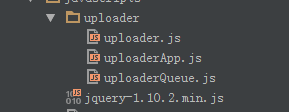
其中:
uploader.js主要實現對html5支持的上傳功能的封裝。
uploaderQueue.js主要實現上傳文件隊列的管理,以及文件上傳對象,把文件隊列中的文件上傳到服務器。
uploaderApp.js主要文件上傳的入口,主要實現上傳窗口對拖曳事件的監聽並把拖曳文件推進上傳文件隊列,啟動文件上傳程序。
下面對核心代碼(需要)做簡單的解釋,全都代碼可以到這裡下載: FileUploader
首先對html5提供的文件上傳做簡單的封裝uploader.js
function uploader(url, data, files) {
  this._files = files;
  this._data = data;
  this._url = url;

  this._xhr = null;

  this.onloadstart = {};
  this.onload = {};
  this.onloadend = {};
  this.onprogress = {};
  this.onerror = {};
  this.ontimeout = {};
  this.callback = {};//請求完成後回調
  _self = this;
 }

 uploader.prototype = {
  init: function () {
   if (!isValid()) {
    throw e;
   }
   this._xhr = new XMLHttpRequest();
   this._bindEvents();
  },
  send: function () {
   if (this._xhr == null) {
    this.init();
   }
   var formData = this._createFormData();
   this._xhr.open('post', this._url, true);
   this._xhr.send(formData);
  },
  _bindEvents: function () {
   _self = this;
   this._xhr.upload.loadstart = function (e) {
    evalFunction(_self.onloadstart, e);
   }
   this._xhr.upload.onload = function (e) {
    evalFunction(_self.onload, e);
   };
   this._xhr.upload.onloadend = function (e) {
    evalFunction(_self.onloadend, e);
   }
   this._xhr.upload.onprogress = function (e) {
    evalFunction(_self.onprogress, e)
   };
   this._xhr.upload.onerror = function (e) {
    evalFunction(_self.onerror, e);
   };
   this._xhr.upload.ontimeout = function (e) {
    evalFunction(_self.ontimeout, e);
   }

   this._xhr.onreadystatechange = function () {
    if (_self._xhr.readyState == 4) {
     if (typeof _self.callback === 'function') {
      var status = _self._xhr.status;
      var data = _self._xhr.responseText;
      _self.callback(status, data);
     }
    }
   }
  },
  _createFormData: function () {
   var formData = new FormData();
   this._addDataToFormData(formData);
   this._addFileToFormData(formData);
   return formData;
  },
  _addDataToFormData: function (formData) {
   if (this._data) {
    for (var item in this._data) {
     formData.append(item, this._data[item]);
    }
   }
  },
  _addFileToFormData: function (formData) {
   if (this._files) {
    for (var i = 0; i < this._files.length; i++) {
     var file = this._files[i];
     formData.append('file[' + i + ']', this._files[i]);
    }
   }
  }
 };
View Code
var uploaderFactory = {
  send: function (url, data, files, callback) {
   var insUploader = new uploader(url, data, files);
   insUploader.callback = function (status, resData) {
    if (typeof callback === 'function') {
     callback(status, resData);
    }
   }
   insUploader.send();
   return insUploader;
  }
 };
uploader對象主要是對html5提供的原生api進行簡單的封裝。uploaderFactory提供一個簡單的接口,使用它可以像jquery的ajax方法一樣完成,文件上傳調用。html5中提供的文件上傳的支持,是在原來XMLHttpRequest基礎之上擴展一些屬性和方法,提供了FormData對象,來支持文件上傳操作。
文件上傳隊列(uploaderQueue.js)也是一個比較重要的對象,它包括兩個對象一個是Queue,文件隊列對象,主要負責管理文件隊列的增刪改查詢等操作,另一個對象是UploadEngine,文件上傳引擎,它的功能主要是負責從文件隊列中取出文件對象,調用uploader對象上傳文件,然後更新文件隊列中的文件狀態。Queue以及UploadEngine都是單例對象。
首先來看下文件隊列對象:
(function (upladerQueue) {

 var Status = {
  Ready: 0,
  Uploading: 1,
  Complete: 2
 }

 var _self = null;

 var instance = null;

 function Queue() {
  this._datas = [];
  this._curSize = 0;//當前長度


  _self = this;
 }

 Queue.prototype = {
  add: function (data) {
   var key = new Date().getTime();
   this._datas.push({key: key, data: data, status: Status.Ready});
   this._curSize = this._datas.length;
   return key;
  },
  remove: function (key) {
   var index = this._getIndexByKey(key);
   this._datas.splice(index, 1);
   this._curSize = this._datas.length;
  },
  get: function (key) {
   var index = this._getIndexByKey(key);
   return index != -1 ? this._datas[index].data : null;
  },
  clear: function () {
   this._datas = [];
   this._curSize = this._datas.length;
  },
  size: function () {
   return this._curSize;
  },
  setItemStatus: function (key, status) {
   var index = this._getIndexByKey(key);
   if (index != -1) {
    this._datas[index].status = status;
   }
  },
  nextReadyingIndex: function () {
   for (var i = 0; i < this._datas.length; i++) {
    if (this._datas[i].status == Status.Ready) {
     return i;
    }
   }
   return -1;
  },
  getDataByIndex: function (index) {
   if (index < 0) {
    return null;
   }
   return this._datas[index];
  },
  _getIndexByKey: function (key) {
   for (var i = 0; i < this._datas.length; i++) {
    if (this._datas[i].key == key) {
     return i;
    }
   }
   return -1;
  }
 };

 function getInstace() {
  if (instance === null) {
   instance = new Queue();
   return instance;
  } else {
   return instance;
  }
 }


 upladerQueue.Queue = getInstace();
 upladerQueue.UploadStatus = Status;
})(window.uploaderQueue);
上傳文件隊列使用一個數組管理每個文件對象信息,每個文件對象有key,data,status三個屬性,該對象主要負責文件對象的增加、刪除、更新、查找的功能。
上傳文件隊列中另一個比較重要的對象是上傳引擎對象(uploadEngine.js)
(function (upladerQueue) {

 var instance = null;
 var _self;

 function uploadEngine() {
  this._url = null;
  this._curUploadingKey = -1;//標志
  this.uploadStatusChanged = {};
  this.uploadItemProgress={};
  _self = this;
 }

 uploadEngine.prototype = {
  setUrl: function (url) {
   this._url = url;
  },
  run: function () {
   if (this._curUploadingKey === -1 && this._url) {
    this._startUpload();
   }
  },
  _startUpload: function () {
   _self = this;
   var index = upladerQueue.Queue.nextReadyingIndex();
   if (index != -1) {
    this._uploadItem(index);
   } else {
    this._curUploadingKey = -1;
    return null;
   }
  },
  _uploadItem: function (index) {
   var data = upladerQueue.Queue.getDataByIndex(index).data;
   _self = this;
   this._readyUploadItem(index);
   var upload = uploaderFactory.send(this._url, null, data.files, function (status, data) {
    _self._completedUploadItem.call(_self, status, data);
   });

   this._uploadItemProgress(upload);
  },
  _uploadItemProgress: function (upload) {
   upload.onprogress = function (e) {
     _self.uploadItemProgress(_self._curUploadingKey,e);
   }
  },
  _readyUploadItem: function (index) {
   this._curUploadingKey = upladerQueue.Queue.getDataByIndex(index).key;
   if (typeof this.uploadStatusChanged === 'function') {
    this.uploadStatusChanged(this._curUploadingKey, upladerQueue.UploadStatus.Uploading);
   }
   upladerQueue.Queue.setItemStatus(this._curUploadingKey, upladerQueue.UploadStatus.Uploading);
  },
  _completedUploadItem: function (status, data) {
   if (typeof this.uploadStatusChanged === 'function') {
    this.uploadStatusChanged(this._curUploadingKey, upladerQueue.UploadStatus.Complete);
   }
   upladerQueue.Queue.setItemStatus(this._curUploadingKey, upladerQueue.UploadStatus.Complete);
   this._startUpload();
  }
 };

 function getInstace() {
  if (instance === null) {
   instance = new uploadEngine();
  }
  return instance;
 }

 upladerQueue.Engine = getInstace();
})(window.uploaderQueue);
該對象比較簡單主要提供一個run以及setUrl方法,用於啟動上傳引擎,以及設置上傳路徑的功能。內部使用遞歸的方法把文件隊列中的方法全部上傳到服務端。使用uploadItemProgress通知外部上傳的進度,使用uploadStatusChanged通知文件上傳狀態,以便更新UI.
uploaderApp.js中主要包括三個對象,一個是類似jquery的一個簡單的jquery對象(App$)。主要用於綁定事件。一個是uploaderArea對象,是拖曳上傳的窗口區域,另一個是入口對象uploaderMain對象。主要用於初始化對象,對外部提供一個init方法,來初始化整個對象。
了解關於App$以及uploaderArea對象的代碼請下載 源代碼 ,下面僅對uploaderMain對象做簡單的說明。
(function (app) {
 var _self;

 function uploaderMain(id) {
  this._id = id;
  this._area = null;
  this.uploaders = [];

  this._URL = 'file/uploader';
 }

 uploaderMain.prototype = {
  init: function () {
   _self = this;
   this._initArea();
   this._initQueueEng();
  },
  _initQueueEng: function () {
   uploaderQueue.Engine.setUrl(this._URL);
   uploaderQueue.Engine.uploadStatusChanged = function (key, status) {
    if (status === uploaderQueue.UploadStatus.Uploading) {
     _self._area.hideItemCancel(key);
    } else if (status === uploaderQueue.UploadStatus.Complete) {
     _self._area.completeItem(key);
     _self._area.showItemCancel(key);
    }
   }
   uploaderQueue.Engine.uploadItemProgress = function (key, e) {
    var progress = e.position / e.total;
    _self._area.changeItemProgress(key, Math.round(progress * 100));
   }
  },
  _initArea: function () {
   this._area = new app.area(this._id);
   this._area.init();
   this._area.drop = function (e) {
    var key = uploaderQueue.Queue.add({files: e.dataTransfer.files});
    uploaderQueue.Engine.run();
    return key;
   }
   this._area.cancelItem = function (key) {
    uploaderQueue.Queue.remove(key);
   }
  }
 };


 app.main = uploaderMain;
})(window.uploaderApp);
在uploaderMain對象,相當於各個對象之間的中介,主要就是做對象的初始化功能、以及對象之間相互調用。使各個對象之間相互協作完成整個模塊的功能。對外提供一個init方法來初始化整個程序,在html頁面中只需如下代碼:
<script type="text/javascript">
  var main=new uploaderApp.main('container');
  main.init();
</script>
以上代碼就是創建一個入口對象,然後使用init方法來啟動整個程序。
以上是對前端js的主要方法做的簡單解釋,如果想詳細了解請下載源代碼。下面簡單看下後端js(nodejs)端實現的主要代碼。
在express基礎知識時,已經講過在express已經對文件上傳功能做了完整的封裝,當路由到action時,文件已經完成上傳只是文件上傳到了一個臨時目錄,這個臨時目錄我們可以在app.js中配置的,配置方式如下:
app.use(express.bodyParser({
  uploadDir:__dirname+'/public/temp'
}));
這樣在文件上傳後文件就存放在/public/temp目錄下,文件名也是express通過一定的算法隨機獲取的。在我們寫的action中只需要把存在臨時目錄中的文件移動到服務端存放文件的目錄下,然後刪除臨時目錄下的文件即可。具體代碼如下:
function uploader(req, res) {
 if (req.files != 'undifined') {
  console.dir(req.files);
  utils.mkDir().then(function (path) {
   uploadFile(req, res, path, 0);
  });

 }
}

function uploadFile(req, res, path, index) {
 var tempPath = req.files.file[index].path;
 var name = req.files.file[index].name;
 if (tempPath) {
  var rename = promise.denodeify(fs.rename);
  rename(tempPath, path + name).then(function () {
   var unlink = promise.denodeify(fs.unlink);
   unlink(tempPath);
  }).then(function () {
    if (index == req.files.file.length - 1) {
     var res = {
      code: 1,
      des: '上傳成功'
     };
     res.send(res);
    } else {
     uploadFile(req, res, path, index + 1);
    }
   });
 }
}
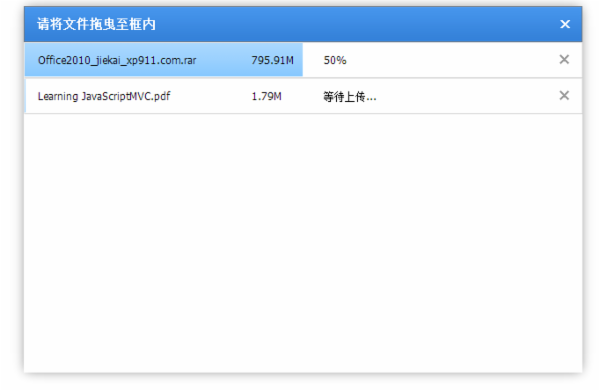
2、實現效果
四、獲取代碼
代碼下載地址:http://www.cnblogs.com/jiaoben/202117.html
相關文章
- text-decoration:line-through CSS文字中劃線 刪除線 貫穿線樣式
- JS中script標簽defer和async屬性的區別詳解
- 基於Blod的ajax進度條下載實現示例代碼
- jQuery插件HighCharts實現氣泡圖效果示例【附demo源碼】
- jQuery插件HighCharts實現的2D堆條狀圖效果示例【附demo源碼下載】
- jQuery插件HighCharts繪制的2D堆柱狀圖效果示例【附demo源碼下載】
- jQuery插件HighCharts實現的2D條狀圖效果示例【附demo源碼下載】
- jQuery插件HighCharts實現的2D面積圖效果示例【附demo源碼下載】
- jQuery is not defined 錯誤原因與解決方法小結
- jQuery插件HighCharts繪制簡單2D折線圖效果示例【附demo源碼】