跨域請求資源的幾種方式,具體如下:
1.什麼是跨域
2.JSONP
3.proxy代理
4.cors
5.xdr
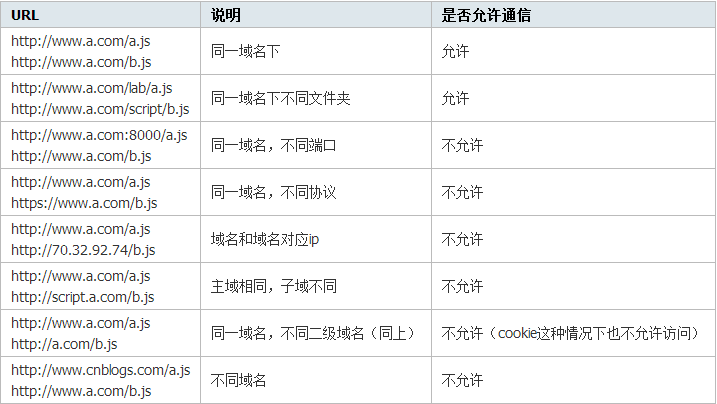
由於浏覽器同源策略,凡是發送請求url的協議、域名、端口三者之間任意一與當前頁面地址不同即為跨域。具體可以查看下表
JSONP
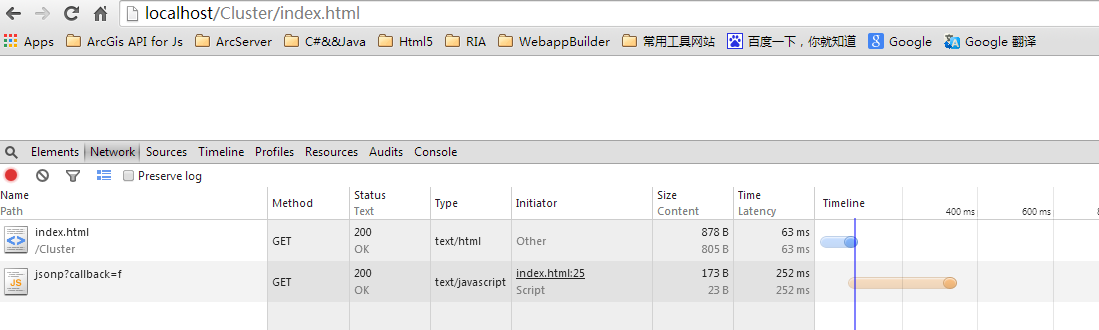
這種方式主要是通過動態插入一個script標簽。浏覽器對script的資源引用沒有同源限制,同時資源加載到頁面後會立即執行(沒有阻塞的情況下)。
<script>
   var _script = document.createElement('script');
   _script.type = "text/javascript";
   _script.src = "http://localhost:8888/jsonp?callback=f";
   document.head.appendChild(_script);
  </script>
實際項目中JSONP通常用來獲取json格式數據,這時前後端通常約定一個參數callback,該參數的值,就是處理返回數據的函數名稱。
<!doctype html>
<html>
 <head>
  <meta charset="utf-8">
  <meta name="viewport" content="initial-scale=1, maximum-scale=1,user-scalable=no">
  <title>jsonp_test</title>

  <script>
   var f = function(data){
    alert(data.name);
   }
   /*var xhr = new XMLHttpRequest();
   xhr.onload = function(){
    alert(xhr.responseText);
   };
   xhr.open('POST', 'http://localhost:8888/cors', true);
   xhr.setRequestHeader("Content-Type", "application/x-www-form-urlencoded");
   xhr.send("f=json");*/
  </script>

  <script>
   var _script = document.createElement('script');
   _script.type = "text/javascript";
   _script.src = "http://localhost:8888/jsonp?callback=f";
   document.head.appendChild(_script);
  </script>
 </head>
 var query = _url.query;
    console.log(query);
    var params = qs.parse(query);
    console.log(params);
    var f = "";

    f = params.callback;

    res.writeHead(200, {"Content-Type": "text/javascript"});
    res.write(f + "({name:'hello world'})");
    res.end();
缺點:
1、這種方式無法發送post請求(這裡)
2、另外要確定jsonp的請求是否失敗並不容易,大多數框架的實現都是結合超時時間來判定。
Proxy代理
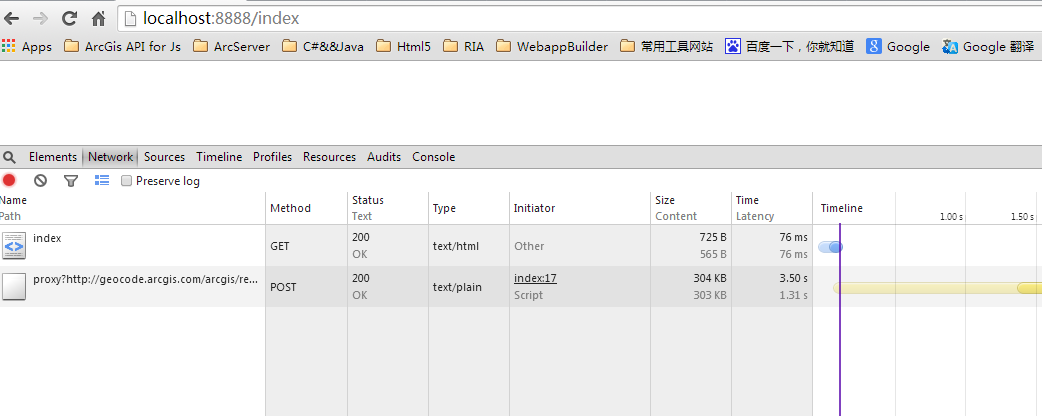
這種方式首先將請求發送給後台服務器,通過服務器來發送請求,然後將請求的結果傳遞給前端。
<!doctype html>
<html>
 <head>
  <meta charset="utf-8">
  <meta name="viewport" content="initial-scale=1, maximum-scale=1,user-scalable=no">
  <title>proxy_test</title>

  <script>
   var f = function(data){
    alert(data.name);
   }
   var xhr = new XMLHttpRequest();
   xhr.onload = function(){
    alert(xhr.responseText);
   };
   xhr.open('POST', 'http://localhost:8888/proxy?http://geocode.arcgis.com/arcgis/rest/services/World/GeocodeServer', true);
   xhr.send("f=json");
  </script>
 </head>

 <body>
 </body>
</html>
var proxyUrl = "";
   if (req.url.indexOf('?') > -1) {
     proxyUrl = req.url.substr(req.url.indexOf('?') + 1);
     console.log(proxyUrl);
   }
   if (req.method === 'GET') {
     request.get(proxyUrl).pipe(res);
   } else if (req.method === 'POST') {
     var post = '';   //定義了一個post變量,用於暫存請求體的信息

    req.on('data', function(chunk){  //通過req的data事件監聽函數,每當接受到請求體的數據,就累加到post變量中
      post += chunk;
    });

    req.on('end', function(){  //在end事件觸發後,通過querystring.parse將post解析為真正的POST請求格式,然後向客戶端返回。
      post = qs.parse(post);
      request({
           method: 'POST',
           url: proxyUrl,
           form: post
         }).pipe(res);
    });
   }
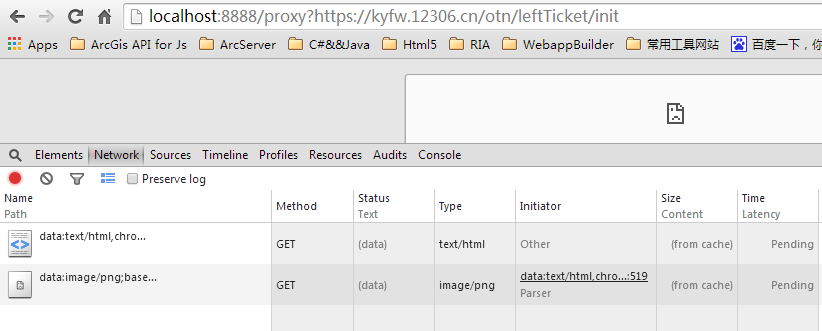
需要注意的是如果你代理的是https協議的請求,那麼你的proxy首先需要信任該證書(尤其是自定義證書)或者忽略證書檢查,否則你的請求無法成功。12306就提供了一個鮮活的例子。
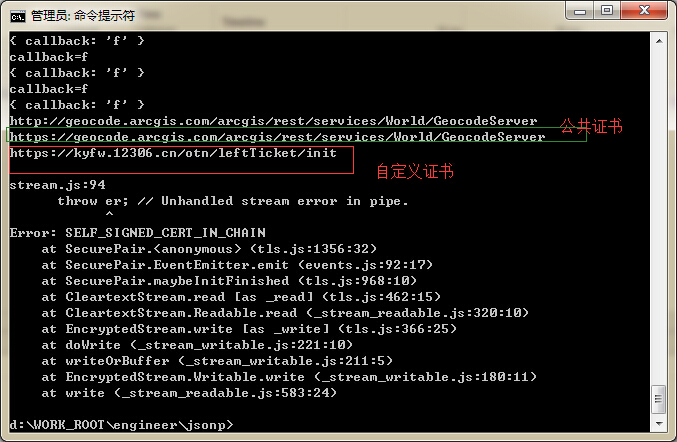
還需要注意一點,對於同一請求浏覽器通常會從緩存中讀取數據,我們有時候不想從緩存中讀取,所以會加一個preventCache參數,這個時候請求url變成:url?preventCache=12345567....;這本身沒有什麼問題,問題出在當使用某些前端框架(比如jquery)發送proxy代理請求時,請求url為proxy?url,同時設置preventCache:true,框架不能正確處理這個參數,結果發出去的請求變成proxy?url&preventCache=123456(正長應為proxy?url?preventCache=12356);後端截取後發送的請求為url&preventCache=123456,根本沒有這個地址,所以你得不到正確結果。
CORS
這是現代浏覽器支持跨域資源請求的一種方式。
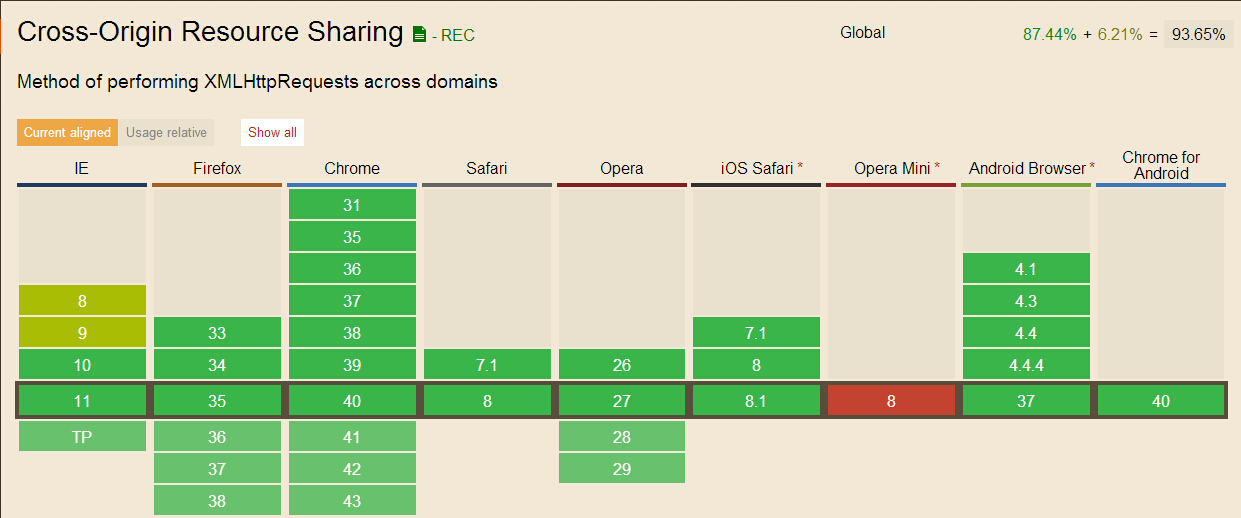
當你使用XMLHttpRequest發送請求時,浏覽器發現該請求不符合同源策略,會給該請求加一個請求頭:Origin,後台進行一系列處理,如果確定接受請求則在返回結果中加入一個響應頭:Access-Control-Allow-Origin;浏覽器判斷該相應頭中是否包含Origin的值,如果有則浏覽器會處理響應,我們就可以拿到響應數據,如果不包含浏覽器直接駁回,這時我們無法拿到響應數據。
<!doctype html>
<html>
 <head>
  <meta charset="utf-8">
  <meta name="viewport" content="initial-scale=1, maximum-scale=1,user-scalable=no">
  <title>jsonp_test</title>

  <script>
   /*var f = function(data){
    alert(data.name);
   }*/
   var xhr = new XMLHttpRequest();
   xhr.onload = function(){
    alert(xhr.responseText);
   };
   xhr.open('POST', 'http://localhost:8888/cors', true);
   xhr.setRequestHeader("Content-Type", "application/x-www-form-urlencoded");
   xhr.send("f=json");
  </script>

  <script>
   /* var _script = document.createElement('script');
   _script.type = "text/javascript";
   _script.src = "http://localhost:8888/jsonp?callback=f";
   document.head.appendChild(_script);*/
  </script>
 </head>

 <body>
 </body>
</html>
前端cors
if (req.headers.origin) {

      res.writeHead(200, {
        "Content-Type": "text/html; charset=UTF-8",
        "Access-Control-Allow-Origin":'http://localhost'/*,
        'Access-Control-Allow-Methods': 'GET, POST, OPTIONS',
        'Access-Control-Allow-Headers': 'X-Requested-With, Content-Type'*/
      });
      res.write('cors');
      res.end();
    }
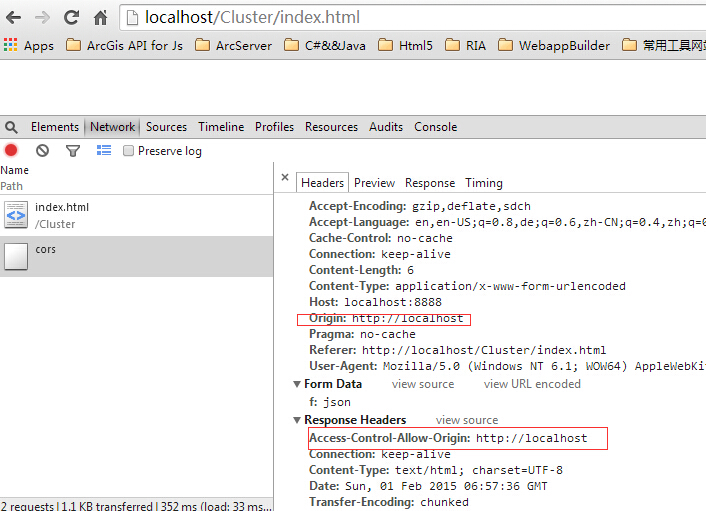
如果我們把Access-Control-Allow-Origin去掉,浏覽器會駁回響應,我們也就拿不到數據。
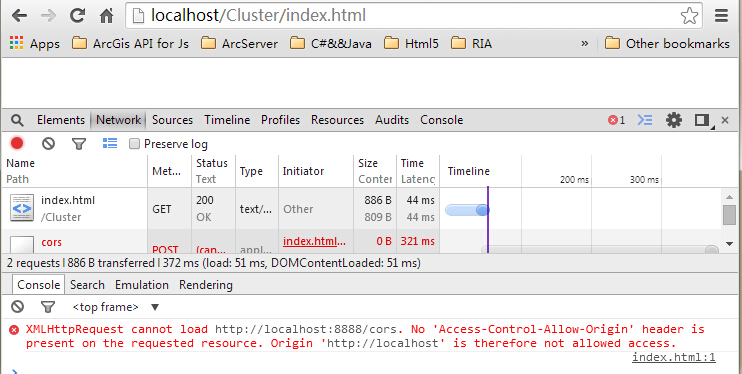
需要注意的一點是Preflighted Request的透明服務器驗證機制支持開發人員使用自定義的頭部、GET或POST之外的方法,以及不同類型的主題內容。總結如如:
1、非GET 、POST請求
2、POST請求的content-type不是常規的三個:application/x- www-form-urlencoded(使用 HTTP 的 POST 方法提交的表單)、multipart/form-data(同上,但主要用於表單提交時伴隨文件上傳的場合)、text/plain(純文本)
3、POST請求的payload為text/html
4、設置自定義頭部
OPTIONS請求頭部中會包含以下頭部:Origin、Access-Control-Request-Method、Access-Control-Request-Headers,發送這個請求後,服務器可以設置如下頭部與浏覽器溝通來判斷是否允許這個請求。
Access-Control-Allow-Origin、Access-Control-Allow-Method、Access-Control-Allow-Headers
var xhr = new XMLHttpRequest();
   xhr.onload = function(){
    alert(xhr.responseText);
   };
   xhr.open('POST', 'http://localhost:8888/cors', true);
   xhr.setRequestHeader("Content-Type", "text/html");
   xhr.send("f=json");
if (req.headers.origin) {

      res.writeHead(200, {
        "Content-Type": "text/html; charset=UTF-8",
        "Access-Control-Allow-Origin":'http://localhost',
        'Access-Control-Allow-Methods': 'GET,POST,OPTIONS',
        'Access-Control-Allow-Headers': 'X-Requested-With, Content-Type'/**/
      });
      res.write('cors');
      res.end();
    }
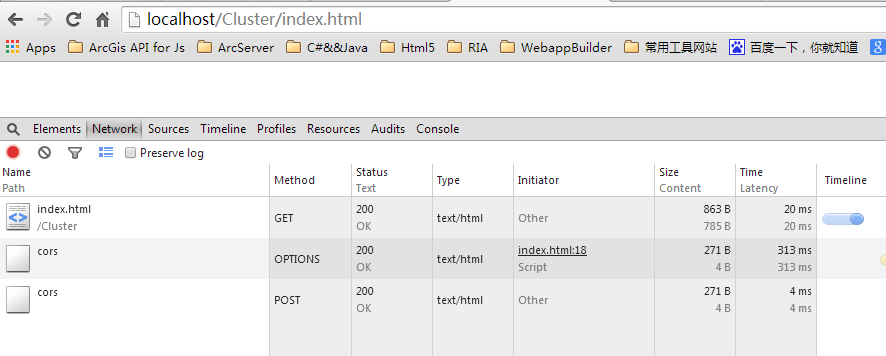
如果你在調試狀態,你會發現後台代碼執行了兩遍,說明發送了兩次請求。注意一下我們的onload代碼只執行了一次,所以說OPTIONS請求對程序來說是透明的,他的請求結果會被緩存起來。
如果我們修改一下後台代碼,把Content-Type去掉,你會發現OPTIONS請求失敗。
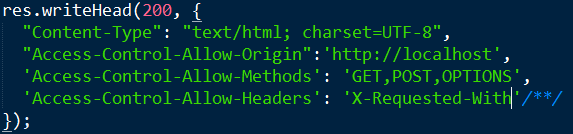
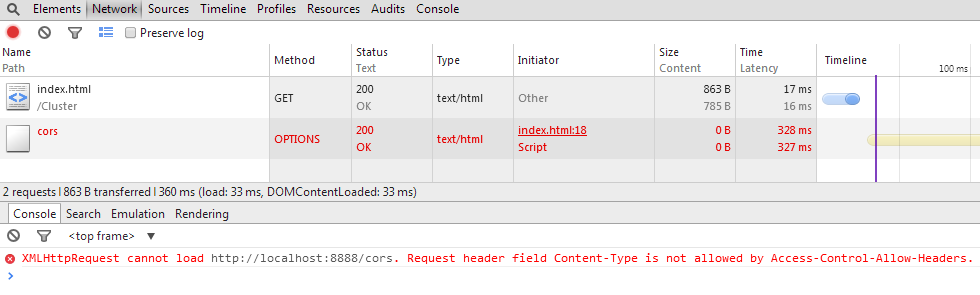
通過setRequestHeader('X-Request-With', null)可以避免浏覽器發送OPTIONS請求。
根據我的測試,當使用cors發送跨域請求時失敗時,後台是接收到了這次請求,後台可能也執行了數據查詢操作,只是響應頭部不合符要求,浏覽器阻斷了這次請求。
XDR
這是IE8、IE9提供的一種跨域解決方案,功能較弱只支持get跟post請求,而且對於協議不同的跨域是無能為力的,比如在http協議下發送https請求。看一下微軟自己的例子就行
<!DOCTYPE html>

<html>
<body>
 <h2>XDomainRequest</h2>
 <input type="text" id="tbURL" value="http://www.contoso.com/xdr.txt" style="width: 300px"><br>
 <input type="text" id="tbTO" value="10000"><br>
 <input type="button" onclick="mytest()" value="Get">
  <input type="button" onclick="stopdata()" value="Stop">
  <input type="button" onclick="readdata()" value="Read">
 <br>
 <div id="dResponse"></div>
 <script>
  var xdr;
  function readdata()
  {
   var dRes = document.getElementById('dResponse');
   dRes.innerText = xdr.responseText;
   alert("Content-type: " + xdr.contentType);
   alert("Length: " + xdr.responseText.length);
  }

  function err()
  {
   alert("XDR onerror");
  }

  function timeo()
  {
   alert("XDR ontimeout");
  }

  function loadd()
  {
   alert("XDR onload");
   alert("Got: " + xdr.responseText);
  }

  function progres()
  {
   alert("XDR onprogress");
   alert("Got: " + xdr.responseText);
  }

  function stopdata()
  {
   xdr.abort();
  }

  function mytest()
  {
   var url = document.getElementById('tbURL');
   var timeout = document.getElementById('tbTO');
   if (window.XDomainRequest)
   {
    xdr = new XDomainRequest();
    if (xdr)
    {
     xdr.onerror = err;
     xdr.ontimeout = timeo;
     xdr.onprogress = progres;
     xdr.onload = loadd;
     xdr.timeout = tbTO.value;
     xdr.open("get", tbURL.value);
     xdr.send();
    }
    else
    {
     alert("Failed to create");
    }
   }
   else
   {
    alert("XDR doesn't exist");
   }
  }
 </script>
</body>
</html>
以上就是我在實際項目中遇到的跨域請求資源的情況,有一種跨域需要特別注意就是在https協議下發送https請求,除了使用proxy代理外其他方法都無解,會被浏覽器直接block掉。如果哪位道友知道解決方法,麻煩你告訴我一聲。
最後附上完整的測試demo
iss中:
<!doctype html>
<html>
 <head>
  <meta charset="utf-8">
  <meta name="viewport" content="initial-scale=1, maximum-scale=1,user-scalable=no">
  <title>jsonp_test</title>

  <script>
   /*var f = function(data){
    alert(data.name);
   }*/
   var xhr = new XMLHttpRequest();
   xhr.onload = function(){
    alert(xhr.responseText);
   };
   xhr.open('POST', 'http://localhost:8888/cors', true);
   xhr.setRequestHeader("Content-Type", "application/x-www-form-urlencoded");
   xhr.setRequestHeader("aaaa","b");
   xhr.send("f=json");
  </script>

  <script>
   /* var _script = document.createElement('script');
   _script.type = "text/javascript";
   _script.src = "http://localhost:8888/jsonp?callback=f";
   document.head.appendChild(_script);*/
  </script>
 </head>

 <body>
 </body>
</html>
node-html
<!doctype html>
<html>
 <head>
  <meta charset="utf-8">
  <meta name="viewport" content="initial-scale=1, maximum-scale=1,user-scalable=no">
  <title>proxy_test</title>

  <script>
   var f = function(data){
    alert(data.name);
   }
   var xhr = new XMLHttpRequest();
   xhr.onload = function(){
    alert(xhr.responseText);
   };
   xhr.open('POST', 'http://localhost:8888/proxy?https://geocode.arcgis.com/arcgis/rest/services/World/GeocodeServer', true);
   xhr.send("f=json");
  </script>
 </head>

 <body>
 </body>
</html>
node-server
var http = require('http');
var url = require('url');
var fs = require('fs');
var qs = require('querystring');
var request = require('request');

http.createServer(function(req, res){
  var _url = url.parse(req.url);
  if (_url.pathname === '/jsonp') {
    var query = _url.query;
    console.log(query);
    var params = qs.parse(query);
    console.log(params);
    var f = "";

    f = params.callback;

    res.writeHead(200, {"Content-Type": "text/javascript"});
    res.write(f + "({name:'hello world'})");
    res.end();
  } else if (_url.pathname === '/proxy') {
   var proxyUrl = "";
   if (req.url.indexOf('?') > -1) {
     proxyUrl = req.url.substr(req.url.indexOf('?') + 1);
     console.log(proxyUrl);
   }
   if (req.method === 'GET') {
     request.get(proxyUrl).pipe(res);
   } else if (req.method === 'POST') {
     var post = '';   //定義了一個post變量,用於暫存請求體的信息

    req.on('data', function(chunk){  //通過req的data事件監聽函數,每當接受到請求體的數據,就累加到post變量中
      post += chunk;
    });

    req.on('end', function(){  //在end事件觸發後,通過querystring.parse將post解析為真正的POST請求格式,然後向客戶端返回。
      post = qs.parse(post);
      request({
           method: 'POST',
           url: proxyUrl,
           form: post
         }).pipe(res);
    });
   }
  } else if (_url.pathname === '/index') {
    fs.readFile('./index.html', function(err, data) {
     res.writeHead(200, {"Content-Type": "text/html; charset=UTF-8"});
      res.write(data);
      res.end();
    });
  } else if (_url.pathname === '/cors') {
    if (req.headers.origin) {

      res.writeHead(200, {
        "Content-Type": "text/html; charset=UTF-8",
        "Access-Control-Allow-Origin":'http://localhost',
        'Access-Control-Allow-Methods': 'GET,POST,OPTIONS',
        'Access-Control-Allow-Headers': 'X-Requested-With, Content-Type,aaaa'/**/
      });
      res.write('cors');
      res.end();
    }
  }

}).listen(8888);
以上就是本文的全部內容,希望對大家的學習有所幫助,也希望大家多多支持。