Vue.js第四天學習筆記(組件)
編輯:關於JavaScript
在這篇文章之前小穎分享過小穎自己寫的組件:Vue.js組件tabs實現選項卡切換效果和Tree升級版(實現省市多級聯動)
先給大家看下小穎寫了一個簡單的組件示例:
組件:
<template>
<div class='content' v-if='showFlag'>
<input type="text" v-bind:style='{ width:compwidth+"px"}' v-model='compvalue' @keyup='myFun' v-el:getvalue>
<label class='example-label'>觀察參數"compvalue"的變化:</label>{{compvalue}}
<button class='btn btn-danger' @click='compfun'>確定</button>
</div>
</template>
<script>
export default {
 // 從父組件接收收據
 props:{
 compvalue:{
  type:String,//類型(原生構造器:String, Number, Boolean, Function, Object, Array),如果綁定類型不對將拋出一條警告
  required: true, //是否是必須項
  twoWay:true,//指定這個 prop 為雙向綁定,如果沒有 'sync' 將拋出一條警告
  default:'',//默認值
 },
 compwidth:{
  coerce: function (val) {
  return val + '' // 將值轉換為字符串
  }
 },
 compfun:{
  type:Function,
  required:true
 }
 },
 ready: function() {},
 computed:{},//計算屬性
 methods: {//組件自身的方法
 myFun:function(){
  alert( this.$els.getvalue.value);
 }
 },
 data() {//綁定數據
 return {
  showFlag:true,
 }
 }
}
</script>
調用組件:
<template>
<div class='example-content'>
<compexample :compvalue.sync='values' :compfun='compFun'></compexample>
</div>
</template>
<script>
import compexample from './componentExample.vue'//引入組件
export default {
 components: {
 compexample
 },
 ready: function() {
 },
 methods: {
 compFun:function(){
  alert('喵嘞個咪');
 }
 },
 data() {
 return {
  values:'hello'
 }
 }
}
</script>
在小穎寫的組件中,小穎把創建組件時,組件的大部分屬性都加了相應注釋,大家看了要是還有什麼疑問,可以留言哦.
下面看寫調用組件後的效果圖吧:
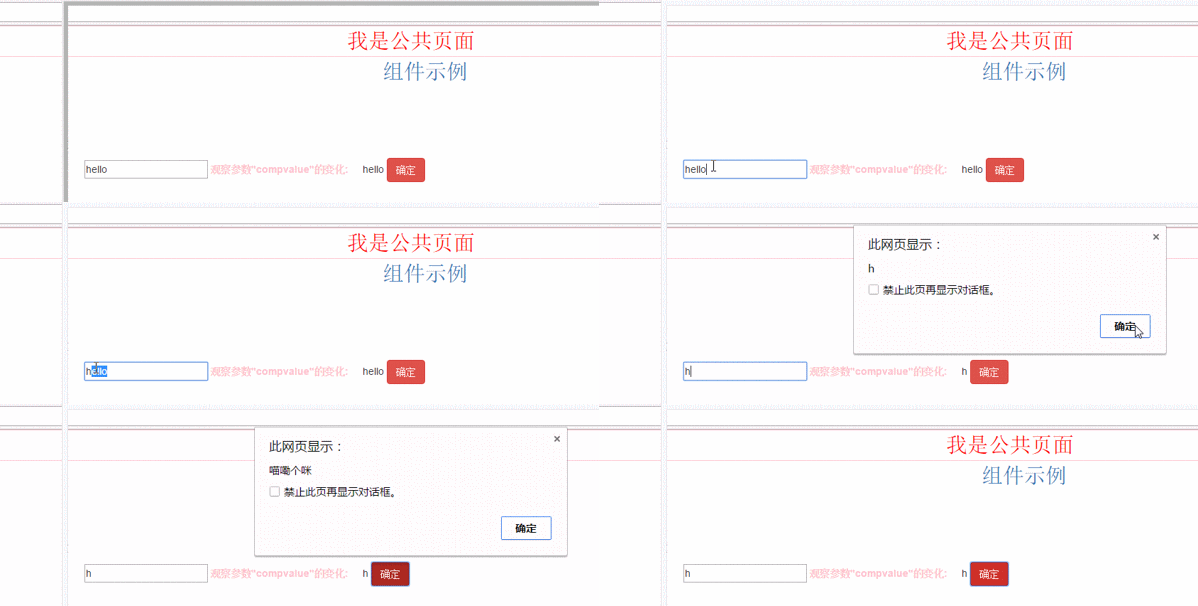
以上就是本文的全部內容,希望對大家的學習有所幫助,也希望大家多多支持。
小編推薦
熱門推薦