小編主要從網上整理了網友提出來的關於bootstrap模態框消失的不同問題,希望對大家有幫助。
狀況一:bootstrap模態框瞬間消失解決
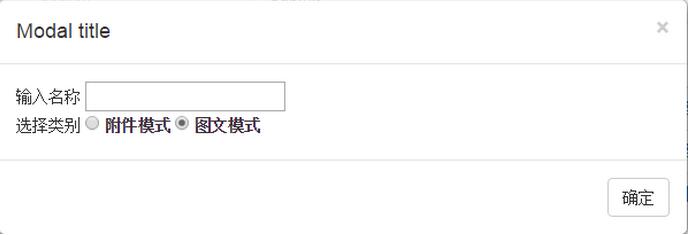
bootstrap模態框挺好,但這方面的例子很少,都是官方的代碼,網上沒有一點新的東西。比如,save changes,即點擊確認後如何處理?沒有例子。只有取消close的功能。我的需求是這樣,點擊一個鏈接,傳一個id,打開模態框,進行輸入、單選、列表選擇等,點模態框確認,然後連同剛才的id、模態框中的各種值,一起提交到後台處理。
第一步:用鏈接傳id並打開模態框。
<a href="" data-toggle="modal" onclick="prom('{{$.Category.Id}}')">添加同級</a>
{{$.Category.Id}}是傳的id值
通過js代碼實現打開模態框
<script type="text/javascript">

//添加同級
 function prom(id) {
 $('#myModal').modal('show');
 $('#myModal').on('hide.bs.modal', function () {
 var radio =$("input[type='radio']:checked").val();
 alert("您選擇的是:" + radio + "。抱歉!添加功能暫時不提供。");
 });
 // if (cname)
 // {
 // $.ajax({
 // type:"post",
 // url:"/category/post",
 // data: {pid:id,title:cname},//父級id
 // success:function(data,status){
 // alert("添加“"+data+"”成功!(status:"+status+".)");
 // }
 // });
 // }
 }
這裡的坑:
$('#myModal').modal('show');
如果只用這一行代碼,模態框就會瞬間消失。
後面添加代碼:
$('#myModal').on('hide.bs.modal', function () {
第二步,點擊模態框的確認如何做呢?我這個方法很笨。下面是模態框的按鈕,我用取消代替確定。
<div class="modal-footer">
 <button type="button" class="btn btn-default" data-dismiss="modal">確定</button>
 <!-- <button type="button" class="btn btn-primary">Save changes</button> -->
</div>
在點擊確定(其實是關閉)後,觸發了
$('#myModal').on('hide.bs.modal', function () {
開始執行裡面的代碼了。
狀況二:bootstrap中的模態框插件,點擊遮蓋層,模態框不消失,怎麼讓消失
代碼:復制代碼 代碼如下:<button type="button" class="btn btn-primary " data-toggle="modal" data-target="#myModal"> Launch demo modal </button> <!-- Modal --> <div class="modal fade" id="myModal" tabindex="-1" role="dialog" aria-labelledby="myModal...
熱心網友給出的答案:
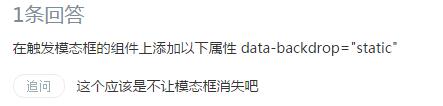
小編有點暈,不知大家明白了嗎?
狀況三:其實這個是狀況二引發的關於【bootstrap modal 模態框彈出瞬間消失的問題】的另一種解決方式
提供一個小例子說明。
<button class="btn btn-primary btn-lg" type="button" data-toggle="modal"data-target="#myModal">
 Launch demo modal
 </button>
注意紅字部分type="button",在需要觸發的按鈕處,加入這一段就好了。
狀況四:這是網友使用bootstrap總結出來的經驗“不讓modal框消失的方法”
If using javascript then:

$('#myModal').modal({
 backdrop: 'static',
 keyboard: false
})
and if HTML:

<a data-controls-modal="your_div_id" data-backdrop="static" data-keyboard="false" href="#">
狀況五:bootstrap modal 模態框彈出瞬間消失問題的解決方法
問題:
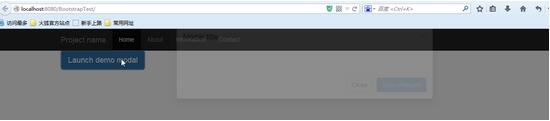
學習使用bootstrap modal的時候,照著官網的例子Copy了代碼,在自己的頁面運行的時候窗口彈出,但一瞬間就消失。在網上查了很久也沒個答案,我是新手,在此請教在線各位。
<%@ page language="java" import="java.util.*" pageEncoding="UTF-8"%>
<%
 String path = request.getContextPath();
 String basePath = request.getScheme() + "://"
 + request.getServerName() + ":" + request.getServerPort()
 + path + "/";
%>

<!DOCTYPE html>
<html lang="zh-cn">
<head>
<meta charset="utf-8">
<meta http-equiv="X-UA-Compatible" content="IE=edge">
<meta name="viewport" content="width=device-width, initial-scale=1">
<title>Index</title>

<link href="Bootstrap/css/bootstrap.css" rel="stylesheet">

<style type="text/css">
body {
 padding-top: 50px;
}
.starter-template {
 padding: 40px 15px;
 text-align: center;
}
</style>

</head>
<body>


 <div class="navbar navbar-inverse navbar-fixed-top" role="navigation">
 <div class="container">
 <div class="navbar-header">
 <button type="button" class="navbar-toggle collapsed" data-toggle="collapse" data-target=".navbar-collapse">
 <span class="sr-only">Toggle navigation</span>
 <span class="icon-bar"></span>
 <span class="icon-bar"></span>
 <span class="icon-bar"></span>
 <span class="icon-bar"></span>
 </button>
 <a class="navbar-brand" href="#">Project name</a>
 </div>
 <div class="collapse navbar-collapse">
 <ul class="nav navbar-nav">
 <li class="active"><a href="#home">Home</a></li>
 <li><a href="#about">About</a></li>
 <li><a href="#info">Information</a></li>
 <li><a href="#contact">Contact</a></li>
 </ul>
 </div>
 </div>
 </div>

 <div class="container">

 <!-- Button trigger modal -->
 <button class="btn btn-primary btn-lg" data-toggle="modal" data-target="#myModal">
 Launch demo modal
 </button>

 <!-- Modal -->
 <div class="modal fade" id="myModal" tabindex="-1" role="dialog" aria-labelledby="myModalLabel" aria-hidden="true">
 <div class="modal-dialog">
 <div class="modal-content">
 <div class="modal-header">
 <button type="button" class="close" data-dismiss="modal"><span aria-hidden="true">×</span><span class="sr-only">Close</span></button>
 <h4 class="modal-title" id="myModalLabel">Modal title</h4>
 </div>
 <div class="modal-body">
 ...
 </div>
 <div class="modal-footer">
 <button type="button" class="btn btn-default" data-dismiss="modal">Close</button>
 <button type="button" class="btn btn-primary">Save changes</button>
 </div>
 </div>
 </div>
 </div>

 </div>


 <script src="jquery/jquery-1.11.1.js"></script>
 <script src="Bootstrap/js/bootstrap.js"></script>
 <script src="Bootstrap/js/transition.js"></script>
 <script src="Bootstrap/js/modal.js"></script>
</body>
</html>
就這樣一瞬間就消失了
網友1:去掉引用modal.js試試?
網友2:各位,樓主的問題解決了。
我猜各位應該都是照著bootstrap官網demo在練習的,請注意,你在官網下載的bootstrap源碼有兩個版本,如圖:

官網Demo使用的是第一個,所以如果你按照官網的Demo練習,那就應該只使用第一個,當然也可以使用第二個,但是不能混用。
網友3:今天我也遇到了,雖然是三個月的東西了。但是我還是想把正確答案貼出來,原因是:bootstrap.min.js(bootstrap.js) 和modal.js重復引用,把 modal.js刪除掉就好了。
網友4:我也遇到類似問題,但是解決方式是刪了bootstrap.min.js;js沖突問題
如果大家還想深入學習,可以點擊這裡進行學習,再為大家附3個精彩的專題:
Bootstrap學習教程
Bootstrap實戰教程
Bootstrap插件使用教程
以上就是本文的全部內容,希望對大家的學習有所幫助,也希望大家多多支持。