現在已經不是純Android獨霸天下的時代了,H5嵌入Android的Hybrid混合開發是大勢所趨。今天給大家帶來的就是移動端中常見的“上拉刷新,下拉加載”特效,這個特效將會基於H5來實現。
先看下運行效果:
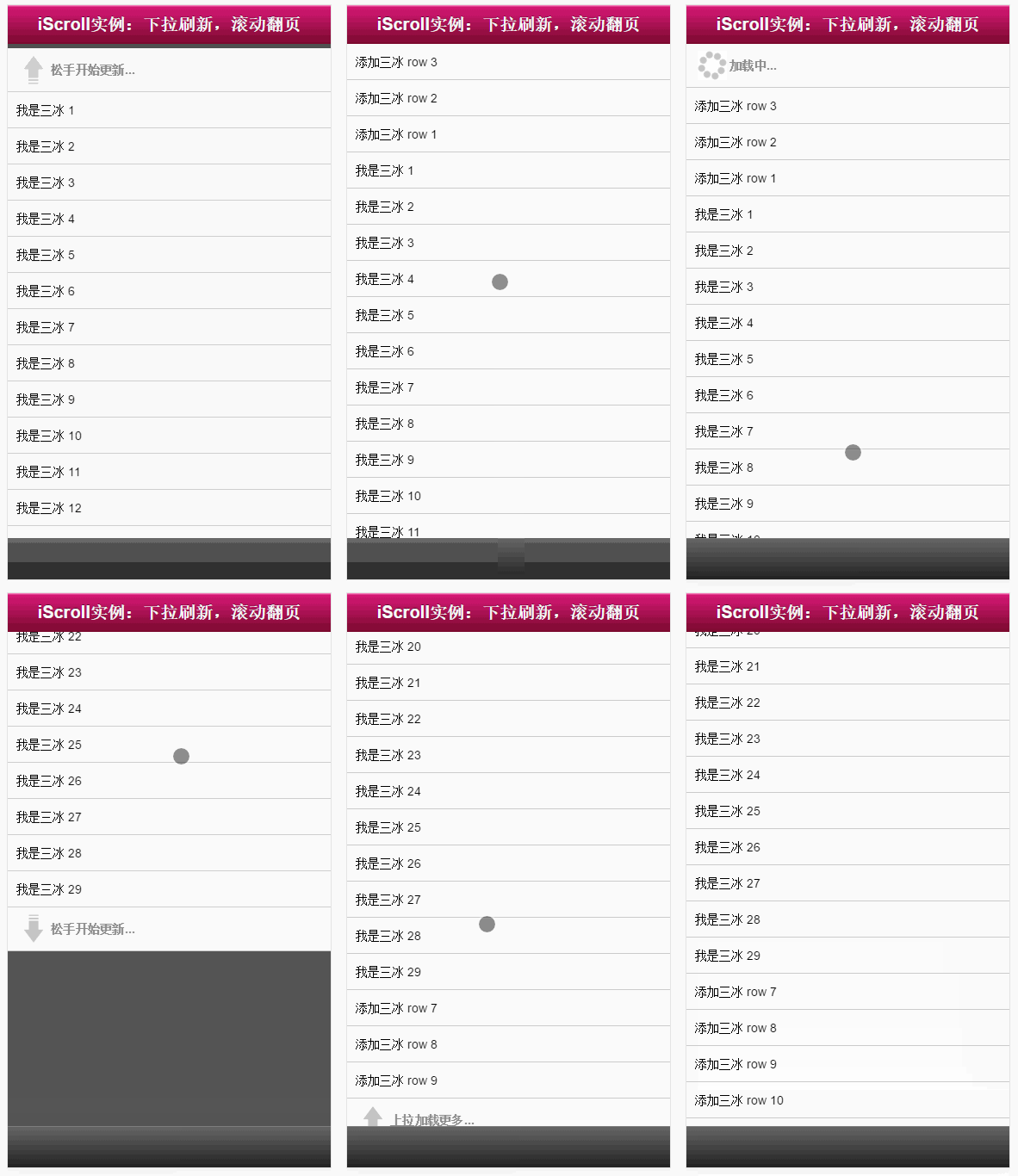
是不是有點小小的‘雞凍' ,它就是由我們今天要介紹的主人公‘iscroll.js'實現的,接下來我以最最簡便的方式教給大家~~
實現步驟
一、准備好iscroll.js庫
到官網下載即可:
https://github.com/cubiq/iscroll
二、搭建頁面結構
<!DOCTYPE html>
<html>
<head>
 <meta http-equiv="Content-Type" content="text/html; charset=utf-8">
 <meta name="viewport" content="width=device-width, initial-scale=1.0, user-scalable=0, minimum-scale=1.0, maximum-scale=1.0">
 <meta name="apple-mobile-web-app-capable" content="yes">
 <meta name="apple-mobile-web-app-status-bar-style" content="black">
 <title>iScroll 實例:下拉刷新,滾動翻頁</title>
 <style type="text/css" media="all">
  body,ul,li {
   padding:0;
   margin:0;
   border:0;
  }

  body {
   font-size:12px;
   -webkit-user-select:none;
   -webkit-text-size-adjust:none;
   font-family:helvetica;
  }

  #header {
   position:absolute;
   top:0; left:0;
   width:100%;
   height:45px;
   line-height:45px;
   background-image:-webkit-gradient(linear, 0 0, 0 100%, color-stop(0, #fe96c9), color-stop(0.05, #d51875), color-stop(1, #7b0a2e));
   background-image:-moz-linear-gradient(top, #fe96c9, #d51875 5%, #7b0a2e);
   background-image:-o-linear-gradient(top, #fe96c9, #d51875 5%, #7b0a2e);
   padding:0;
   color:#eee;
   font-size:20px;
   text-align:center;
  }

  #header a {
   color:#f3f3f3;
   text-decoration:none;
   font-weight:bold;
   text-shadow:0 -1px 0 rgba(0,0,0,0.5);
  }

  #footer {
   position:absolute;
   bottom:0; left:0;
   width:100%;
   height:48px;
   background-image:-webkit-gradient(linear, 0 0, 0 100%, color-stop(0, #999), color-stop(0.02, #666), color-stop(1, #222));
   background-image:-moz-linear-gradient(top, #999, #666 2%, #222);
   background-image:-o-linear-gradient(top, #999, #666 2%, #222);
   padding:0;
   border-top:1px solid #444;
  }

  #wrapper {
   position:absolute; z-index:1;
   top:45px; bottom:48px; left:0;
   width:100%;
   background:#555;
   overflow:auto;
  }

  #scroller {
   position:relative;
  /* -webkit-touch-callout:none;*/
   -webkit-tap-highlight-color:rgba(0,0,0,0);

   float:left;
   width:100%;
   padding:0;
  }

  #scroller ul {
   position:relative;
   list-style:none;
   padding:0;
   margin:0;
   width:100%;
   text-align:left;
  }

  #scroller li {
   padding:0 10px;
   height:40px;
   line-height:40px;
   border-bottom:1px solid #ccc;
   border-top:1px solid #fff;
   background-color:#fafafa;
   font-size:14px;
  }

  #scroller li > a {
   display:block;
  }

  /**
   *
   * 下拉樣式 Pull down styles
   *
   */
  #pullDown, #pullUp {
   background:#fff;
   height:40px;
   line-height:40px;
   padding:5px 10px;
   border-bottom:1px solid #ccc;
   font-weight:bold;
   font-size:14px;
   color:#888;
  }
  #pullDown .pullDownIcon, #pullUp .pullUpIcon {
   display:block; float:left;
   width:40px; height:40px;
   background:url(pull-icon@2x.png) 0 0 no-repeat;
   -webkit-background-size:40px 80px; background-size:40px 80px;
   -webkit-transition-property:-webkit-transform;
   -webkit-transition-duration:250ms;
  }
  #pullDown .pullDownIcon {
   -webkit-transform:rotate(0deg) translateZ(0);
  }
  #pullUp .pullUpIcon {
   -webkit-transform:rotate(-180deg) translateZ(0);
  }


 </style>
</head>
<body>
 <div id="header">
  <a href="../db.html#page2">iScroll實例:下拉刷新,滾動翻頁</a>
 </div>

 <div id="wrapper">
  <div id="scroller">

   <div id="pullDown">
    <span class="pullDownIcon"></span><span class="pullDownLabel">下拉刷新...</span>
   </div>

   <ul id="thelist">
    <li>我是三冰 1</li>
    <li>我是三冰 2</li>
    <li>我是三冰 3</li>
    <li>我是三冰 4</li>
    <li>我是三冰 5</li>
    <li>我是三冰 6</li>
    <li>我是三冰 7</li>
    <li>我是三冰 8</li>
    <li>我是三冰 9</li>
    <li>我是三冰 10</li>
    <li>我是三冰 11</li>
    <li>我是三冰 12</li>
    <li>我是三冰 13</li>
   </ul>

   <div id="pullUp">
    <span class="pullUpIcon"></span><span class="pullUpLabel">上拉加載更多...</span>
   </div>

  </div>
 </div>


 <div id="footer"></div>
</body>
</html>
代碼非常簡單,無需多言,僅僅搭建一個靜態結構而已~~
效果如下:
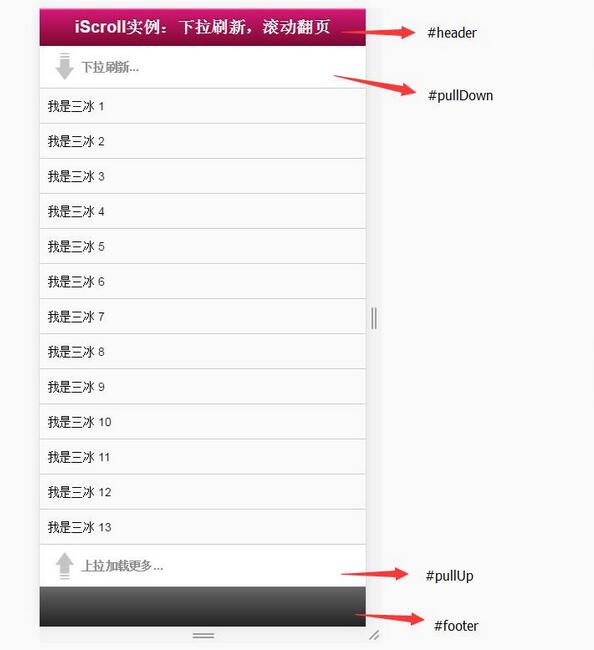
對照這個效果圖看上面代碼簡直太easy,暫時與iscroll沒有半毛錢關系,就是純靜態頁面,此時你們唯一沒有就是下面這個小圖標,不用著急,文章最後會給到你的~~
二、完整Js代碼
<script type="application/javascript" src="iscroll.js"></script>

<script type="text/javascript">

var myScroll,
 pullDownEl, pullDownOffset,
 pullUpEl, pullUpOffset,
 generatedCount = 0;

/**
 * 下拉刷新 (自定義實現此方法)
 * myScroll.refresh();  // 數據加載完成後,調用界面更新方法
 */
function pullDownAction () {
 setTimeout(function () { // <-- Simulate network congestion, remove setTimeout from production!
  var el, li, i;
  el = document.getElementById('thelist');

  for (i=0; i<3; i++) {
   li = document.createElement('li');
   li.innerText = '添加三冰 ' + (++generatedCount);
   el.insertBefore(li, el.childNodes[0]);
  }

  myScroll.refresh();  //數據加載完成後,調用界面更新方法 Remember to refresh when contents are loaded (ie: on ajax completion)
 }, 1000); // <-- Simulate network congestion, remove setTimeout from production!
}

/**
 * 滾動翻頁 (自定義實現此方法)
 * myScroll.refresh();  // 數據加載完成後,調用界面更新方法
 */
function pullUpAction () {
 setTimeout(function () { // <-- Simulate network congestion, remove setTimeout from production!
  var el, li, i;
  el = document.getElementById('thelist');

  for (i=0; i<3; i++) {
   li = document.createElement('li');
   li.innerText = '添加三冰 ' + (++generatedCount);
   el.appendChild(li, el.childNodes[0]);
  }

  myScroll.refresh();  // 數據加載完成後,調用界面更新方法 Remember to refresh when contents are loaded (ie: on ajax completion)
 }, 1000); // <-- Simulate network congestion, remove setTimeout from production!
}

/**
 * 初始化iScroll控件
 */
function loaded() {
 pullDownEl = document.getElementById('pullDown');
 pullDownOffset = pullDownEl.offsetHeight;
 pullUpEl = document.getElementById('pullUp');
 pullUpOffset = pullUpEl.offsetHeight;

 myScroll = new iScroll('wrapper', {
  scrollbarClass: 'myScrollbar', /* 重要樣式 */
  useTransition: false, /* 此屬性不知用意,本人從true改為false */
  topOffset: pullDownOffset,
  onRefresh: function () {
   if (pullDownEl.className.match('loading')) {
    pullDownEl.className = '';
    pullDownEl.querySelector('.pullDownLabel').innerHTML = '下拉刷新...';
   } else if (pullUpEl.className.match('loading')) {
    pullUpEl.className = '';
    pullUpEl.querySelector('.pullUpLabel').innerHTML = '上拉加載更多...';
   }
  },
  onScrollMove: function () {
   if (this.y > 5 && !pullDownEl.className.match('flip')) {
    pullDownEl.className = 'flip';
    pullDownEl.querySelector('.pullDownLabel').innerHTML = '松手開始更新...';
    this.minScrollY = 0;
   } else if (this.y < 5 && pullDownEl.className.match('flip')) {
    pullDownEl.className = '';
    pullDownEl.querySelector('.pullDownLabel').innerHTML = '下拉刷新...';
    this.minScrollY = -pullDownOffset;
   } else if (this.y < (this.maxScrollY - 5) && !pullUpEl.className.match('flip')) {
    pullUpEl.className = 'flip';
    pullUpEl.querySelector('.pullUpLabel').innerHTML = '松手開始更新...';
    this.maxScrollY = this.maxScrollY;
   } else if (this.y > (this.maxScrollY + 5) && pullUpEl.className.match('flip')) {
    pullUpEl.className = '';
    pullUpEl.querySelector('.pullUpLabel').innerHTML = '上拉加載更多...';
    this.maxScrollY = pullUpOffset;
   }
  },
  onScrollEnd: function () {
   if (pullDownEl.className.match('flip')) {
    pullDownEl.className = 'loading';
    pullDownEl.querySelector('.pullDownLabel').innerHTML = '加載中...';
    pullDownAction(); // Execute custom function (ajax call?)
   } else if (pullUpEl.className.match('flip')) {
    pullUpEl.className = 'loading';
    pullUpEl.querySelector('.pullUpLabel').innerHTML = '加載中...';
    pullUpAction(); // Execute custom function (ajax call?)
   }
  }
 });

 setTimeout(function () { document.getElementById('wrapper').style.left = '0'; }, 800);
}

//初始化綁定iScroll控件
document.addEventListener('touchmove', function (e) { e.preventDefault(); }, false);
document.addEventListener('DOMContentLoaded', loaded, false);

</script>
這麼多代碼看啊,不用著急,挑幾個重點給你說說:
1)onRefresh函數是指頁面刷新或調用refresh()函數會觸發此函數,裡面代碼中主要做【一些重置樣式和文字】的處理。
2)onScrollMove函數是指拖拽頁面,不松手的時候會觸發此函數,裡面代碼中主要做【箭頭有個旋轉效果和松手提示】的處理。
3)onScrollEnd函數是指松開手,停止拖拽的時候會觸發的函數,裡面代碼中主要做【刷新數據和一些加載動畫效果】的處理。
4)topOffset屬性主要是可以隱藏一個高度,正好把下拉刷新給隱藏掉
5)函數pullDownAction和pullUpAction中,我是自己用createElement函數造數據,但是真實開發中,這裡可以換成Ajax請求服務器數據即可
看看現在的效果如何:
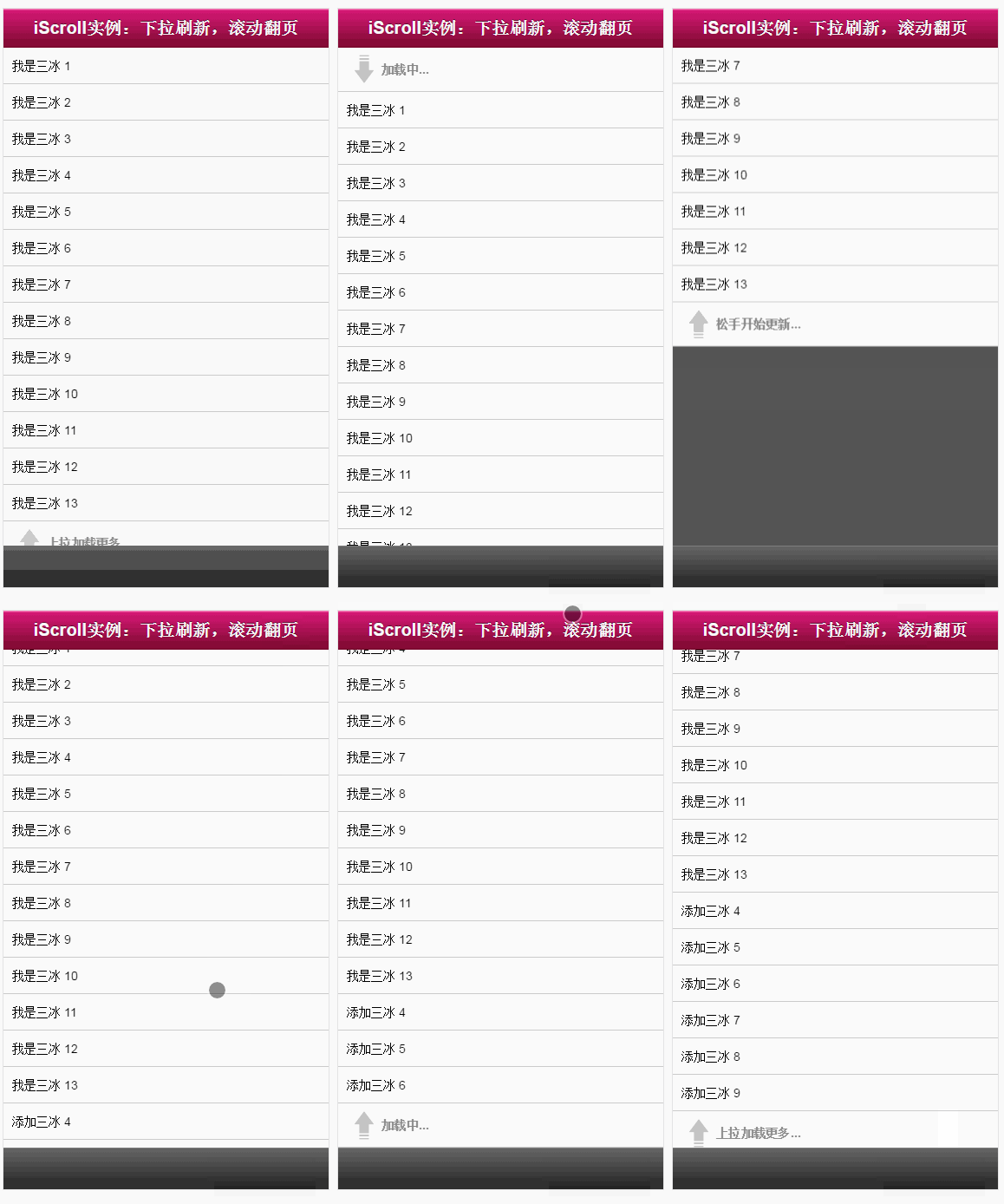
現在數據什麼的都能刷新了,只差那麼一點點,如果下拉和上拉的時候,加載的小圖標有個動畫效果那就超級“完美”了:
既然是要來點動畫效果,肯定是用最新的CSS3技術呀,廢話不多說,直接貼完整代碼了:
<!DOCTYPE html>
<html>
<head>
 <meta http-equiv="Content-Type" content="text/html; charset=utf-8">
 <meta name="viewport" content="width=device-width, initial-scale=1.0, user-scalable=0, minimum-scale=1.0, maximum-scale=1.0">
 <meta name="apple-mobile-web-app-capable" content="yes">
 <meta name="apple-mobile-web-app-status-bar-style" content="black">
 <title>iScroll 實例:下拉刷新,滾動翻頁</title>
 <style type="text/css" media="all">
  body,ul,li {
   padding:0;
   margin:0;
   border:0;
  }

  body {
   font-size:12px;
   -webkit-user-select:none;
   -webkit-text-size-adjust:none;
   font-family:helvetica;
  }

  #header {
   position:absolute;
   top:0; left:0;
   width:100%;
   height:45px;
   line-height:45px;
   background-image:-webkit-gradient(linear, 0 0, 0 100%, color-stop(0, #fe96c9), color-stop(0.05, #d51875), color-stop(1, #7b0a2e));
   background-image:-moz-linear-gradient(top, #fe96c9, #d51875 5%, #7b0a2e);
   background-image:-o-linear-gradient(top, #fe96c9, #d51875 5%, #7b0a2e);
   padding:0;
   color:#eee;
   font-size:20px;
   text-align:center;
  }

  #header a {
   color:#f3f3f3;
   text-decoration:none;
   font-weight:bold;
   text-shadow:0 -1px 0 rgba(0,0,0,0.5);
  }

  #footer {
   position:absolute;
   bottom:0; left:0;
   width:100%;
   height:48px;
   background-image:-webkit-gradient(linear, 0 0, 0 100%, color-stop(0, #999), color-stop(0.02, #666), color-stop(1, #222));
   background-image:-moz-linear-gradient(top, #999, #666 2%, #222);
   background-image:-o-linear-gradient(top, #999, #666 2%, #222);
   padding:0;
   border-top:1px solid #444;
  }

  #wrapper {
   position:absolute; z-index:1;
   top:45px; bottom:48px; left:0;
   width:100%;
   background:#555;
   overflow:auto;
  }

  #scroller {
   position:relative;
  /* -webkit-touch-callout:none;*/
   -webkit-tap-highlight-color:rgba(0,0,0,0);

   float:left;
   width:100%;
   padding:0;
  }

  #scroller ul {
   position:relative;
   list-style:none;
   padding:0;
   margin:0;
   width:100%;
   text-align:left;
  }

  #scroller li {
   padding:0 10px;
   height:40px;
   line-height:40px;
   border-bottom:1px solid #ccc;
   border-top:1px solid #fff;
   background-color:#fafafa;
   font-size:14px;
  }

  #scroller li > a {
   display:block;
  }

  /**
   *
   * 下拉樣式 Pull down styles
   *
   */
  #pullDown, #pullUp {
   background:#fff;
   height:40px;
   line-height:40px;
   padding:5px 10px;
   border-bottom:1px solid #ccc;
   font-weight:bold;
   font-size:14px;
   color:#888;
  }
  #pullDown .pullDownIcon, #pullUp .pullUpIcon {
   display:block; float:left;
   width:40px; height:40px;
   background:url(pull-icon@2x.png) 0 0 no-repeat;
   -webkit-background-size:40px 80px; background-size:40px 80px;
   -webkit-transition-property:-webkit-transform;
   -webkit-transition-duration:250ms;
  }
  #pullDown .pullDownIcon {
   -webkit-transform:rotate(0deg) translateZ(0);
  }
  #pullUp .pullUpIcon {
   -webkit-transform:rotate(-180deg) translateZ(0);
  }


  /**
   * 動畫效果css3代碼
   */
  #pullDown.flip .pullDownIcon {
   -webkit-transform:rotate(-180deg) translateZ(0);
  }

  #pullUp.flip .pullUpIcon {
   -webkit-transform:rotate(0deg) translateZ(0);
  }

  #pullDown.loading .pullDownIcon, #pullUp.loading .pullUpIcon {
   background-position:0 100%;
   -webkit-transform:rotate(0deg) translateZ(0);
   -webkit-transition-duration:0ms;

   -webkit-animation-name:loading;
   -webkit-animation-duration:2s;
   -webkit-animation-iteration-count:infinite;
   -webkit-animation-timing-function:linear;
  }

  @-webkit-keyframes loading {
   from { -webkit-transform:rotate(0deg) translateZ(0); }
   to { -webkit-transform:rotate(360deg) translateZ(0); }
  }

 </style>
</head>
<body>
 <div id="header">
  <a href="../db.html#page2">iScroll實例:下拉刷新,滾動翻頁</a>
 </div>

 <div id="wrapper">
  <div id="scroller">

   <div id="pullDown">
    <span class="pullDownIcon"></span><span class="pullDownLabel">下拉刷新...</span>
   </div>

   <ul id="thelist">
    <li>我是三冰 1</li>
    <li>我是三冰 2</li>
    <li>我是三冰 3</li>
    <li>我是三冰 4</li>
    <li>我是三冰 5</li>
    <li>我是三冰 6</li>
    <li>我是三冰 7</li>
    <li>我是三冰 8</li>
    <li>我是三冰 9</li>
    <li>我是三冰 10</li>
    <li>我是三冰 11</li>
    <li>我是三冰 12</li>
    <li>我是三冰 13</li>
   </ul>

   <div id="pullUp">
    <span class="pullUpIcon"></span><span class="pullUpLabel">上拉加載更多...</span>
   </div>

  </div>
 </div>


 <div id="footer"></div>

<script type="application/javascript" src="iscroll.js"></script>

<script type="text/javascript">

var myScroll,
 pullDownEl, pullDownOffset,
 pullUpEl, pullUpOffset,
 generatedCount = 0;

/**
 * 下拉刷新 (自定義實現此方法)
 * myScroll.refresh();  // 數據加載完成後,調用界面更新方法
 */
function pullDownAction () {
 setTimeout(function () { // <-- Simulate network congestion, remove setTimeout from production!
  var el, li, i;
  el = document.getElementById('thelist');

  for (i=0; i<3; i++) {
   li = document.createElement('li');
   li.innerText = '添加三冰 ' + (++generatedCount);
   el.insertBefore(li, el.childNodes[0]);
  }

  myScroll.refresh();  //數據加載完成後,調用界面更新方法 Remember to refresh when contents are loaded (ie: on ajax completion)
 }, 1000); // <-- Simulate network congestion, remove setTimeout from production!
}

/**
 * 滾動翻頁 (自定義實現此方法)
 * myScroll.refresh();  // 數據加載完成後,調用界面更新方法
 */
function pullUpAction () {
 setTimeout(function () { // <-- Simulate network congestion, remove setTimeout from production!
  var el, li, i;
  el = document.getElementById('thelist');

  for (i=0; i<3; i++) {
   li = document.createElement('li');
   li.innerText = '添加三冰 ' + (++generatedCount);
   el.appendChild(li, el.childNodes[0]);
  }

  myScroll.refresh();  // 數據加載完成後,調用界面更新方法 Remember to refresh when contents are loaded (ie: on ajax completion)
 }, 1000); // <-- Simulate network congestion, remove setTimeout from production!
}

/**
 * 初始化iScroll控件
 */
function loaded() {
 pullDownEl = document.getElementById('pullDown');
 pullDownOffset = pullDownEl.offsetHeight;
 pullUpEl = document.getElementById('pullUp');
 pullUpOffset = pullUpEl.offsetHeight;

 myScroll = new iScroll('wrapper', {
  scrollbarClass: 'myScrollbar', /* 重要樣式 */
  useTransition: false, /* 此屬性不知用意,本人從true改為false */
  topOffset: pullDownOffset,
  onRefresh: function () {
   if (pullDownEl.className.match('loading')) {
    pullDownEl.className = '';
    pullDownEl.querySelector('.pullDownLabel').innerHTML = '下拉刷新...';
   } else if (pullUpEl.className.match('loading')) {
    pullUpEl.className = '';
    pullUpEl.querySelector('.pullUpLabel').innerHTML = '上拉加載更多...';
   }
  },
  onScrollMove: function () {
   if (this.y > 5 && !pullDownEl.className.match('flip')) {
    pullDownEl.className = 'flip';
    pullDownEl.querySelector('.pullDownLabel').innerHTML = '松手開始更新...';
    this.minScrollY = 0;
   } else if (this.y < 5 && pullDownEl.className.match('flip')) {
    pullDownEl.className = '';
    pullDownEl.querySelector('.pullDownLabel').innerHTML = '下拉刷新...';
    this.minScrollY = -pullDownOffset;
   } else if (this.y < (this.maxScrollY - 5) && !pullUpEl.className.match('flip')) {
    pullUpEl.className = 'flip';
    pullUpEl.querySelector('.pullUpLabel').innerHTML = '松手開始更新...';
    this.maxScrollY = this.maxScrollY;
   } else if (this.y > (this.maxScrollY + 5) && pullUpEl.className.match('flip')) {
    pullUpEl.className = '';
    pullUpEl.querySelector('.pullUpLabel').innerHTML = '上拉加載更多...';
    this.maxScrollY = pullUpOffset;
   }
  },
  onScrollEnd: function () {
   if (pullDownEl.className.match('flip')) {
    pullDownEl.className = 'loading';
    pullDownEl.querySelector('.pullDownLabel').innerHTML = '加載中...';
    pullDownAction(); // Execute custom function (ajax call?)
   } else if (pullUpEl.className.match('flip')) {
    pullUpEl.className = 'loading';
    pullUpEl.querySelector('.pullUpLabel').innerHTML = '加載中...';
    pullUpAction(); // Execute custom function (ajax call?)
   }
  }
 });

 setTimeout(function () { document.getElementById('wrapper').style.left = '0'; }, 800);
}

//初始化綁定iScroll控件
document.addEventListener('touchmove', function (e) { e.preventDefault(); }, false);
document.addEventListener('DOMContentLoaded', loaded, false);

</script>
</body>
</html>
以上就是本文的全部內容,希望對大家的學習有所幫助,也希望大家多多支持。