JS實現的圖片預覽插件與用法示例【不上傳圖片】
編輯:關於JavaScript
本文實例講述了JS實現不需要上傳的圖片預覽插件與用法。分享給大家供大家參考,具體如下:
小小的幾十行代碼,很牛逼,很實用。
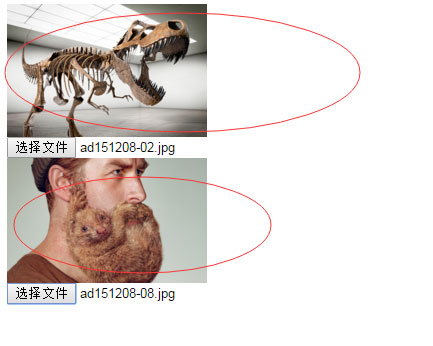
支持多個圖片的預覽,只要new多個對象就行了。
html如下
<!DOCTYPE html PUBLIC "-//W3C//DTD XHTML 1.0 Transitional//EN"
"http://www.w3.org/TR/xhtml1/DTD/xhtml1-transitional.dtd">
<html xmlns="http://www.w3.org/1999/xhtml">
<head>
  <title>uploadPreview演示</title>
  <script src="uploadPreview.js" type="text/javascript"></script>
  <script>
    window.onload = function () {
      new uploadPreview({ UpBtn: "up_img", DivShow: "imgdiv", ImgShow: "imgShow" });
      new uploadPreview({ UpBtn: "up_img2", DivShow: "imgdiv2", ImgShow: "imgShow2" });
    }
  </script>
</head>
<body>
  <div id="imgdiv"><img id="imgShow" width="200"/></div>
  <input type="file" id="up_img" />
  <div id="imgdiv"><img id="imgShow2" width="200" /></div>
  <input type="file" id="up_img2" />
</body>
</html>
插件uploadPreview.js代碼如下
/*
*發布時間:2014年12月12日
*插件介紹:圖片上傳本地預覽插件 兼容浏覽器(IE 谷歌 火狐) 不支持safari 當然如果是使用這些內核的浏覽器基本都兼容
*使用方法:
*界面構造(IMG標簽外必須擁有DIV 而且必須給予DIV控件ID)
* <div id="imgdiv"><img id="imgShow" width="120" height="120" /></div>
* <input type="file" id="up_img" />
*調用代碼:
* new uploadPreview({ UpBtn: "up_img", DivShow: "imgdiv", ImgShow: "imgShow" });
*參數說明:
*UpBtn:選擇文件控件ID;
*DivShow:DIV控件ID;
*ImgShow:圖片控件ID;
*Width:預覽寬度;
*Height:預覽高度;
*ImgType:支持文件類型 格式:["jpg","png"];
*callback:選擇文件後回調方法;
*版本:v1.4
更新內容如下:
1.修復回調.
*版本:v1.3
更新內容如下:
1.修復多層級框架獲取路徑BUG.
2.去除對jquery插件的依賴.
*/
/*
*work:圖片預覽插件
*/
var uploadPreview = function(setting) {
  /*
  *work:this(當前對象)
  */
  var _self = this;
  /*
  *work:判斷為null或者空值
  */
  _self.IsNull = function(value) {
    if (typeof (value) == "function") { return false; }
    if (value == undefined || value == null || value == "" || value.length == 0) {
      return true;
    }
    return false;
  }
  /*
  *work:默認配置
  */
  _self.DefautlSetting = {
    UpBtn: "",
    DivShow: "",
    ImgShow: "",
    Width: 100,
    Height: 100,
    ImgType: ["gif", "jpeg", "jpg", "bmp", "png"],
    ErrMsg: "選擇文件錯誤,圖片類型必須是(gif,jpeg,jpg,bmp,png)中的一種",
    callback: function() { }
  };
  /*
  *work:讀取配置
  */
  _self.Setting = {
    UpBtn: _self.IsNull(setting.UpBtn) ? _self.DefautlSetting.UpBtn : setting.UpBtn,
    DivShow: _self.IsNull(setting.DivShow) ? _self.DefautlSetting.DivShow : setting.DivShow,
    ImgShow: _self.IsNull(setting.ImgShow) ? _self.DefautlSetting.ImgShow : setting.ImgShow,
    Width: _self.IsNull(setting.Width) ? _self.DefautlSetting.Width : setting.Width,
    Height: _self.IsNull(setting.Height) ? _self.DefautlSetting.Height : setting.Height,
    ImgType: _self.IsNull(setting.ImgType) ? _self.DefautlSetting.ImgType : setting.ImgType,
    ErrMsg: _self.IsNull(setting.ErrMsg) ? _self.DefautlSetting.ErrMsg : setting.ErrMsg,
    callback: _self.IsNull(setting.callback) ? _self.DefautlSetting.callback : setting.callback
  };
  /*
  *work:獲取文本控件URL
  */
  _self.getObjectURL = function(file) {
    var url = null;
    if (window.createObjectURL != undefined) {
      url = window.createObjectURL(file);
    } else if (window.URL != undefined) {
      url = window.URL.createObjectURL(file);
    } else if (window.webkitURL != undefined) {
      url = window.webkitURL.createObjectURL(file);
    }
    return url;
  }
  /*
  *work:綁定事件
  */
  _self.Bind = function() {
    document.getElementById(_self.Setting.UpBtn).onchange = function() {
      if (this.value) {
        if (!RegExp("\.(" + _self.Setting.ImgType.join("|") + ")$", "i").test(this.value.toLowerCase())) {
          alert(_self.Setting.ErrMsg);
          this.value = "";
          return false;
        }
        if (navigator.userAgent.indexOf("MSIE") > -1) {
          try {
            document.getElementById(_self.Setting.ImgShow).src = _self.getObjectURL(this.files[0]);
          } catch (e) {
            var div = document.getElementById(_self.Setting.DivShow);
            this.select();
            top.parent.document.body.focus();
            var src = document.selection.createRange().text;
            document.selection.empty();
            document.getElementById(_self.Setting.ImgShow).style.display = "none";
            div.style.filter = "progid:DXImageTransform.Microsoft.AlphaImageLoader(sizingMethod=scale)";
            div.style.width = _self.Setting.Width + "px";
            div.style.height = _self.Setting.Height + "px";
            div.filters.item("DXImageTransform.Microsoft.AlphaImageLoader").src = src;
          }
        } else {
          document.getElementById(_self.Setting.ImgShow).src = _self.getObjectURL(this.files[0]);
        }
        _self.Setting.callback();
      }
    }
  }
  /*
  *work:執行綁定事件
  */
  _self.Bind();
}
更多關於JavaScript相關內容感興趣的讀者可查看本站專題:《JavaScript文件與目錄操作技巧匯總》、《JavaScript切換特效與技巧總結》、《JavaScript查找算法技巧總結》、《JavaScript動畫特效與技巧匯總》、《JavaScript錯誤與調試技巧總結》、《JavaScript數據結構與算法技巧總結》、《JavaScript遍歷算法與技巧總結》及《JavaScript數學運算用法總結》
希望本文所述對大家JavaScript程序設計有所幫助。
小編推薦
熱門推薦