bootstrap flask登錄頁面編寫實例
編輯:關於JavaScript
本文章來為各位介紹一個python的例子,這個就是bootstrap+flask寫登錄頁面的例子,希望文章能夠對各位有所幫助。
Flask是一個使用 Python 編寫的輕量級 Web 應用框架。其 WSGI 工具箱采用 Werkzeug ,模板引擎則使用 Jinja2 。在一般應用或個人開發中,可以很容易的寫出應用。本篇就結合bootstrap,寫一個簡單的login界面。
一、效果圖
無圖無真像,先上效果圖:
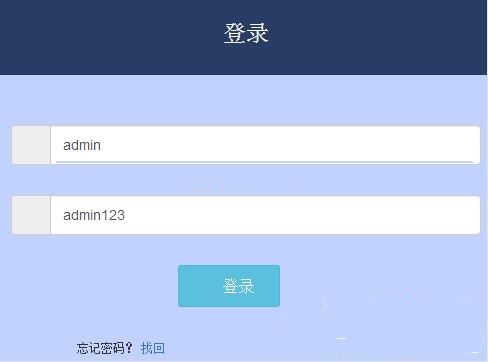
flask-bootstrap
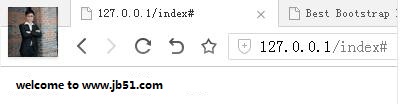
flask-login
二、目錄結構
該代碼寫時采用動靜分離的方法進行編寫,目錄樹如下:
[root@jb51 login]# tree
.
├── run.py
├── static
│ └── css
│ ├── bootstrap.min.css
│ └── style.css
└── templates
├── index.html
└── login.html
三、入口run文件
動態代碼只有一個run.py文件,代碼如下:
from flask import *
app = Flask(__name__,static_url_path='/static')
@app.route("/login",methods=['POST','GET'])
def login():
 error = None
 if request.method == 'POST':
 if request.form['username'] != 'admin' or request.form['password'] != 'admin123':
  error= "sorry"
 else:
  return redirect(url_for('index'))
 return render_template('login.html',error=error)
@app.route("/index")
def index():
 return render_template('index.html')
if __name__ == "__main__":
 app.run(
 host="0.0.0.0",
 port=80,
 debug=True)
實際應用中,根據需要,可以關閉debug模試。
四、靜態模塊
templates下有兩個模塊文件分別是login.html和index.html
login.html
<!DOCTYPE html PUBLIC "-//W3C//DTD XHTML 1.0 Transitional//EN" "http://www.w3.org/TR/xhtml1/DTD/xhtml1-transitional.dtd">
<html xmlns="http://www.w3.org/1999/xhtml">
<head>
<meta http-equiv="Content-Type" content="text/html; charset=utf-8" />
<meta name="viewport" content="width=device-width,initial-scale=1,maximum-scale=1.0" />
<title>Bootstrap響應式登錄界面模板</title>
<link rel="stylesheet" type="text/css" href="{{ url_for('static', filename='css/bootstrap.min.css') }}">
<link rel="stylesheet" type="text/css" href="{{ url_for('static', filename='css/style.css') }}">
</head>
<body>
<div class="box">
<div class="login-box">
<div class="login-title text-center">
<h1><small>登錄</small></h1>
</div>
<div class="login-content ">
<div class="form">
<form action="#" method="post">
<div class="form-group">
 <div class="col-xs-12 ">
  <div class="input-group">
   <span class="input-group-addon"><span class="glyphicon glyphicon-user"></span></span>
   <input type="text" id="username" name="username" class="form-control" placeholder="用戶名">
  </div>
 </div>
</div>
<div class="form-group">
 <div class="col-xs-12 ">
  <div class="input-group">
   <span class="input-group-addon"><span class="glyphicon glyphicon-lock"></span></span>
   <input type="text" id="password" name="password" class="form-control" placeholder="密碼">
  </div>
 </div>
</div>
<div class="form-group form-actions">
 <div class="col-xs-4 col-xs-offset-4 ">
  <button type="submit" class="btn btn-sm btn-info"><span class="glyphicon glyphicon-off"></span> 登錄</button>
 </div>
</div>
<div class="form-group">
 <div class="col-xs-6 link">
  <p class="text-center remove-margin"><small>忘記密碼?</small> <a href="javascript:void(0)" ><small>找回</small></a>
  </p>
 </div>
 <div class="col-xs-6 link">
  <p class="text-center remove-margin"><small>還沒注冊?</small> <a href="javascript:void(0)" ><small>注冊</small></a>
  </p>
 </div>
</div>
</form>
</div>
</div>
</div>
</div>
<div style="text-align:center;"><p>來源:<a href="http://www.jb51.net/" target="_blank">運維之路</a></p></div>
</body>
</html>
index.html
index.html 模板中內容如下:
<h1>welcome to www.jb51.net/ <h1>
如果大家還想深入學習,可以點擊這裡進行學習,再為大家附兩個精彩的專題:Bootstrap學習教程 Bootstrap實戰教程
以上就是本文的全部內容,希望對大家的學習有所幫助,也希望大家多多支持。
小編推薦
熱門推薦