前端變化層出不窮,去年NG火一片,今年react,vue火一片,ng硬著頭皮看了幾套教程,總被其中的概念繞暈,react是faceback出品,正在不斷學習中,同時抽時間了解了vue,查看了vue官方文擋,看完格外入眼,總覺得要拿來試一試手。
正好周未,做一個小成績單玩玩,以前有用avalon也做過一個類似的,從過程來看,二個框架都在避免開發者頻繁操作dom,脫離dom苦海,安心處理數據業務邏輯,從二個示例來看,可以成倍的提高開發效率。
vue示例代碼如下:
<!DOCTYPE html>
<html lang="en">
<head>
 <meta charset="UTF-8">
 <title>vue成績單</title>
 <style type="text/css">
 *{
 margin:0;
 padding:0;
 }
 .report_card{
 width:800px;
 margin:0 auto;
 font-size:12px;
 }
 .report_card table{
 width:100%;
 border-collapse: collapse;
 text-align:center;
 }
 .report_card caption{
 font-size:14px;
 text-align:left;
 line-height:30px;
 font-weight:bold;
 }
 .report_card table th,.report_card table td{
 border:1px solid #ccc;
 }
 .report_card table th{
 height:36px;
 background:#f8f8f8;
 }
 .report_card table td{
 height:32px;
 background:#f8f8f8;
 }
 .content{
 width:100%;
 height:32px;
 line-height:32px;
 position:relative;
 }
 .content input{
 position:absolute;
 top:0;
 left:0;
 width:100%;
 color:#999;
 padding-left:10px;
 -webkit-box-sizing:border-box;
 box-sizing:border-box;
 height:30px;
 border:1px solid blue;
 -webkit-animation:borderAn 2s infinite;
 animation:borderAn 2s infinite;
 }
 .studyForm select{
 width:100px;
 height:28px;
 }
 .searchInput{
 width:200px;
 height:28px;
 }
 .searchButton{
 width:100px;
 height:32px;
 }
 @-webkit-keyframes borderAn{
 0%{
 border-color:transparent;
 }
 100%{
 border-color:blue;
 }
 }
 @keyframes borderAn{
 0%{
 border-color:transparent;
 }
 100%{
 border-color:blue;
 }
 }
 .studyForm{
 margin:10px 0;
 }
 .studyForm input{
 width:120px;
 height:30px;

 }
 </style>
</head>
<body>
 <div class="report_card" id="reportCard">
 <table class="studyForm">
 <caption>成績錄入/處理</caption>
 <tbody>
 <tr>
  <td width="170">學號:<input type="text" v-model="addArr.stuId"></td>
  <td width="170">姓名:<input type="text" v-model="addArr.name"></td>
  <td width="170">語文:<input type="text" v-model="addArr.ywScores"></td>
  <td width="170">數學:<input type="text" v-model="addArr.sxScores"></td>
  <td colspan="2" width="120">
  <a href="javascript:void(0);" v-on:click="submitStu">錄入</a>
  <a href="javascript:void(0);" v-on:click="resetStu">重置</a>
  </td>
 </tr>
 <tr>
  <td align="left">
  搜索:<input v-model="searchTxt" type="text" class="searchInput">
  </td>
  <td>
  排序字段:
  <select v-model='sortKey'>
  <option value="ywScores">語文</option>
  <option value="sxScores">數學</option>
  </select>
  </td>
  <td>
  排序類型:
  <select v-model="sortClass">
  <option value="1">升序</option>
  <option value="-1">降序</option>
  </select>
  </td>
  <td colspan="3"></td>
 </tr>
 </tbody>
 </table>
 <table class="scoreList">
 <caption>成績列表</caption>
 <thead>
 <th width="170">學號</th>
 <th width="170">姓名</th>
 <th width="170">語文</th>
 <th width="170">數學</th>
 <th colspan="2" width="120">操作</th>
 </thead>
 <tbody>
 <tr v-for="item in studyArr | filterBy searchTxt | orderBy sortKey sortClass">
  <td><div class="content">{{item.stuId}}<input v-model="editArr.stuId" type="text" v-if="$index==nowEditCol"></div></td>
  <td><div class="content">{{item.name}}<input v-model="editArr.name" type="text" v-if="$index==nowEditCol"></div></td>
  <td><div class="content">{{item.ywScores}}<input v-model="editArr.ywScores" type="text" v-if="$index==nowEditCol"></div></td>
  <td><div class="content">{{item.sxScores}}<input v-model="editArr.sxScores" type="text" v-if="$index==nowEditCol"></div></td>
  <td>
  <a href="javascript:void(0);" v-on:click="startEdit($index)" v-if="$index!=nowEditCol">編輯</a>
  <a href="javascript:void(0);" v-on:click="cancelEdit" v-if="$index==nowEditCol">取消</a>
  <a href="javascript:void(0);" v-on:click="sureEdit($index)" v-if="$index==nowEditCol">確認</a>
  </td>
  <td><a href="javascript:void(0);" v-on:click="deleteStu($index)">刪除</a></td>
 </tr>
 </tbody>
 </table>
 </div>
 <script type="text/javascript" src="vue.js"></script>
 <script type="text/javascript">
 var studyArrJson=[
 {'stuId':'stu0001','name':'張三','ywScores':85,'sxScores':90},
 {'stuId':'stu0002','name':'李四','ywScores':88,'sxScores':85},
 {'stuId':'stu0003','name':'王五','ywScores':65,'sxScores':75},
 {'stuId':'stu0004','name':'劉六','ywScores':58,'sxScores':96}
 ];
 var reportCardVm=new Vue({
 el:'#reportCard',
 data:{
 studyArr:studyArrJson,//成績花名冊
 addArr:{'stuId':'','name':'','ywScores':'','sxScores':''},//新增的表單字段
 nowEditCol:-1,//當前編輯的行
 editStatus:false,//當前是否在編輯狀態
 searchTxt:'',//搜索字段
 sortKey:'ywScores',//排序健
 sortClass:'1',//升降排序1為升,-1為降
 },
 methods:{
 //啟動索引index數據編輯
 startEdit:function(index){
  this.nowEditCol=index;
 },
 //取消編輯狀態
 cancelEdit:function(){
  this.nowEditCol=-1;
 },
 //啟動索引index數據修改確認
 sureEdit:function(index){
  this.studyArr.$set(index,this.editArr);
  this.nowEditCol=-1;
 },
 //刪除索引index數據
 deleteStu:function(index){
  this.studyArr.splice(index,1);
 },
 //新增成績
 submitStu:function(){
  var addArr={
  'stuId':this.addArr.stuId,
  'name':this.addArr.name,
  'ywScores':this.addArr.ywScores,
  'sxScores':this.addArr.sxScores
  };
  this.studyArr.push(addArr);
  this.resetStu();
 },
 //復位新增表單
 resetStu:function(){
  this.addArr={
  'stuId':'',
  'name':'',
  'ywScores':'',
  'sxScores':''
  }
 }
 },
 computed:{
 //存儲當前編輯的對象
 editArr:function(){
  var editO=this.studyArr[this.nowEditCol];
  return {
  'stuId':editO.stuId,
  'name':editO.name,
  'ywScores':editO.ywScores,
  'sxScores':editO.sxScores
  }
 }
 }
 })
 </script>
</body>
</html>
在線測試地址:http://jsbin.com/kavugufuci/edit?html,output
一個VUE對象就是一個view model,基本由下面幾部分組成
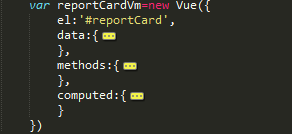
其中data主動存放當前view的屬性也就是在頁面上能用來綁定的數據,methods主要用來存當前view model的方法,computed也是用來存當前view的屬性的,只是它是計算屬性,它的值可能由data裡某一個值直接影響,相當於你修改了view裡的data裡的某一個值 ,它會自動跟著修改,就想當於ng裡用$watch來實現的功能,當前vue也提示了$watch功能,但是用計算屬性使用起來更快捷高效。
當前示例view model分析
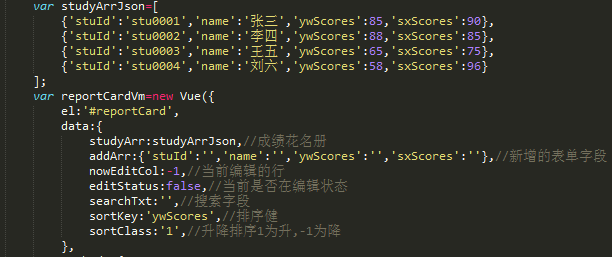
這是當前的view model屬性,如果數據要綁定到html上去,可響應的那都要在這一塊初始定好,如果後續會用到的也要在初始的時候掛好位置,後期手動添加是不會起作用的,此項目各字段功能具體看文字注釋。
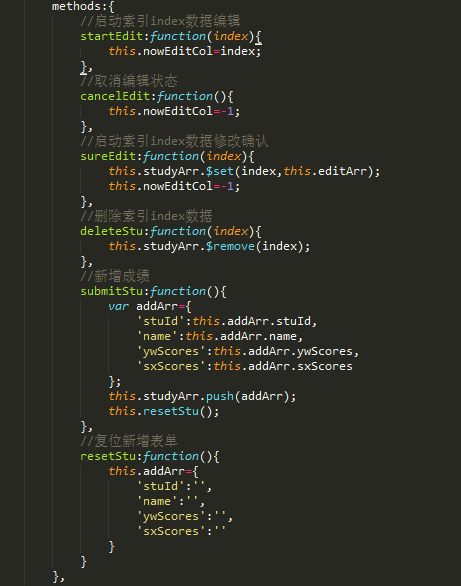
這是此 view model的方法,可直接綁定到html上也可以內部以this.開頭來調用,內部的this都是指向當前view model,可以調用當前view model上的所有屬性跟方法,這裡也是我們處理數據,書寫業務邏輯的地方,此示例項目各方法功能具體看文字注釋。
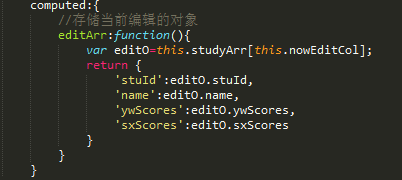
這裡是計算屬性,它的值由data下的nowEditCol來決定,相當於你寫一個$watch方法在監聽nowEditCol,但是此處vue內部幫你處理了,推薦在項目中使用。
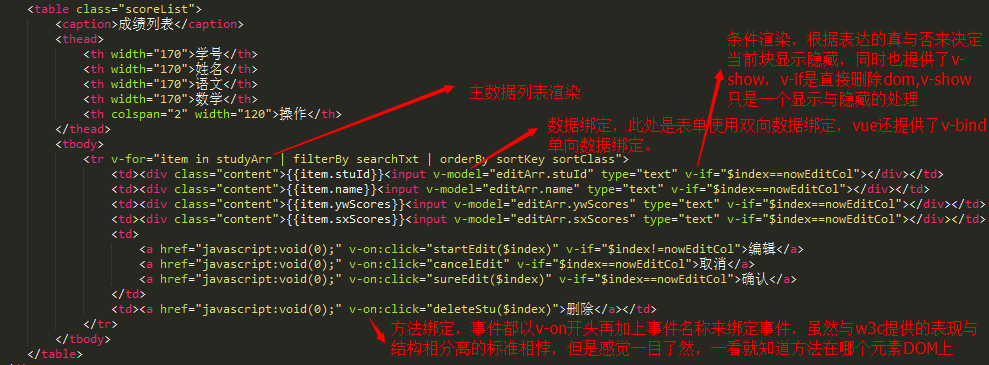
當前項目使用view model方式,都是直接綁定在DOM元素上來做的,這也是熱門的MVVM框架的模式.
我一直都有在了解vue跟avalon ,ng,react這方面的東東,但是考慮到切入速度跟入手難受,我首先選擇的是vue,avalon,但是又由於vue的兼容,如果要使用vue就得放棄
安卓4.2以下的版本的原生浏覽器,於是就開始使用avalon,用avalon 做過一些H5項目,但是由於avalon只是一個司徒正美個人項目總覺得在一些穩定性和未來發展上感覺
很難說,在跑很多測試案例的時候也發現一些BUG,當然在我做的那些項目還沒有掉進avalon的大坑,但是avalon的兼容是值得稱贊的,司徒正美應該是花費了很大精力,
如果你做的項目要兼容到非標准的浏覽就如IE6-7-8,又想體驗MVVM框架開發的高效的時候,avalon是你的首選。在目前兼容環境越來越好的情況,後期如果再接到H5的項目,
我會選擇用vue來做做項目。
更多vue的學習了解,請查閱官方文擋:http://cn.vuejs.org/guide/,這也是你入手vue最佳地方。
本文已被整理到了《Vue.js前端組件學習教程》,歡迎大家學習閱讀。
以上就是本文的全部內容,希望對大家的學習有所幫助,也希望大家多多支持。
- 上一頁:Vue.js表單控件實踐
- 下一頁:vuex實現簡易計數器