JS+HTML5實現的前端購物車功能插件實例【附demo源碼下載】
編輯:關於JavaScript
本文實例講述了JS+HTML5實現的前端購物車功能插件。分享給大家供大家參考,具體如下:
最近做一個商城,需要用到一個簡答的購物車功能,當然,後端實現比較容易,,這裡重點還是講一下前端的JS插件。
從源代碼裡面沒看出來,它叫啥,好像叫:ctshop .js,不管啦,反正我提供下載就好,我做了一些簡單的修復,支持了中文
這個插件使用了HTML5的新特效:storage ,就是游覽器數據庫的功能,這跟之前把數據存在cookies裡面原理是相識的,這樣的好處在於用戶刷新頁面,數據還在,,又不需要跟後端進行數據交互。
create_storage_cart: function() {
 for (var t = this, e = t.storage_get(), a = 0, n = e.items.length; n > a; a++) {
  var i = e.items[a].id,
  r = e.items[a].name,
  s = e.items[a].price,
  c = e.items[a].input;
  t.cart.append('<li class="animated ' + t.settings.animation + '" data-id=' + i + "><span class=" + t.settings.cart + "-name>" + r + "</span><span class=" + t.settings.cart + "-price>" + s + '</span><input type="number" min="1" value="' + c + '" class=' + t.settings.cart + "-input><button class=" + t.settings.cart + "-remove>x</button></li>")
  }
},
需要兼容老版的游覽器,需要在上面進行修改。下面是插件的配置文件
s = {
  currency: "$",
  currency_after_number: "false",
  permanent_cart_buttons: "false",
  display_total_value: "true",
  permanent_total_value: "false",
  animation: "fadeIn",
  empty_disable: "false",
  empty_text: "Your cart is empty",
  paypal: {
  business: "office@createit.pl",
  currency_code: "USD",
  lc: "EN",
  cpp_cart_border_color: "",
  cpp_payflow_color: "",
  no_note: "0",
  no_shipping: "0",
  "return": "",
  cancel_return: ""
  },
 lang:{  //我新增的屬性,主要是用來支持多語言
  clear:'清空',
  checked:'結算'
 },
};
實例化
$('body').ctshop({
  currency: '$',
  paypal: {
  currency_code: 'RMB'
 },
  empty_text:'您敢信,你的購物車居然是空的!',
});
很簡單的吧。。
運行效果圖如下:
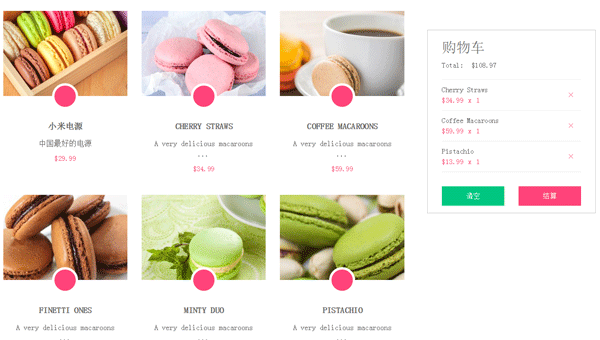
完整實例代碼點擊此處本站下載。
更多關於JavaScript相關內容感興趣的讀者可查看本站專題:《JavaScript切換特效與技巧總結》、《JavaScript查找算法技巧總結》、《JavaScript動畫特效與技巧匯總》、《JavaScript錯誤與調試技巧總結》、《JavaScript數據結構與算法技巧總結》、《JavaScript遍歷算法與技巧總結》及《JavaScript數學運算用法總結》
希望本文所述對大家JavaScript程序設計有所幫助。
小編推薦
熱門推薦