輕松搞定js表單驗證
編輯:關於JavaScript
先看看效果圖:
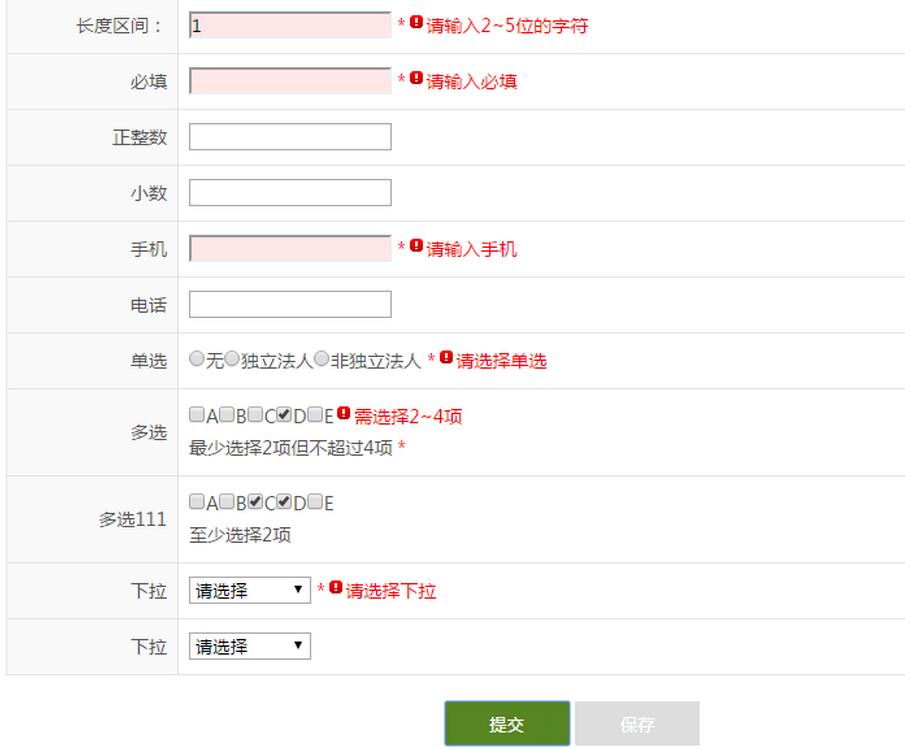
html:
引入
<script src="/Scripts/jquery-1.10.2.js"></script>
<script src="/Scripts/Validate-1.0.1.js"></script>
<!DOCTYPE html>

<html xmlns="http://www.w3.org/1999/xhtml">
<head runat="server">
  <meta http-equiv="Content-Type" content="text/html; charset=utf-8" />
  <title></title>
  <script src="/Scripts/jquery-1.10.2.js"></script>
  <script src="/Scripts/Validate-1.0.1.js"></script>
  <link href="/Content/system.css" rel="stylesheet" type="text/css" />
  <link href="/Content/metro.css" rel="stylesheet" type="text/css" />
</head>
<body>
  <form id="form1" runat="server">
    <div class="form_content">
      <div class="form_center_part">
        <div class="form_view_main">
          <div class="form_part">
            <table width="100%" border="0" cellspacing="0" cellpadding="0" class="table_part_t">
              <tbody>
                <tr>
                  <th>長度區間:</th>
                  <td class="graytxt1">
                    <asp:TextBox ID="txtNewPwd" runat="server" class="required length_2_5" />
                  </td>
                </tr>
                <tr>
                  <th>必填</th>
                  <td class="graytxt1">
                    <asp:TextBox ID="txtPwd" runat="server" class="required"/>
                  </td>
                </tr>
                <tr>
                  <th>正整數</th>
                  <td class="graytxt1">
                    <asp:TextBox ID="TextBox1" runat="server" class="integer" />
                  </td>
                </tr>
                <tr>
                  <th>小數</th>
                  <td class="graytxt1">
                    <asp:TextBox ID="TextBox3" runat="server" class="decimal" />
                  </td>
                </tr>
                <tr>
                  <th>手機</th>
                  <td class="graytxt1">
                    <asp:TextBox ID="txtMobile" runat="server" class="required mobile"></asp:TextBox>
                  </td>
                </tr>
                <tr>
                  <th>電話</th>
                  <td class="graytxt1">
                    <asp:TextBox ID="TextBox2" runat="server" class="tel"></asp:TextBox>
                  </td>
                </tr>
                <tr>
                  <th>單選</th>
                  <td class="graytxt1">
                    <asp:RadioButtonList ID="rbtnlCode" runat="server" class="rbtn required" RepeatLayout="Flow" RepeatDirection="Horizontal">
                      <asp:ListItem Value="1">無</asp:ListItem>
                      <asp:ListItem Value="2">A</asp:ListItem>
                      <asp:ListItem Value="3">B</asp:ListItem>
                    </asp:RadioButtonList>
                  </td>
                </tr>
                <tr>
                  <th>多選</th>
                  <td class="graytxt1">
                    <asp:CheckBoxList ID="chklCode" runat="server" class="chk required length_2_4" RepeatLayout="Flow" RepeatDirection="Horizontal">
                      <asp:ListItem Value="1">A</asp:ListItem>
                      <asp:ListItem Value="2">B</asp:ListItem>
                      <asp:ListItem Value="3">C</asp:ListItem>
                      <asp:ListItem Value="4">D</asp:ListItem>
                      <asp:ListItem Value="5">E</asp:ListItem>
                    </asp:CheckBoxList>
                    <br />
                    最少選擇2項但不超過4項
                  </td>
                </tr>
                <tr>
                  <th>多選111</th>
                  <td class="graytxt1">
                    <asp:CheckBoxList ID="CheckBoxList1" runat="server" class="chk length_2_0" RepeatLayout="Flow" RepeatDirection="Horizontal">
                      <asp:ListItem Value="1">A</asp:ListItem>
                      <asp:ListItem Value="2">B</asp:ListItem>
                      <asp:ListItem Value="3">C</asp:ListItem>
                      <asp:ListItem Value="4">D</asp:ListItem>
                      <asp:ListItem Value="5">E</asp:ListItem>
                    </asp:CheckBoxList>
                    <br />
                    至少選擇2項
                  </td>
                </tr>
                <tr>
                  <th>下拉</th>
                  <td class="graytxt1">
                    <asp:DropDownList ID="drpCode" runat="server" class="drp required">
                      <asp:ListItem Value="">請選擇</asp:ListItem>
                      <asp:ListItem Value="2">A</asp:ListItem>
                      <asp:ListItem Value="3">B</asp:ListItem>
                    </asp:DropDownList>
                  </td>
                </tr>
              </tbody>
            </table>
          </div>
          <div class="btn_center">
            <asp:Button ID="btnSubmit" runat="server" CssClass="btn_box submit" Text="提交" OnClick="btnSubmit_Click" />
            <asp:Button ID="btnSave" runat="server" CssClass="btn_box save" Text="保存" OnClick="btnSave_Click" />
          </div>
        </div>
      </div>
    </div>
  </form>
</body>
</html>
腳本:Validate-1.0.1.js
/// <reference path="jquery-1.10.2-vsdoc.js" />
/*
  @Name:驗證
  @Author:朱翰洲
  @WeChat/QQ:86128281
  @Version: 1.0.1 Beta
  @Update:2016/10/10
  @Desc: 將會持續更新

使用說明:
  1)demo源碼為ASP.NET
  2)需要驗證的控件加onblur="Check(this)"或onclick="Check(this)"。
  3)Check(),可自定義提示消息,無自定義時讀取默認提示,詳見該函數內的注釋。
  4)頁面無其他邏輯驗證時,可加入Validate-?.?.?.default.js腳本文件,無需在控件中加入Check(this)。
  5)radio、checkbox和select詳見selectClass或Validate()內的注釋。
  6)文本、多選有length_?_?區間驗證(至少?項)時須與控件ID命名匹配(id^=xx),否則保存時將會跳過該驗證,詳見SaveValidate()。
  7)若僅需控制MaxLength建議使用MaxLength屬性。
  8)常用格式驗證(.mobile,.tel,.email)需對應,需要其他驗證可擴展。
  9)若有驗證格式如手機、電話等格式,將不再驗證長度
  10)css文件中的名稱不得與該驗證中使用的class名稱沖突。
  11)所有class可根據使用習慣更改。

class:
  1)required:非空
  2)onerror:標記錯誤
  3)length_?_?:詳見checkLength()內的注釋
  4)rbtn:radio
  5)chk:checkbox
  6)drp:select
  7)mobile:手機
  8)tel:電話
  9)email:郵箱

 */


//.rbtn as RadioButtonList
//.chk as CheckBoxList
//.drp as DropDownList
var selectClass = ".rbtn,.chk,.drp";

//獲取驗證類型class
function getDictTypeClass() {
  var keys = ".";
  $.each(dictType, function (key, val) {
    keys += key + ",.";
  });
  return keys.substring(0, keys.length - 2);
}

var dictType = {
  "mobile": ["手機", /^0?(13[0-9]|15[0-9]|18[0-9]|14[57])[0-9]{8}$/],
  "tel": ["電話", /^0\d{2,3}-?\d{7,8}$/],
  "email": ["郵箱", /^[0-9a-z][0-9a-z\-\_\.]+@([0-9a-z][0-9a-z\-]*\.)+[a-z]{2,}$/i],
  "integer": ["整數", /^[1-9]+[0-9]*]*$/],
  "decimal": ["數字", /^[0-9]+.?[0-9]*$/],
}

$(function () {
  $(".required").each(function () {
    $(this).parent().append("<em>*</em>");//在必填項後添加 * 標記必填,可根據需要修改顯示位置
  });
  try {
    //判斷是否有Check()
    if (jQuery.isFunction(Check)) {
      $(selectClass).click(function () {
        Check(this);
      });
      $(getDictTypeClass() + ",.required").blur(function () {
        Check(this);
      });
      $("#btnSubmit").click(function () {
        return SubmitValidate();
      })
      $("#btnSave").click(function () {
        return SaveValidate();
      })
    }
  }
  catch (err) {

  }
});

function Check(par, message) {
  var id = getId(par.id);
  if (typeof (message) == "undefined") {
    //未設置message 讀取默認提示信息
    message = ($(id).is(selectClass) ? "請選擇" : "請輸入") + $(id).parent().prev().text().trim().replace(':', '').replace(':', '');
  }
  Validate(id, message);
}

//驗證
function Validate(id, message) {
  var isRequired = getIsRequired(id);
  if ($(id).is(selectClass)) {
    $(id).css("background", "none");
    //單選
    if ($(id).hasClass("rbtn")) {
      if (isRequired) {
        if (typeof ($("input:radio[name='" + replaceId(id) + "']:checked").val()) == "undefined") {
          AddError(id, message);
        } else {
          RemoveError(id);
        }
      }
    }
      //多選
    else if ($(id).hasClass("chk")) {
      var options = $("input[name^='" + replaceId(id) + "']:checked").length;//選項(數量)
      var isLength = getIsCheckLength(id);//有選項限制
      if (isLength || isRequired) {
        //必選
        if (isRequired) {
          if (options > 0) {
            //有選擇項限制
            if (isLength == true) {
              checkLength(id, options, "");
              //return;
            }
            else {
              RemoveError(id);
            }
          } else {
            AddError(id, message);//未選中
          }
        }
          //非必選,但選擇後有選擇項限制
        else if (isLength && options > 0) {
          checkLength(id, options, "");
        }
        else {
          RemoveError(id);
        }
      }
    }
      //下拉
    else if ($(id).hasClass("drp")) {
      if (isRequired) {
        if ($(id).val() == "") {
          AddError(id, message);
        } else {
          RemoveError(id);
        }
      }
    }
  }
    //TextBox
  else {
    if ($(id).val().trim() !== "") {
      if (getIsCheckLength(id)) {
        checkLength(id, $(id).val().trim().length, "text");
      }
      else {
        checkFormat(id); //格式驗證不再驗證長度
      }
    } else {
      if (isRequired) {
        AddError(id, message);
      } else {
        RemoveError(id);
      }
    }
  }
}
//是否必填
function getIsRequired(id) {
  return $(id).hasClass("required");
}
//是否驗證長度
function getIsCheckLength(id) {
  if (typeof ($(id).attr('class')) != "undefined") {
    return $(id).attr('class').indexOf('length') != "-1";
  } else {
    return "false";
  }
}
//驗證長度 itemLength長度或選項數量。text文本其他值為多選
function checkLength(id, itemLength, text) {
  //$(id).filter(":contains('length')")
  if (getIsCheckLength(id)) {
    var length = getClassName(id, "length");
    var min = length.split('_')[1], max = length.split('_')[2];//取出最小值和最大值
    //min為0時,取max的最大長度
    if (min == 0) {
      var tips = text == "text" ? "最大長度不超過" + max + "位字符" : "需選擇" + max + "項";
      if (itemLength > max) {
        AddError(id, tips);
      }
      else {
        RemoveError(id);
      }
    }
      //max為0時,取min的最小長度
    else if (max == 0) {
      if (itemLength < min) {
        AddError(id, text == "text" ? "請輸入" + (min - 1) + "位以上字符" : "至少選擇" + min + "項");
      }
      else {
        RemoveError(id);
      }
    }
      //min和max大於0時,取區間
    else if (min > 0 && max > 0) {
      var tips = text == "text" ? "請輸入" + min + "~" + max + "位的字符" : "需選擇" + +min + "~" + max + "項";
      if (itemLength < min) {
        AddError(id, tips);
      }
      else if (itemLength > max) {
        AddError(id, tips);
      }
      else {
        RemoveError(id);
      }
    }
    else {
      RemoveError(id);
    }
  }
}

String.prototype.trim = function () {
  return this.replace(/(^\s*)|(\s*$)/g, '');
};
var error_icon = "<img src=/Images/error_small.png>";
//驗證失敗,添加onerror
function AddError(id, message) {
  var spId = id.replace("#", "sp");
  $(id).addClass("onerror");
  if ($(id).nextAll("span") == undefined || $(id).nextAll("span").attr("id") !== spId) {
    if ($(id).next().html() === "*") {// 提示信息放在必填驗證符號後
      $(id).next().after("<span id='" + spId + "' style='color:red'>" + error_icon + message + "</span>");
    } else {
      $(id).after("<span id='" + spId + "' style='color:red'>" + error_icon + message + "</span>");
    }
  } else {
    $("#" + spId).html(error_icon + message);
  }
}
//驗證成功,移除onerror
function RemoveError(id) {
  $(id).removeClass("onerror");
  $(id.replace("#", "#sp")).html("");
}
//刪除ID中的#(參數id:#txtId)
function replaceId(id) {
  return id.replace("#", "");
}
//在ID前加上#(參數id:txtId)
function getId(id) {
  return "#" + id;
}
//判斷className是否存在,返回className
function getClassName(id, className) {
  var clazzs = $(id).attr('class');// 獲取class 字符串
  var classIndex = clazzs.substring(clazzs.indexOf(className));//截取
  if (classIndex != "-1") {
    var last = classIndex.indexOf(" ");//判斷後面是否有空格或其他樣式
    return (last == -1 ? classIndex : classIndex.substring(0, last));
  }
  return "";
}
//驗證格式(驗證內容詳見dictType)
function checkFormat(id) {
  if ($(id).is(getDictTypeClass()) && $(id).val().trim() != "") {
    var clazz = getDictTypeClass().replace('.', '').split(',');
    for (var i = 0; i < clazz.length; i++) {
      if ($(id).attr('class').indexOf(clazz[i].replace('.', '')) != "-1") {
        var name = clazz[i].replace('.', '');
        if (dictType[name][1].exec($(id).val().trim())) {
          RemoveError(id)
        }
        else {
          AddError(id, dictType[name][0] + "格式錯誤");
        }
        break;
      }
    }
  }
  else {
    RemoveError(id);
  }
}

//提交時驗證
function SubmitValidate() {
  $(".required:input").trigger('blur');
  $(selectClass).trigger('click');
  return $(".onerror").length == 0;
}
//保存時驗證
function SaveValidate() {
  $(".onerror").each(function () {
    RemoveError(getId($(this).attr("id")));//移除所有驗證的提示
  });
  //查找所有需要驗證格式的文本,若非空,驗證格式是否正確
  $(getDictTypeClass()).each(function () {
    if ($(this).val().trim() != "") {
      checkFormat(getId($(this).attr("id")));
    }
  });
  //驗證區間
  $("form [id^=txt],[id^=chk]").each(function () {
    var id = $(this).attr('id');
    //文本框
    if (id.indexOf("txt") != "-1") {
      if ($(this).val().trim() != "" && getIsCheckLength(getId(id))) {
        checkLength(getId(id), $(this).val().trim().length, "text");
      }
    }
      //多選
    else {
      var options = $("input[name^='" + id + "']:checked").length;
      if (options > 0 && getIsCheckLength(getId(id))) {
        checkLength(getId(id), options, "");
      }
    }
  });
  return $(".onerror").length == 0;
}
以上就是本文的全部內容,希望對大家的學習有所幫助,也希望大家多多支持。
- 上一頁:炫酷的js手風琴效果
- 下一頁:JS取模、取商及取整運算方法示例
小編推薦
熱門推薦