BootStrap中Table分頁插件使用詳解
編輯:關於JavaScript
分頁(Pagination),是一種無序列表,Bootstrap 像處理其他界面元素一樣處理分頁。
bootstrap-table介紹
bootstrap-table 是一個輕量級的table插件,使用AJAX獲取JSON格式的數據,其分頁和數據填充很方便,支持國際化。
下載地址
https://github.com/wenzhixin/bootstrap-table/archive/1.11.0.zip
使用方式
引入css和js
<!--css樣式-->
<link href="css/bootstrap/bootstrap.min.css" rel="stylesheet">
<link href="css/bootstrap/bootstrap-table.css" rel="stylesheet">
<!--js-->
<script src="js/bootstrap/jquery-1.12.0.min.js" type="text/javascript"></script>
<script src="js/bootstrap/bootstrap.min.js"></script>
<script src="js/bootstrap/bootstrap-table.js"></script>
<script src="js/bootstrap/bootstrap-table-zh-CN.js"></script>
2. table數據填充
bootstrap-table獲取數據有兩種方式,一是通過table 的data-url屬性指定數據源,二是通過JavaScript初始化表格時指定url來獲取數據
<table id="screenTable" data-toggle="table">
<thead>
...
</thead>
</table>
$(function () {
$('#screenTable').bootstrapTable({
url: "/screen/list",
dataField: "rows",
cache: false, //是否使用緩存,默認為true
striped: true, //是否顯示行間隔色
pagination: true, //是否顯示分頁
pageSize: 10, //每頁的記錄行數
pageNumber: 1, //初始化加載第一頁,默認第一頁
pageList: [10, 20, 50], //可供選擇的每頁的行數
search: true, //是否顯示表格搜索
showRefresh: true, //是否顯示刷新按鈕
clickToSelect: true, //是否啟用點擊選中行
toolbar: "#toolbar_screen", //工具按鈕用哪個容器
sidePagination: "server", //分頁方式:client客戶端分頁,server服務端分頁
queryParamsType: "limit", //查詢參數組織方式
columns: [{
field: "id",
title: "ID",
align: "center",
valign: "middle"
}, {
field: "name",
title: "定制名稱",
align: "center",
valign: "middle",
formatter: 'infoFormatter'
}, {
field: "time",
title: "定制時間",
align: "center",
valign: "middle"
}],
formatNoMatches: function () {
return '無符合條件的記錄';
}
});
$(window).resize(function () {
$('#screenTable').bootstrapTable('resetView');
});
});
function infoFormatter(value, row, index) {
return '<a href=/screen/' + row.id + ' target="_blank">' + row.name + '</a>';
}
效果圖如下
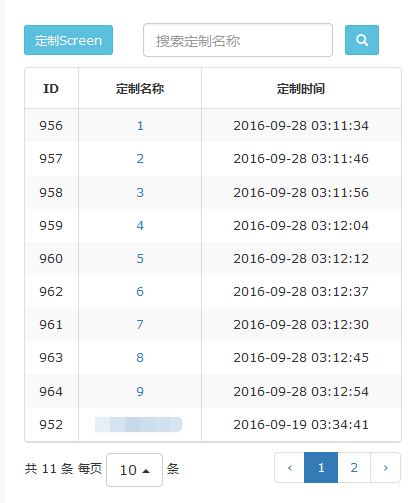
以上所述是小編給大家介紹的BootStrap中Table分頁插件使用詳解,希望對大家有所幫助,如果大家有任何疑問請給我留言,小編會及時回復大家的。在此也非常感謝大家對網站的支持!
小編推薦
熱門推薦