js帶鬧鈴功能的倒計時代碼
編輯:關於JavaScript
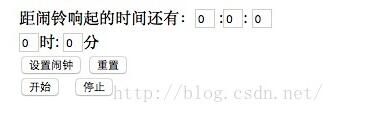
Js倒計時代碼,帶鬧鈴功能,自定義鬧鐘倒計時功能,點擊開始按鈕,即可開始倒數,代碼不是太復雜,新手應該能看懂,代碼分享給大家。
效果圖:
源碼:
<html>
<head>
<title>Js倒計時,鬧鈴功能</title>
<script language="javascript">
function $(id){
 return document.getElementById(id);
}
function down(){
 $("second").value-=1;

 if($("second").value==0&&$("minutes").value==0&&$("hours").value==0)
 {
 window.alert("干正事了!!!");
 clearInterval(timeout);

 }


 if($("second").value==-1)
 {
 $("second").value=59;
 $("minutes").value-=1;
 }
 if($("minutes").value==-1)
 {
 $("minutes").value=59;
 $("hours").value-=1;
 }
}
var timeout;
function begin(){
 timeout=setInterval("down()",1000);
}
function stop(){
 clearInterval(timeout);
}
var dt=new Date();
function setclock()
{
 var hours=$("clock_hours").value-dt.getHours();
 var minutes=$("clock_minutes").value-dt.getMinutes();
 if(minutes<0)
 {
 if(hours<0)
 {
 $("minutes").value=60-Math.abs(minutes);
 $("hours").value=24-Math.abs(hours);
 }
 else if(hours==0)
 {
 $("minutes").value=60-Math.abs(minutes);
 $("hours").value=Math.abs(hours);
 }
 else
 {
 $("minutes").value=60-Math.abs(minutes);
 $("hours").value=Math.abs(hours)-1;
 }
 }
 else if(minutes==0)
 {
 if(hours<0)
 {
 $("minutes").value=Math.abs(minutes);
 $("hours").value=24-Math.abs(hours);
 }
 else if(hours==0)
 {
 $("minutes").value=Math.abs(minutes);
 $("hours").value=Math.abs(hours)+24;
 }
 else
 {
 $("minutes").value=Math.abs(minutes);
 $("hours").value=Math.abs(hours);
 }
 }
 else
 {
 if(hours<0)
 {
 $("minutes").value=60-Math.abs(minutes);
 $("hours").value=24-Math.abs(hours);
 }
 else if(hours==0)
 {
 $("minutes").value=Math.abs(minutes);
 $("hours").value=Math.abs(hours);
 }
 else
 {
 $("minutes").value=Math.abs(minutes);
 $("hours").value=Math.abs(hours);
 }
 }
}
function reset()
{
 var time=document.getElementsByName("time");
 for(i=0;i<time.length;i++)
 {
 time[i].value=0;
 }
}
</script>
</head>
<body>
距鬧鈴響起的時間還有:<input type="text" id="hours" style="width:20px" value="0" name="time" />
:<input type="text" id="minutes" value="0" style="width:20px" name="time"/>:
<input type="text" id="second" value="0" style="width:20px" name="time"/><br/>
<input type="text" id="clock_hours" value="0" style="width:20px" name="time"/>時:
<input type="text" id="clock_minutes" value="0" style="width:20px" name="time"/>分<br/>
<input type="button" value="設置鬧鐘" onclick="setclock()" />
<input type="button" value="重置" onclick="reset()" /><br/>
<input type="button" value="開始" onclick="begin()">
<input type="button" value="停止" onclick="stop()">
</body>
</html>
以上就是本文的全部內容,希望對大家的學習有所幫助,也希望大家多多支持。
小編推薦
熱門推薦