搭建環境
項目github地址
項目中涉及了json-server模擬get請求,用了vue-router;
關於Vue生命周期以及vue-router鉤子函數詳解
生命周期
1.0版本
1.哪些生命周期接口
init
Created
beforeCompile
Compiled
Ready
Attatched
Detached
beforeDestory
destoryed
2.執行順序
1. 不具有keep-alive
進入:
init->create->beforeCompile->complied->attatched->ready
移出:
beforeDestory->detached->destoryed;
2. 具有keep-alive
第一次的時候
進入:
init->create->beforeCompile->complied->attatched->ready
移出:
detached;
之後的每次
進入:
attatched
移出:
detached
鉤子函數
3.鉤子函數有哪些
data
activete
deactivate
canactivate
candeactivate
4.執行順序
進入:
canactivate->actiavte->date
移出:
candeactivate->deactiavte
兩者一起出現
5.對於一個組件A裡面有子組件B,當這個組件A進行移入和移出操作時,組件之間的生命周期喝鉤子函數的執行順序參考如下:
例如
A.vue
<div>
<B></B>
</div>
備注:下面括號裡的是嵌套的子組件
1. 不具有keep-alive:
移入:
1. canActivate;
2. init;
3. create;
4. beforeCompile;
5. (嵌套子組件:init,create,beforeCompile,compile);
6. compile;
7. activate;
8. data;
9. attached;
10. (子組件attached);
11. (子組件ready);
12. ready;
移出:
13. canDeactivate;
14. deactivate;
15. beforeDestroy;
16. (子組件beforeDestroy);
17. (子組件destoryed);
18. detached;
19. (子組件detached);
20. destoryed;
2. 具有keep-alive:
移入:
1. canActivate;
2. activate;
3. data;
4. attached;
5. (子組件attached);
移出:
6. canDeactivate;
7. deactivate;
8. detached;
9. (子組件detached);
6.鉤子函數activate和data的執行順序
涉及鉤子函數異步 resolve 規則:
1.如果鉤子返回一個 Promise,則鉤子何時 resolve 取決於該 Promise 何時 resolve。
2.如果鉤子既不返回 Promise,也沒有任何參數,則該鉤子將被同步 resolve。
3.如果鉤子不返回 Promise,但是有一個參數(transition),則鉤子會等到transition.next(),transition.abort()或是transition.redirect()之一被調用才 resolve。
4.在驗證類的鉤子,比如canActivate,canDeactivate以及全局 beforeEach 鉤子中,如果返回值是一個布爾值 (Boolean),也會使得鉤子同步 resolve。
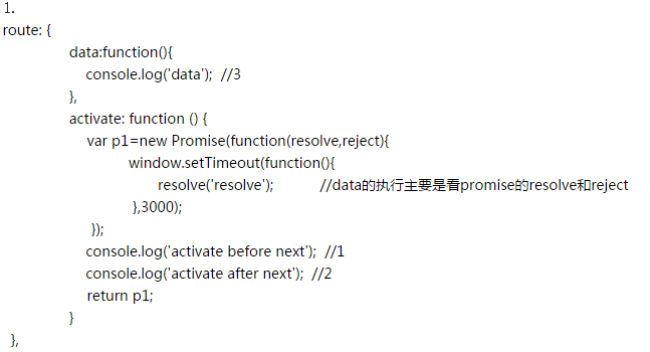


7.根據什麼可以確保界面已經更新完成,也就是說掛在完成
執行生命周期attached說明已掛載
雙向綁定與渲染機制
1.數據的監聽和觸發(訂閱和發布observer)
src目錄下observer:
1. array.js
2. dep.js;(實現一個發布訂閱對象)
3. index.js;(利用Object.defineProperty這個API,並為此屬性設計一個特殊的 getter/setter,然後在 setter 裡觸發一個函數,達到監聽的效果);
下面是這部分的源碼
Object.defineProperty(obj, key, {
enumerable: true,
configurable: true,
get: function reactiveGetter () {
var value = getter ? getter.call(obj) : val
if (Dep.target) {
dep.depend()
if (childOb) {
childOb.dep.depend()
}
if (isArray(value)) {
for (var e, i = 0, l = value.length; i < l; i++) {
e = value[i]
e && e.__ob__ && e.__ob__.dep.depend()
}
}
}
return value
},
set: function reactiveSetter (newVal) {
var value = getter ? getter.call(obj) : val
if (newVal === value) {
return
}
if (setter) {
setter.call(obj, newVal)
} else {
val = newVal
}
childOb = observe(newVal)
dep.notify()
}
})
簡化上面的監聽與觸發代碼如下:
function notidy(obj,key){
console.log(key+" has changed");
console.log(key+" now is: "+obj[key]);
}
function ToData(key,val){
var ob=this;
Object.defineProperty(ob,key,{
enumerable:true,
configurable:true,
get:function(){
return val;
},
set:function(newval){
if(newval==val){
return;
}
val=newval;
notidy(this,key);
}
})
}
src目錄下directive.js
在directive中可以看到一系列解析出來的屬性,而directive的實例化可以在utils/lifecycle.js中看到。
下面這段代碼在Directive.prototype._bind中
var watcher = this._watcher = new Watcher(
this.vm,
this.expression,
this._update, // callback
{
filters: this.filters,
twoWay: this.twoWay,
deep: this.deep,
preProcess: preProcess,
postProcess: postProcess,
scope: this._scope
}
)
// v-model with inital inline value need to sync back to
// model instead of update to DOM on init. They would
// set the afterBind hook to indicate that.
if (this.afterBind) {
this.afterBind()
} else if (this.update) {
this.update(watcher.value)
}
Directive.prototype.set = function (value) {
/* istanbul ignore else */
if (this.twoWay) {
this._withLock(function () {
this._watcher.set(value)
})
} else if (process.env.NODE_ENV !== 'production') {
warn(
'Directive.set() can only be used inside twoWay' +
'directives.'
)
}
}
src目錄下Watch.js:
從下面的代碼可以找到watcher對象通過addDep方法實現訂閱
Watcher.prototype.addDep = function (dep) {
var id = dep.id
if (!this.newDepIds.has(id)) {
this.newDepIds.add(id)
this.newDeps.push(dep)
if (!this.depIds.has(id)) {
dep.addSub(this)
}
}
}
2.前面說那麼多關於雙向綁定,其實這也是VUE內部的渲染機制,總結如下
1. 通過 observer 對 data 進行了監聽,並且提供訂閱某個數據項的變化的能力
2. 把 template 解析成一段 document fragment,然後解析其中的 directive,得到每一個 directive 所依賴的數據項及其更新方法。比如 v-text="message" 被解析之後 (這裡僅作示意,實際程序邏輯會更嚴謹而復雜):所依賴的數據項this.$data.message,以及相應的視圖更新方法 node.textContent = this.$data.message
3. 通過 watcher 把上述兩部分結合起來,即把 directive 中的數據依賴訂閱在對應數據的 observer 上,這樣當數據變化的時候,就會觸發 observer,進而觸發相關依賴對應的視圖更新方法,最後達到模板原本的關聯效果。
3.vue是如何改進了v-for具有相同數據渲染出錯的?
數組的渲染
未使用track-by的數組渲染內部緩存的默認id是數組的值value,意味著如果數組中存在相同的值,通過id獲取的是相同的一個fragement片段,最後通過insertBefore操作DOM由於是相同的一個實例,故不會生效。
<div>
<ul id='test'>
<li id="child1">child1</li>
<li id="child">child2</li>
</ul>
</div>
<script>
_element1=document.getElementById('child1');
_element2=document.getElementById('child2');
document.getElementById('test').insertBefore(_element1,_element2);
</script>
渲染的結果是child2在child1前面
使用track-by目的是自定義這個內部的id,使得數組中具有相同的值的幾項都不會選擇到相同的實例,對於使用track-by='$index'還是其他唯一區分的id值有一定的區別,各有好處。
使用$index使得反轉的數據沒有移動操作,而對於使用其他的id在順序不一樣的時候會有相應的移動操作。
對象的渲染
對象一般使用鍵作為內部緩存對象的id,通過track-by也可以自定義這個id提高性能。
vm.model = {
a: { id: 1, val: "model1"},
b: { id: 2, val: "model2"},
c: { id: 3, val: "model2"},
}
列表更新
vm.model = {
d: { id: 1, val: "model1"},
e: { id: 2, val: "model2"},
f: { id: 3, val: "model2"}
}
以上所述是小編給大家介紹的vue從使用到源碼實現教程詳解,希望對大家有所幫助,如果大家有任何疑問請給我留言,小編會及時回復大家的。在此也非常感謝大家對網站的支持!