jquery實用技巧之輸入框提示語句
編輯:關於JavaScript
我們在編寫網頁的時候不可避免的會遇到輸入框,那麼怎麼設計輸入框才能更加優雅呢?不同的人會有不同的答案,下面分享一個比較不錯的設計。
效果圖
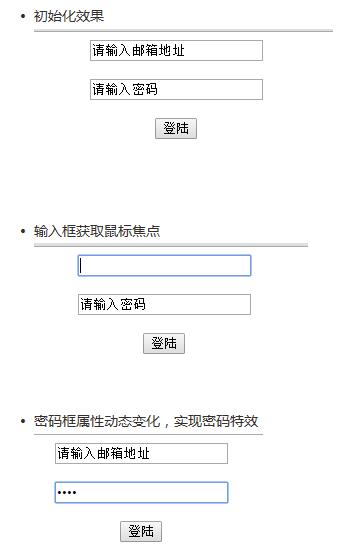
細節
這個效果主要是通過JQuery來實現,我的思路如下:
輸入框獲取鼠標焦點之前,顯示原標簽的value屬性值;獲取了鼠標焦點之後,如果當前value有值,那就清空,否則恢復;密碼框特殊照顧,待會講。
實現的代碼如下:
$("#address").focus(function(){
    var address_text = $(this).val();
    if(address_text=="請輸入郵箱地址"){
      $(this).val("");
    }
  });
$("#address").blur(function(){
    var address_value = $(this).val();
    if(address_value==""){
      $(this).val("請輸入郵箱地址")
    }
  });
完整的小例子
完整的代碼如下,尤其注意<input type="text" id="password">的實現!
<!DOCTYPE html>
<html>
<head>
  <meta charset="utf-8">
  <title>文本輸入框中內容的提示效果</title>
  <script type="text/javascript" src="jquery-2.2.4.min.js"></script>
</head>
<body>
<script>
$(function(){
  $("#address").focus(function(){
    var address_text = $(this).val();
    if(address_text=="請輸入郵箱地址"){
      $(this).val("");
    }
  });
  $("#password").focus(function(){
    var password_text = $(this).val();
    if(password_text=="請輸入密碼"){
      $(this).attr("type","password");
      $(this).val("");
    }
  });
  $("#address").blur(function(){
    var address_value = $(this).val();
    if(address_value==""){
      $(this).val("請輸入郵箱地址")
    }
  });
  $("#password").blur(function(){
    var password_value = $(this).val();
    if(password_value==""){
      $(this).attr("type","text");
      $(this).val("請輸入密碼")
    }
  });
});
</script>
<div align="center">
  <input type="text" id ="address" value="請輸入郵箱地址"><br><br>
  <input type="text" id ="password" value="請輸入密碼"><br><br>
  <input type="button" name="登錄" value="登陸">
</div>
</body>
</html>
$(function(){});其就是$(document).ready(function(){});的縮寫。這個倒不是什麼重點。
$(this).attr(“type”,”password”);將當前對象(也就是獲取鼠標焦點的輸入框)的屬性值進行動態的改變。達到輸入數據的時候以密碼框的形式出現。
以上就是本文的全部內容,希望對大家的學習有所幫助,也希望大家多多支持。
小編推薦
熱門推薦