Bootstrap開關(switch)控件學習筆記分享
編輯:關於JavaScript
bootstrap-switch插件是一個針對Bootstrap實現的開關(switch)按鈕控件,可以支持尺寸、顏色等屬性的自定義。開關式按鈕在國內網站上使用的並不是很多,Bootstrap 的應用在國外非常流行,不知道是我們不喜歡還是使用它很麻煩很難適合網站來使用。但這種開頭式按鈕在手機等移動設備上的應用是最廣泛的,屏幕的特性促使它更好的發展。
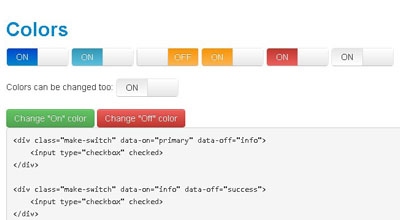
功能說明:
介紹chekbox與radio的兩個表單的簡單使用,其他更多的效果與功能可以浏覽demo,點擊按鈕以滑動的方式進行on/off切換。
使用說明:
1.引入CSS與JS文件
<link rel="stylesheet" href="static/stylesheets/bootstrap-switch.css" />
<script src="http://ajax.googleapis.com/ajax/libs/jquery/1.9.1/jquery.min.js"></script>
<script src="static/js/bootstrap-switch.js"></script>
2.html內容添加
<div class="make-switch" data-on="info" data-off="success">
          <input type="checkbox" checked>
        </div>
        <div class="make-switch" data-on="success" data-off="warning">
          <input type="checkbox" checked>
        </div>
        <div class="make-switch" data-on="warning" data-off="danger">
          <input type="checkbox" checked>
        </div>
        <div class="make-switch" data-on="danger" data-off="default">
          <input type="checkbox" checked>
        </div>
        <div class="make-switch" data-on="default" data-off="primary">
          <input type="checkbox" checked>
        </div>
1). div完全是為了給checkbox添加式樣。
2). input就很簡單了,就是普通的標簽。
3).make-switch:對使用插件的checkbox添加CSS樣式。
4).data-on:為on狀態時的CSS樣式。
5).data-off:為off狀態時的CSS樣式。
3.radio單選框的使用:
<label for="option11">Option 1</label>
            <div class="make-switch radio2">
              <input id="option11" type="radio" name="radio2" value="option11">
            </div>
            <label for="option12">Option 2</label>
            <div class="make-switch radio2">
              <input id="option12" type="radio" name="radio2" value="option12" checked="checked">
            </div>
            <label for="option13">Option 3</label>
            <div class="make-switch radio2">
              <input id="option13" type="radio" name="radio2" value="option13">
            </div>
radio單選框的使用方法是相同的,因為單選框先中其中一個是其他狀態都要改變,所以要添加相應的JS代碼;
<script>
  $('.radio2').on('switch-change', function () {
    $('.radio2').bootstrapSwitch('toggleRadioStateAllowUncheck', true);
  });
</script>
4.啟動
$("div[class='switch']").each(function() {
  $this = $(this);
  var onColor = $this.attr("onColor");
  var offColor = $this.attr("offColor");
  var onText = $this.attr("onText");
  var offText = $this.attr("offText");
  var labelText = $this.attr("labelText");

  var $switch_input = $(" :only-child", $this);
  $switch_input.bootstrapSwitch({
    onColor : onColor,
    offColor : offColor,
    onText : onText,
    offText : offText,
    labelText : labelText
  });
});
1). 通過jquery獲取所有的switch div,從而獲取其屬性onColor 、offColor 等等
2). 緊接著,獲取div包含的子元素input。
3). 通過bootstrapSwitch方法對input進行加載。
這樣我們就以簡單的實現我們想要的開關按鈕效果了。
如果大家還想深入學習,可以點擊這裡進行學習,再為大家附一個精彩的專題:Bootstrap學習教程
以上就是關於Bootstrap開關(switch)控件的使用方法,希望對大家的學習有所幫助。
小編推薦
熱門推薦