基於JS實現密碼框(password)中顯示文字提示功能代碼
編輯:關於JavaScript
其實實際上實現中並不能讓password中顯示文字提示,但是我們在工作中有這樣的需求,當沒輸入東西的時候,框內有提示輸入密碼,但是當輸入東西的時候又顯示的是*號,那麼是如何實現的呢?其實原理很簡單,就是放兩個文本框,樣式以及定位都是一樣的。先將type為password的隱藏,只顯示type為text的偽密碼框,value設置提示內容例如請輸入密碼。然後當input觸發的時候,type為text的input隱藏,讓type為password的input顯示出來。然後當檢測password的value為空的時候,再將type為password隱藏,type為text的顯示。啥話也不說了,上代碼。(ps:額外添加了重置功能)
先上html部分
<table class="login_table">
<tr>
<td>賬號</td>
<td><input type="text" value="請輸入您的賬號" class="admin" /></td>
</tr>
<tr>
<td>密碼</td>
<td>
<input type="text" value="請輸入您的密碼"id="login_showPwd" />
<input type="password"id="login_password" style="display: none"/>
</td>
</tr>
<tr>
<td>
<input type="button" value="登錄" />
<input type="button" value="重置" id ="btn_res"/>
</td>
</tr>
</table>
然後上js部分
//賬號部分
$(function(){
$(".admin").focus(function(){
if($(this).val() == "請輸入您的賬號"){
$(this).val("");
}
});
$(".admin").blur(function(){
if($(this).val() == ""){
$(this).val("請輸入您的賬號");
}
});
// 密碼部分
$('#login_showPwd').focus(function(){
var text_value=$(this).val();
if(text_value == this.defaultValue){
$('#login_showPwd').hide();
$('#login_password').show().focus();
}
});
$('#login_password').blur(function(){
var text_value = $(this).val();
if(text_value==""){
$('#login_showPwd').show();
$('#login_password').hide();
}
});
//重置部分
$('#btn_res').click(function(){
$('.admin').val("請輸入您的賬號");
$('#login_password').hide().val("");
$("#login_showPwd").show();
});
});
下面給大家介紹密碼輸入框 底下顯示的文字方法
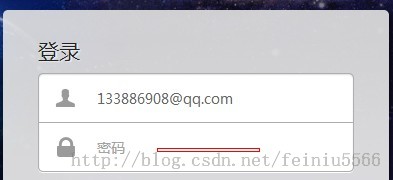
一個小的提示很多網站密碼輸入框裡面都有密碼兩個字,以前以為是text的,值到今天才知道,它就是password標簽,寫法如下
<input type="password" name="pas" placeholder="密碼"/>
加了一個placeholder屬性就好了
以上所述是小編給大家介紹的實現密碼框(password)中顯示文字提示功能代碼的相關知識,希望對大家有所幫助,如果大家有任何疑問請給我留言,小編會及時回復大家的。在此也非常感謝大家對網站的支持!
小編推薦
熱門推薦