淺析JS異步加載進度條
編輯:關於JavaScript
展現效果:
1) 當點擊Load的時候,模擬執行異步加載. 浏覽器被遮擋. 進度條出現.
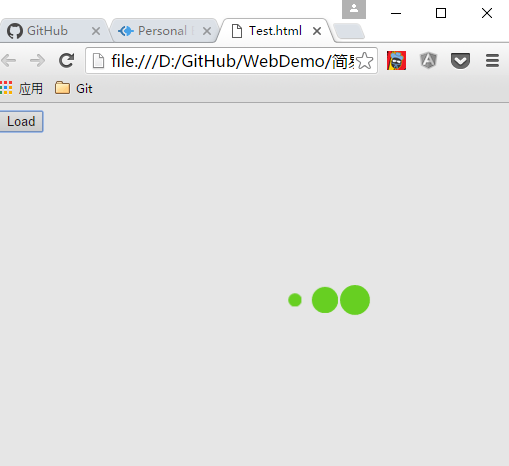
實現思路:
1.當用戶點擊load button執行異步請求. 調用方法 出現加載條
2.怎麼實現進度條呢?
1) 在document.body 新增一個div.覆蓋浏覽器. 設置背景會灰色. z-index = 999. 加載的時候讓用戶無法修改界面值
2) 在document.body 新增一個動態的div.
代碼實現:
Main.html:
<!DOCTYPE html>
<html>
<head>
<meta charset="utf-8">
<title></title>
<script src="Loading.js" charset="utf-8"></script>
<link rel="stylesheet" href="Loading.css" media="screen" title="no title" charset="utf-8">
</head>
<body>
<button onclick="showLoading()">Load</button>
</body>
</html>
Loading.js:
function showLoading()
{
var overDiv = document.createElement("div");
var loadingDiv = document.createElement("div");
var childDiv1 = document.createElement("div");
var childDiv2 = document.createElement("div");
var childDiv3 = document.createElement("div");
overDiv.classList.add('over');
loadingDiv.classList.add('spinner');
childDiv1.classList.add('bounce1')
childDiv2.classList.add('bounce2')
childDiv3.classList.add('bounce3')
loadingDiv.appendChild(childDiv1);
loadingDiv.appendChild(childDiv2);
loadingDiv.appendChild(childDiv3);
document.body.appendChild(overDiv);
document.body.appendChild(loadingDiv)
setTimeout(function()
{
document.body.removeChild(overDiv);
document.body.removeChild(loadingDiv)
}, 5000);
}
Loading.css
.spinner {
width: 150px;
text-align: center;
left: 50%;
top: 50%;
position: absolute;
z-index: 1000;
}
.over {
width: 100%;
height: 100%;
z-index: 998;
background-color: gray;
position:absolute;
top: 0px ;
left : 0px;
opacity: 0.2;
}
.spinner > div {
width: 30px;
height: 30px;
background-color: #67CF22;
border-radius: 100%;
display: inline-block;
-webkit-animation: bouncedelay 1.4s infinite ease-in-out;
animation: bouncedelay 1.4s infinite ease-in-out;
/* Prevent first frame from flickering when animation starts */
-webkit-animation-fill-mode: both;
animation-fill-mode: both;
}
.spinner .bounce1 {
-webkit-animation-delay: -0.32s;
animation-delay: -0.32s;
}
.spinner .bounce2 {
-webkit-animation-delay: -0.16s;
animation-delay: -0.16s;
}
@-webkit-keyframes bouncedelay {
0%, 80%, 100% { -webkit-transform: scale(0.0) }
40% { -webkit-transform: scale(1.0) }
}
@keyframes bouncedelay {
0%, 80%, 100% {
transform: scale(0.0);
-webkit-transform: scale(0.0);
} 40% {
transform: scale(1.0);
-webkit-transform: scale(1.0);
}
}
總結:
1.可以將方法提出來. 對Ajax請求重新封裝一次. 實現調用Ajax請求的時候自動條用進度條方法.
2.如果是Angular的話. Angular提供了方法監控http調用.監控http執行請求的時候調用進度條方法就行了.無需在每次執行 http調用.監控http執行請求的時候調用進度條方法就行了.無需在每次執行http的時候都去自己調用出現進度條的方法.
以上內容是小編給大家介紹的js異步加載進度條的相關內容,希望對大家有所幫助!
小編推薦
熱門推薦