js實現文本框輸入文字個數限制代碼
編輯:關於JavaScript
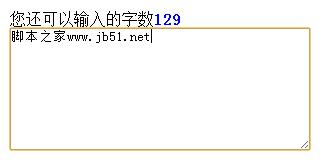
通常情況下,文本框輸入的文字個數並不是無限制的,一般都會限定一個輸入最高上限,較為人性化的網站可能會有可輸入字數倒計效果,比如還剩余20可以輸入這樣的提示,下面就通過一個實例介紹一下如何實現此效果。
先看看效果圖:
代碼如下:
<html>
<head>
<title>文本框輸入文字倒計效果代碼</title>
<style type="text/css">
*
{
 margin:0;
 padding:0;
}
.box
{
 width:500px;
 margin:10px auto;
}
p span
{
 color:#069;
 font-weight:bold;
}
textarea
{
 width:300px;
}
.textColor
{
 background-color:#0C9;
}
.grey
{
 padding:5px;
 color:#FFF;
 background-color:#CCCCCC;
}
</style>
<script type="text/javascript" src="jQuery/jquery-1.8.3.js"></script>
<script type="text/javascript">
$(function(){
 var $tex=$(".tex");
 var $but=$(".but");
 var ie=jQuery.support.htmlSerialize;
 var str=0;
 var abcnum=0;
 var maxNum=280;
 var texts=0;

 $tex.val("");
 $tex.focus(function(){
 if($tex.val()=="")
 {
  $("p").html("您還可以輸入的字數<span>140</span>");
 }
 })
 $tex.blur(function(){
 if($tex.val() == "")
 {
  $("p").html("請在下面輸入您的文字:");
 }
 })
 if(ie)
 {
  $tex[0].oninput = changeNum;
 }
 else
 {
  $tex[0].onpropertychange = changeNum;
 }

 function changeNum()
 {
 //漢字的個數
 str=($tex.val().replace(/\w/g,"")).length;
 //非漢字的個數
 abcnum=$tex.val().length-str;
 total=str*2+abcnum;
 if(str*2+abcnum<maxNum||str*2+abcnum==maxNum)
 {
  $but.removeClass()
  $but.addClass("but");
  texts=Math.ceil((maxNum-(str*2+abcnum))/2);
  $("p").html("您還可以輸入的字數<span>"+texts+"</span>").children().css({"color":"blue"});
 }
 else if(str*2+abcnum>maxNum)
 {
  $but.removeClass("")
  $but.addClass("grey");
  texts =Math.ceil(((str*2+abcnum)-maxNum)/2);
  $("p").html("您輸入的字數超過了<span>"+texts+"</span>").children("span").css({"color":"red"});
 }
 }
})
</script>
</head>
<body>
<div class="box">
 <p>請在下面輸入您的文字:</p>
 <textarea name="weibao" class="tex" cols="" rows="8"></textarea>
</div>
</body>
</html>
希望本文所述對大家學習javascript程序設計有所幫助。
小編推薦
熱門推薦