jquery插件jquery.confirm彈出確認消息
編輯:關於JavaScript
本文為大家介紹了插件jquery.confirm彈出確認消息的實現方法,具有一定的參考價值,特分享給大家供大家參考,具體內容如下
實現效果:
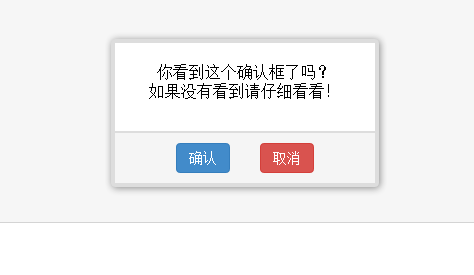
具體代碼:
1、插件默認參數
// 默認參數
$.confirm.defaults = {
 // 樣式
 css: "http://static.qianduanblog.com/css/jquery.confirm/default.min.css?v=" + Math.ceil(new Date() / 86400000),
 // 確認框內容
 content: "確認嗎?",
 // 確認按鈕文字
 sureButton: "確認",
 // 取消按鈕文字
 cancelButton: "取消",
 // 位置
 position: {},
 // 自動打開
 autoOpen: false,
 // 動畫持續時間
 duration: 123,
 // 打開確認框回調
 onopen: emptyFn,
 // 單擊了確認或者取消回調
 onclick: emptyFn,
 // 確認回調
 onsure: emptyFn,
 // 取消回調
 oncancel: emptyFn,
 // 關閉確認框回調
 onclose: emptyFn
}
2、插件結構與樣式
jquery.confirm的dom結構為:
<div class="jquery_confirm____" style="display:none">
 <div class="jquery_confirm____body">確認框消息</div>
 <div class="jquery_confirm____footer">
  <button class="button button-primary jquery_confirm____sure">確認</button>
  <button class="button button-error jquery_confirm____cancel">取消</button>
 </div>
</div>
默認的插件樣式基於css.3,默認的插件樣式地址為default,插件樣式只渲染一次,不會多次渲染,以第一次使用插件的樣式為准。
3、使用方法
// 打開確認框
$.confirm({
 content: "確認要查看嗎?",
 onopen: function() {
  alert("確認框打開了!");
 },
 onclose: function() {
  alert("確認框關閉了!");
 },
 onsure: function() {
  alert("你單擊了確認按鈕!");
 },
 oncancel: function() {
  alert("你單擊了取消按鈕!");
 },
 onclick: function(s) {
  if (s) {
   alert("你單擊了確認按鈕!");
  } else {
   alert("你單擊了取消按鈕!");
  }
 }
});

$.confirm("確認嗎?", function(s) {
 if (s) {
  alert("你單擊了確認按鈕!");
 } else {
  alert("你單擊了取消按鈕!");
 }
});
希望本文所述對大家學習jquery程序設計有所幫助。
小編推薦
熱門推薦