js文本框輸入內容智能提示效果
編輯:關於JavaScript
本文實例講述了js文本框輸入內容智能提示效果代碼。分享給大家供大家參考。具體如下:
運行效果截圖如下:
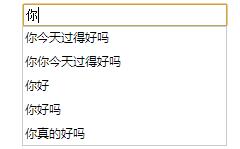
大體思路:
1.監聽文本框事件。這裡是用的keyup事件。大家可以嘗試用onchange事件。不過感覺keyup事件的效果要好一點。
2.根據輸入內容通過ajax異步的方式去訪問後台數據。
3.遍歷返回數據將數據添加到顯示區域。
4.在添加數據的同時給每一條數據加上一些效果,點擊其中一條將數據填到文本框,並且提示內容消失。
5.後台數據應該拼接成json格式。
具體代碼如下:
<!DOCTYPE html PUBLIC "-//W3C//DTD XHTML 1.0 Transitional//EN" "http://www.w3.org/TR/xhtml1/DTD/xhtml1-transitional.dtd">
<html xmlns="http://www.w3.org/1999/xhtml">
<head runat="server">
 <title>自動提示</title>
 <script src="Scripts/jquery-1.4.1.js" type="text/javascript"></script>
 <script type="text/ecmascript">
  function txtchange() {
   var nnmae = $("#intxt").val();
   $.ajax({
    type: "post",
    url: "ashx/AutoNote.ashx",
    data: { name: nnmae },
    dataType: "json",
    success: function (data) {
     $("#tbcontent").html(""); //刪除原有數據
     if (data != "null") {
      for (var i = 0; i < $(data).length; i++) {
       $("#tbcontent").append('<div class="item" onclick="mousedown(this)">' + data[i].name + '</div>');
      }
      $("#tbcontent").slideDown();
     }
    }
   });
  }
  //選擇其中的提示內容
  function mousedown(object) {
   $("#intxt").val($(object).text());
   $("#tbcontent").fadeOut();
  }
  //文檔框失去焦點,隱藏提示內容
  function lost() {
   $("#tbcontent").fadeOut();
  }
 </script>
 <style type="text/css">
  .item:hover
  {
   background-color: Gray;
   cursor:pointer;
  }
  .show
  {
   width: 200px;
   z-index: 10;
   display: block;
  }
  .hidden
  {
   width: 200px;
   z-index: 10;
   display: none;
   border:1px solid rgb(80,160,91);
   border-top:none;
  }
  table tr td
  {
   margin:none;
   padding:none;
   border:none;
  }
 </style>
</head>
<body>
 <form id="form1" runat="server">
 <div style="width: 210px; margin-left:auto; margin-right:auto">
  <table>
   <tr>
    <td>
     <input type="text" style="width: 200px;" id="intxt" onkeyup="txtchange()" onblur="lost()"/>
    </td>
   </tr>
   <tr>
    <td>
     <div id="tbcontent" class="hidden">
     </div>
    </td>
   </tr>
  </table>
 </div>
 </form>
</body>
</html>
js文本框輸入內容智能提示效果,對於我們輸入信息進行搜索很有實用價值,希望這篇文章對大家學習javascript 程序設計有所幫助。
小編推薦
熱門推薦