JS實現網頁上隨滾動條滾動的層效果代碼
編輯:關於JavaScript
本文實例講述了JS實現網頁上隨滾動條滾動的層效果代碼。分享給大家供大家參考,具體如下:
這款網頁上隨滾動條滾動層代碼,拖動滾動條即可看到效果,對聯廣告的代碼也都是基於此的,右側的浮動層同樣是可以關閉的稍微加工,便可實現一個浮動廣告的代碼,運行一下,先看效果吧。
運行效果截圖如下:
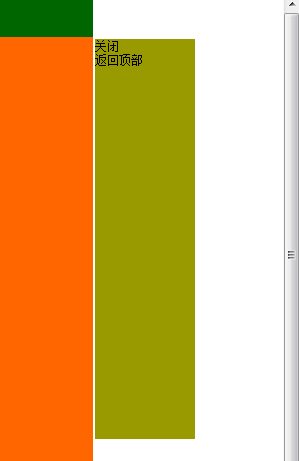
在線演示地址如下:
http://demo.jb51.net/js/2015/js-web-fixed-scroll-adv-codes/
具體代碼如下:
<!DOCTYPE html PUBLIC "-//W3C//DTD XHTML 1.0 Transitional//EN"
"http://www.w3.org/TR/xhtml1/DTD/xhtml1-transitional.dtd">
<html xmlns="http://www.w3.org/1999/xhtml">
<head>
<meta http-equiv="Content-Type" content="text/html; charset=utf-8" />
<title>隨滾動條滾動的層</title>
<style>
body{ margin:0; padding:0; font-size:12px; font-family:"宋體",Arial, Helvetica, sans-serif;}
div,p,ul,ol,li,dl,dt,dd,h1,h2,h3,h4,h5,h6,form,input,form{ margin:0; padding:0;}
h1,h2,h3,h4,h5,h6{font-size:100%;font-weight:normal;}
img{ border:0;}
ol,ul{list-style:none;}
a{ text-decoration:none; color:#fff;}
a:hover{ text-decoration:none;}
#scroll_div{ width:100px; height:400px; background:#990; }
#btn_close,#btn_gotop{ cursor:pointer;}
</style>
</head>
<body>
<div style=" width:1002px;height:42px;margin:0 auto; background-color:#060;">頭</div>
<div style="width:1002px; margin:0 auto; background-color:#f60;">
我們提供各類編程源碼、<br>素材、書籍教程、設計模板、<br>網頁特效代碼以及常用軟件下載等,<br>做有質量的<br>學習型源碼下載站。
<br>
<br>
<br>
<br>
<br>
<br>
<br>
<br>
<br>
<br>
<br>
<br>
<br>
<br>
<br>
<br>
<br>
<br>
<br>
<br>
<br>
<br>
<br>
<br>
<br>
<br>
<br>
<br>
<br>
<br>
<br>
<br>
<br>
<br>
<br>
<br>
<br>
<br>
<br>
<br>
<br>
<br>
<br>
<br>
<br>
<br>
<br>
<br>
<br>
<br>
<br>
<br>
<br>
<br>
<br>
<br>
<br>
</div>
<div style=" width:1002px;height:95px;margin:0 auto; background-color:#060;">底</div>
<div id="scroll_div">
<span id="btn_close">關閉</span><br />
<span id="btn_gotop">返回頂部</span>
</div>
<script type="text/javascript">
var Bianyuan = {
 //添加事件2(DOM-保證this指向對象是obj)
 addEvent : function(obj, type, fn){
  if (obj.attachEvent){
   obj['e'+type+fn] = fn;
   obj[type+fn] = function(){obj['e'+type+fn](window.event);}
   obj.attachEvent('on'+type, obj[type+fn]);
  }else{
   obj.addEventListener(type, fn, false);
  }
 },
 //獲取id元素
 $ : function(id){
  return document.getElementById(id);
 },
 //取得浏覽器可視區size
 getBrowserSize : function(){
  var pageWidth = window.innerWidth,
   pageHeight = window.innerHeight;
  if (typeof pageWidth != "number"){
   if (document.compatMode == "CSS1Compat"){
    pageWidth = document.documentElement.clientWidth;
    pageHeight = document.documentElement.clientHeight;
   } else{
    pageWidth = document.body.clientWidth;
    pageWidth = document.body.clientHeight;
   }
  }
  //ie減去17滾動條寬度
  if(!window.ActiveXObject){
   pageWidth -= 17;
  }
  return {
   width : pageWidth,
   height : pageHeight
  }
 },
 //獲取滾動條高度
 getPageScroll : function(){
  var yScroll;
  if (self.pageYOffset) {
   yScroll = self.pageYOffset;
  } else if (document.documentElement && document.documentElement.scrollTop){
   yScroll = document.documentElement.scrollTop;
  } else if (document.body) {
   yScroll = document.body.scrollTop;
  }
  return yScroll;
 }
}
function scrollBar(scrollId, dir, headHeight, footHeight, areaWidth, o){
 //滾動框寬高
 var scrollBar = Bianyuan.$(scrollId),
  barWidth = scrollBar.offsetWidth,
  barHeight = scrollBar.offsetHeight;
 //可視區寬高
 var pageWidth = Bianyuan.getBrowserSize().width,
  pageHeight = Bianyuan.getBrowserSize().height;
 //內容寬高
 var widthMore = document.documentElement.scrollWidth,
  heightMore = document.body.scrollHeight||(document.documentElement.scrollHeight);
 //最大寬高
 var maxWidth = Math.max(pageWidth, widthMore),
  maxHeight = Math.max(pageHeight, heightMore);
 scrollBar.style.position = 'absolute';
 //設置top--假設滾動框高度小於整個頁面高度,如果大於直接將其隱藏
 if (maxHeight < (barHeight + footHeight + footHeight + 4)){
  scrollBar.style.display = 'none';
 }else{
  //不擋頂部---如果想改距頂高度,改下邊的第一個2值
  scrollBar.style.top = Bianyuan.getPageScroll() + headHeight + 2 + 'px';
  //不擋底部
  if ((heightMore - Bianyuan.getPageScroll() - barHeight) <= footHeight){
   scrollBar.style.top = heightMore - footHeight - barHeight - 2 + 'px';
  }
 }
 //無視主體內容-左右
 if (dir == 'left' && areaWidth == 1){
  scrollBar.style.left = 2 + 'px';
 }else if (dir == 'right' && areaWidth == 1){
  scrollBar.style.left = maxWidth - barWidth - 2 + 'px';
 //根據主體內容寬-左右
 }else if (dir == 'left' && areaWidth != 1){
  if (pageWidth >= (barWidth*2 + areaWidth + 4)){
   scrollBar.style.left = (pageWidth - areaWidth)/2 - barWidth - 2 + 'px';
  }else{
   scrollBar.style.left = 2 + 'px';
  }
 }else if (dir == 'right' && areaWidth != 1){
  if (pageWidth >= (barWidth*2 + areaWidth + 4)){
   scrollBar.style.left = (pageWidth - areaWidth)/2 + areaWidth + 2 + 'px';
  }else{
   scrollBar.style.left = maxWidth - barWidth - 2 + 'px';
  }
 }
 //關閉和返回頂部
 if (o){
  if (o.btnClose){
   var closeBtn = Bianyuan.$(o.btnClose);
   Bianyuan.addEvent(closeBtn, 'click', function(){
    scrollBar.style.display = 'none';
   })
  }
  if (o.goTop){
   var gotopBtn = Bianyuan.$(o.goTop);
   Bianyuan.addEvent(gotopBtn, 'click', function(){
    document.documentElement.scrollTop = 0;
    document.body.scrollTop = 0;
   })
  }
 }
 //改變窗口大小或滾動條滾動
 resizeWindow(scrollId, dir, headHeight, footHeight, areaWidth, o);
}
function resizeWindow(scrollId, dir, headHeight, footHeight, areaWidth, o){
 window.onresize = function(){scrollBar(scrollId, dir, headHeight, footHeight, areaWidth, o);}
 window.onscroll = function(){scrollBar(scrollId, dir, headHeight, footHeight, areaWidth, o);}
}
</script>
<script type="text/javascript">
scrollBar("scroll_div", "right", 42, 95, 1002, {btnClose:"btn_close",goTop:"btn_gotop"});
</script>
</body>
</html>
希望本文所述對大家JavaScript程序設計有所幫助。
小編推薦
熱門推薦