JS基於Ajax實現的網頁Loading效果代碼
編輯:關於JavaScript
本文實例講述了JS基於Ajax實現的網頁Loading效果代碼。分享給大家供大家參考,具體如下:
這是一款很不錯的網頁Loading效果,常用於Ajax交互式網頁設計中,點擊按鈕即可彈出Loading框,若Loading框未加載完成時關閉網頁,會彈出確認提示框,用於一些對安全性能要求高的網頁交互處理中,比如付款操作。
運行效果截圖如下:
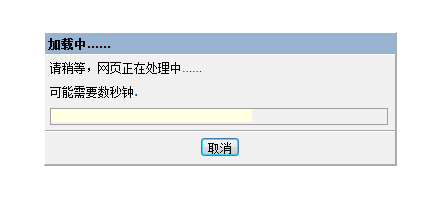
在線演示地址如下:
http://demo.jb51.net/js/2015/js-ajax-web-loading-style-codes/
具體代碼如下:
<html>
<head>
<meta http-equiv="Content-Type" content="text/html; charset=gb2312">
<title>很不錯的網頁Ajax Loading效果</title>
</head>
<BODY STYLE="FONT-SIZE: 10pt; FONT-FAMILY: Verdana, Arial, Helvetica">
<SCRIPT LANGUAGE="JScript">
var NUMBER_OF_REPETITIONS = 40;
var nRepetitions = 0;
var g_oTimer = null;
function startLongProcess()
{
  divProgressDialog.style.display = "";
  resizeModal();
  btnCancel.focus();
  window.onresize = resizeModal;
  window.onbeforeunload = showWarning;
  continueLongProcess();
}
function updateProgress(nNewPercent)
{
  divProgressInner.style.width = (parseInt(divProgressOuter.style.width)
   * nNewPercent / 100)+ "px";
}
function stopLongProcess()
{
  if (g_oTimer != null)
  {
   window.clearTimeout(g_oTimer);
   g_oTimer = null;
  }
  // Hide the fake modal DIV
  divModal.style.width = "0px";
  divModal.style.height = "0px";
  divProgressDialog.style.display = "none";
  // Remove our event handlers
  window.onresize = null;
  window.onbeforeunload = null;
  nRepetitions = 0;
}
function continueLongProcess()
{
  if (nRepetitions < NUMBER_OF_REPETITIONS)
  {
   var nTimeoutLength = Math.random() * 250;
   updateProgress(100 * nRepetitions / NUMBER_OF_REPETITIONS);
   g_oTimer = window.setTimeout("continueLongProcess();", nTimeoutLength);
   nRepetitions++;
  }
  else
  {
   stopLongProcess();
  }
}
function showWarning()
{
  return "Navigating to a different page or refreshing the window could cause you to lose precious data.\n\nAre you*absolutely* certain you want to do this?";
}
function resizeModal()
{
  divModal.style.width = document.body.scrollWidth;
  divModal.style.height = document.body.scrollHeight;
  divProgressDialog.style.left = ((document.body.offsetWidth -
divProgressDialog.offsetWidth) / 2);
  divProgressDialog.style.top = ((document.body.offsetHeight -
divProgressDialog.offsetHeight) / 2);
}
</SCRIPT>
<INPUT TYPE="BUTTON" VALUE="Click Me!" onclick="startLongProcess();">
<!-- BEGIN PROGRESS DIALOG -->
<DIV STYLE="BORDER: buttonhighlight 2px outset; FONT-SIZE: 8pt; Z-INDEX:
4; FONT-FAMILY: Tahoma; POSITION: absolute; BACKGROUND-COLOR: buttonface;
DISPLAY: none; WIDTH: 350px; CURSOR: default" ID="divProgressDialog"
onselectstart="window.event.returnValue=false;">
  <DIV STYLE="PADDING: 3px; FONT-WEIGHT: bolder; COLOR: captiontext;
BORDER-BOTTOM: white 2px groove; BACKGROUND-COLOR: activecaption">
   加載中……  </DIV>
  <DIV STYLE="PADDING: 5px">
   請稍等,網頁正在處理中……
  </DIV>
  <DIV STYLE="PADDING: 5px">
   可能需要數秒鐘.
  </DIV>
  <DIV STYLE="PADDING: 5px">
     <DIV ID="divProgressOuter" STYLE="BORDER: 1px solid threedshadow;
WIDTH: 336px; HEIGHT: 15px">
      <DIV ID="divProgressInner" STYLE="COLOR: white; TEXT-ALIGN:
center; BACKGROUND-COLOR: infobackground; MARGIN: 0px; WIDTH: 0px; HEIGHT:
13px;"></DIV>
     </DIV>
  </DIV>
  <DIV STYLE="BORDER-TOP: white 2px groove; PADDING-BOTTOM: 5px; PADDING-TOP: 3px;
BACKGROUND-COLOR: buttonface; TEXT-ALIGN: center">
     <INPUT STYLE="FONT-FAMILY: Tahoma; FONT-SIZE: 8pt" TYPE="button"
ID="btnCancel" onclick="stopLongProcess();" VALUE="取消">
  </DIV>
</DIV>
<!-- END PROGRESS DIALOG -->
<!-- BEGIN FAKE MODAL DIV-->
<DIV ID="divModal"
  STYLE="BACKGROUND-COLOR: white; FILTER: alpha(opacity=75); LEFT: 0px; POSITION:
 absolute; TOP: 0px; Z-INDEX: 3"
  onclick="window.event.cancelBubble=true; window.event.returnValue=false;">
</DIV>
<!-- END FAKE MODAL DIV -->
</body>
</html>
希望本文所述對大家JavaScript程序設計有所幫助。
小編推薦
熱門推薦