JS+CSS實現的藍色table選項卡效果
編輯:關於JavaScript
本文實例講述了JS+CSS實現的藍色table選項卡效果。分享給大家供大家參考。具體如下:
這是一款藍色的JS+Table類型的選項卡,部分標簽內容存儲在JS數組,個人感覺本特效不是太合理,因為內容從Js裡輸出會給讀取內容造成很大麻煩,這裡你就當學習一種JS編程方法,代碼是需要改進的。
先來看看運行效果截圖:
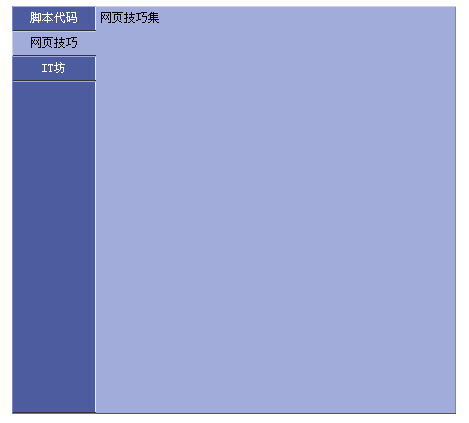
在線演示地址如下:
http://demo.jb51.net/js/2015/js-css-blue-table-style-nav-demo/
具體代碼如下:
<html>
<head>
<title>選項卡</title>
<meta http-equiv="Content-Type" content="text/html; charset=gb2312">
<style>
td,a,body{font-size:9pt;color:#000000;}
.DivAround_focus{cursor:pointer;background-color:#A1ACDB;border-right:solid 1px #A1ACDB;border-bottom:solid 1px #333333; border-left:solid 1px #C8CEEA; border-top:solid 1px #C8CEEA}
.DivAround_blur{cursor:pointer;background:#4D5C9F;border-right:solid 1px #eeeeee;border-bottom:solid 1px #333333; border-left:solid 1px #798ACC; border-top:solid 1px #A1ACDB;color:#FFFFFF}
.DivAround_content{background-color:#A1ACDB;border-right:solid 1px #888888;border-bottom:solid 1px #555555; border-left:0px; border-top:solid 1px #C8CEEA;}
</style>
</head>
<body>
<script language="javascript">
var AroundInfoArray=new Array();
AroundInfoArray[0]="腳本資源";
AroundInfoArray[1]="網頁技巧集";
AroundInfoArray[2]="IT資訊坊";
function ChangeFocus(obj)
{
for(i=0;i<document.getElementById("leftButtonTAble").rows.length;i++)
{
 if(document.getElementById("leftButtonTAble").rows[i].cells[0]==obj)
 {
  document.getElementById("leftButtonTAble").rows[i].cells[0].className="DivAround_focus";
  document.getElementById("DivAroundContent").innerHTML=AroundInfoArray[i];
 }else{
  document.getElementById("leftButtonTAble").rows[i].cells[0].className="DivAround_blur";
 }
}
}
</script>
<table cellpadding="0" cellspacing="0" border="0" align="center" bgcolor="#6271B1"><tr><td width="84" valign="top">
   <table cellpadding="0" cellspacing="0" border="0" height="407" width="84" id="leftButtonTAble">
    <tr><td height="25" align="center" class="DivAround_focus" onClick="ChangeFocus(this)">腳本代碼</td></tr>
    <tr><td height="25" align="center" class="DivAround_blur" onClick="ChangeFocus(this)">網頁技巧</td></tr>
    <tr><td height="25" align="center" class="DivAround_blur" onClick="ChangeFocus(this)">IT坊</td></tr>
    <tr><td style="border-right:solid 1px #eeeeee"> </td></tr>
   </table>
  </td><td width="360">
   <table cellpadding="0" cellspacing="0" border="0" width="100%" class="DivAround_content">
    <tr><td height="406" valign="top" style="padding:4px" id="DivAroundContent">內容</td></tr>
   </table>
  </td></tr>
  </table>
  <script language="javascript">ChangeFocus(document.getElementById("leftButtonTAble").rows[0].cells[0]);
</script>
</body>
</html>
希望本文所述對大家的JavaScript程序設計有所幫助。
小編推薦
熱門推薦