JS實現不規則TAB選項卡效果代碼
編輯:關於JavaScript
本文實例講述了JS實現不規則TAB選項卡效果代碼。分享給大家供大家參考。具體如下:
這是一款不規則TAB選項卡效果,將中規中矩的方角換成了不規則的圓角,也就是這一換,倒讓浏覽者新鮮了不少,也使選項卡增多了幾份靈感,不是嗎?
運行效果截圖如下:
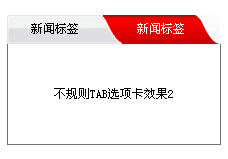
在線演示地址如下:
http://demo.jb51.net/js/2015/js-box-tab-nav-style-menu-codes/
具體代碼如下:
<html>
<head>
<meta http-equiv="Content-Type" content="text/html; charset=gb2312" />
<title>不規則TAB選項卡效果</title>
<style type="text/css">
<!--
body,td{font-size: 12px;}
.tab{margin-top:100px}
#TabCon1{width:212px;height:100px;line-height:100px;border-left:#757575 1px solid;border-bottom:#757575 1px solid;border-right:#757575 1px solid;}
#TabCon2{width:212px;height:100px;line-height:100px;border-left:#757575 1px solid;border-bottom:#757575 1px solid;border-right:#757575 1px solid;}
.xixi1{width:212px;height:29px;line-height:29px;background-image:url(images/news_bghover1.gif);cursor:pointer;}
.xixi2{width:212px;height:29px;line-height:29px;background-image:url(images/news_bghover2.gif);cursor:pointer;}
.tab1{width:96px;height:29px;line-height:29px;float:left;text-align:center;cursor:pointer; color:#FFF;}
.tab2{width:116px;height:29px;line-height:29px;float:left;text-align:center;cursor:pointer;color:#000;}
-->
</style>
</head>
<body style="text-align:center">
<script type="text/javascript">
 function setTab03Syn ( i )
 {
  selectTab03Syn(i);
 }
 function selectTab03Syn ( i )
 {
  switch(i){
   case 1:
   document.getElementById("TabCon1").style.display="block";
   document.getElementById("TabCon2").style.display="none";
   document.getElementById("font1").style.color="#ffffff";
   document.getElementById("font2").style.color="#000000";
   break;
   case 2:
   document.getElementById("TabCon1").style.display="none";
   document.getElementById("TabCon2").style.display="block";
   document.getElementById("font1").style.color="#000000";
   document.getElementById("font2").style.color="#ffffff";
   break;
  }
 }
</script>
<div class="tab">
<div id="bg" class="xixi1">
<div id="font1" class="tab1" onMouseOver="setTab03Syn(1);document.getElementById('bg').className='xixi1'">新聞標簽</div>
<div id="font2" class="tab2" onMouseOver="setTab03Syn(2);document.getElementById('bg').className='xixi2'">新聞標簽</div>
</div>
<div id="TabCon1">不規則TAB選項卡效果</div>
<div id="TabCon2" style="display:none">不規則TAB選項卡效果2</div>
</div>
</body>
</html>
希望本文所述對大家的JavaScript程序設計有所幫助。
小編推薦
熱門推薦