js實現點擊向下展開的下拉菜單效果代碼
編輯:關於JavaScript
本文實例講述了js實現點擊向下展開的下拉菜單效果代碼。分享給大家供大家參考。具體如下:
這裡介紹js實現點擊向下展開的下拉菜單特效代碼,無調用jQuery,真正的JS下拉菜單,兼容性方面未做測試,覺得有用處的自己測試修正吧,本文僅提供基礎的代碼供參考。
運行效果截圖如下:
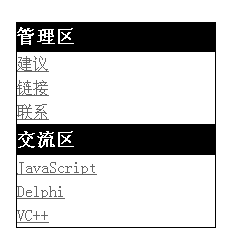
在線演示地址如下:
http://demo.jb51.net/js/2015/js-click-show-down-menu-style-codes/
具體代碼如下:
<!DOCTYPE html PUBLIC "-//W3C//DTD XHTML 1.0 Transitional//EN"
"http://www.w3.org/TR/xhtml1/DTD/xhtml1-transitional.dtd">
<html xmlns="http://www.w3.org/1999/xhtml">
<head>
<meta http-equiv="Content-Type" content="text/html; charset=utf-8" />
<title>下拉菜單</title>
<style type="text/css">
*{margin:0; padding:0}
#nav{width:200px; margin:50px}
#nav h3{ cursor:pointer; line-height:30px; height:30px; background-color:#000000; color:#fff}
#nav a{display:block; line-height:24px;color:#666666}
#nav a:hover{background-color:#eee; color:#000;}
#nav div{display:none; border:1px solid #000; border-top:none}
</style>
<script type="text/javascript">
function $(id){return document.getElementById(id)}
window.onload = function(){
 $("nav").onclick = function(e){
 var src = e?e.target:event.srcElement;
 if(src.tagName == "H3"){
  var next = src.nextElementSibling || src.nextSibling;
  next.style.display = (next.style.display =="block")?"none":"block";
 }
 }
}
</script>
</head>
<body>
<div id="nav">
 <h3>管理區</h3>
  <div>
   <a href="#">建議</a>
    <a href="#">鏈接</a>
    <a href="#">聯系</a>
  </div>
  <h3>交流區</h3>
  <div>
   <a href="#">JavaScript</a>
    <a href="#">Delphi</a>
    <a href="#">VC++</a>
  </div>
</div>
</body>
</html>
希望本文所述對大家的javascript程序設計有所幫助。
小編推薦
熱門推薦