js實現的早期滑動門菜單效果代碼
編輯:關於JavaScript
本文實例講述了js實現的早期滑動門菜單效果代碼。分享給大家供大家參考。具體如下:
這裡介紹的是傳說中的早期滑動門菜單Demo代碼,測試時請把鼠標放到左側相應的導航欄目上,放在左側菜單上的時候,你就發現玄機了,右側的內容會跟著變化,JS與HTML結合實現的,比較傳統的導航效果。
運行效果截圖如下:
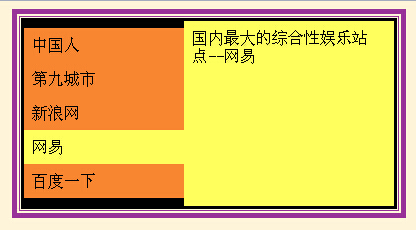
在線演示地址如下:
http://demo.jb51.net/js/2015/js-old-ver-menu-cha-codes/
具體代碼如下:
<HTML>
<HEAD>
<TITLE>文字導航效果--滑動門</TITLE>
<META http-equiv=Content-Type content="text/html; charset=gb2312">
</HEAD>
<BODY bgColor=#fef4d9>
<CENTER>
<TABLE borderColor=#993399 border=5 borderlight="green">
 <TBODY>
 <TR>
 <TD align=middle>
  <SCRIPT language=JavaScript>
<!-- Begin
var linktext=new Array()
linktext[0]='<table border="0" width="210" height="185" bgcolor="#EFEFEF" cellpadding="8" cellspacing="0"><tr><td valign="top">國內最常用的校友錄站點</td></tr></table>'
linktext[1]='<table border="0" width="210" height="185" bgcolor="#D1FD80" cellpadding="8" cellspacing="0"><tr><td valign="top">國內最大的游戲網站-第九城市</td></tr></table>'
linktext[2]='<table border="0" width="210" height="185" bgcolor="#FDB9FD" cellpadding="8" cellspacing="0"><tr><td valign="top">國內最大的新聞發布類站點-新浪網</td></tr></table>'
linktext[3]='<table border="0" width="210" height="185" bgcolor="#FFFF5E" cellpadding="8" cellspacing="0"><tr><td valign="top">國內最大的綜合性娛樂站點--網易</td></tr></table>'
linktext[4]='<table border="0" width="210" height="185" bgcolor="#C2D7FC" cellpadding="8" cellspacing="0"><tr><td valign="top">最大的搜索引擎站點...百度</td></tr></table>'
var ns6=document.getElementById&&!document.all
var ie=document.all
function show_text(thetext, whichdiv){
if (ie) eval("document.all."+whichdiv).innerHTML=linktext[thetext]
else if (ns6) document.getElementById(whichdiv).innerHTML=linktext[thetext] }
function reset(whichdiv){
if (ie) eval("document.all."+whichdiv).innerHTML='<table border="0" width="210" height="185" bgcolor="#F88530" cellpadding="0" cellspacing="8"><tr><td valign="top"><font face="arial" size="4"><b>請把鼠標放到左側相應的導航欄目上<p>有所變化</b></font></td></tr></table>'
else if (ns6) document.getElementById(whichdiv).innerHTML='<table border="0" width="210" height="185" bgcolor="#F88530" cellpadding="8" cellspacing="0"><tr><td valign="top"><font face="arial" size="4"><b>請把鼠標放到左側相應的導航欄目上<p>看到變化效果了嗎?</b></font></td></tr></table>'}
// End -->
</SCRIPT>
  <TABLE cellSpacing=0 cellPadding=3 width=370 align=center bgColor=black
  border=0>
  <TBODY>
  <TR>
   <TD>
   <TABLE cellSpacing=0 cellPadding=0 width=370 background=""
    border=0><TBODY>
    <TR>
    <TD>
     <TABLE cellSpacing=0 cellPadding=8 width=160 bgColor=#f88530
     border=0>
     <TBODY>
     <TR>
      <TD onMouseOver="bgColor='#EFEFEF'; show_text(0,'div1')"
      style="CURSOR: hand"
      onclick="window.location='http://www.chinaren.com'"
      onmouseout="bgColor='#F88530'; reset('div1')">中國人</TD></TR>
     <TR>
      <TD onMouseOver="bgColor='#D1FD80'; show_text(1,'div1')"
      style="CURSOR: hand"
      onclick="window.location='http://www.the9.com'"
      onmouseout="bgColor='#F88530'; reset('div1')">第九城市</TD></TR>
     <TR>
      <TD onMouseOver="bgColor='#FDB9FD'; show_text(2,'div1')"
      style="CURSOR: hand"
      onclick="window.location='http://www.sina.com.cn'"
      onmouseout="bgColor='#F88530'; reset('div1')">新浪網</TD></TR>
     <TR>
      <TD onMouseOver="bgColor='#FFFF5E'; show_text(3,'div1')"
      style="CURSOR: hand"
      onclick="window.location='http://www.163.com'"
      onmouseout="bgColor='#F88530'; reset('div1')">網易</TD></TR>
     <TR>
      <TD onMouseOver="bgColor='#C2D7FC'; show_text(4,'div1')"
      style="CURSOR: hand"
      onclick="window.location='http://www.baidu.com'"
      onmouseout="bgColor='#F88530'; reset('div1')">百度一下</TD></TR></TBODY></TABLE></TD>
    <TD><SPAN id=div1>
     <TABLE height=185 cellSpacing=0 cellPadding=8 width=210
     bgColor=#f88530 border=0>
     <TBODY>
     <TR>
      <TD vAlign=top><FONT face=arial
      size=4><B>請把鼠標放到左側相應的導航欄目上
 <P>有所變化</P></B></FONT></TD></TR></TBODY></TABLE></SPAN></TD></TR></TBODY></TABLE></TD></TR></TBODY></TABLE></TD></TR></TBODY></TABLE>
</CENTER>
</BODY>
</HTML>
希望本文所述對大家的javascript程序設計有所幫助。
小編推薦
熱門推薦