JS簡單實現城市二級聯動選擇插件的方法
編輯:關於JavaScript
本文實例講述了JS簡單實現城市二級聯動選擇插件的方法。分享給大家供大家參考。具體如下:
js實現的城市聯動選擇菜單,網上經常見到,不多介紹了,本款城市選擇菜單原型基於Select,主要使用JavaScript來實現,運用了數組和循環等基礎技巧制作完成的。本效果只是為了演示如何實現,裡面的數據不全,需要的自己可以添加。
運行效果截圖如下:
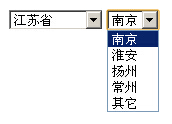
在線演示地址如下:
http://demo.jb51.net/js/2015/js-ejld-city-cha-plug-codes/
具體代碼如下:
<html>
<head>
<title>Js城市二級聯動選擇插件</title>
<script>
var citys=new Array(
new Array("南京","淮安","揚州","常州",'其它'),
new Array("北京"),
new Array("天津"),
new Array("上海"),
new Array("其它")
);
function scity(pname,cname){
var province=['江蘇省','北京','天津','上海','其它'];
document.write('<select id="pro" onchange="selectc(this)" name="'+pname+'">');
document.write('<option value="">--選擇省份--</option>')
for(var i=0;i<province.length;i++){
 document.write('<option value="'+province[i]+'">'+province[i]+'</option>');
}
document.write('</select>');
document.write('<select id="city" name="'+cname+'">');
document.write('<option value="">--選擇城市--</option>');
document.write('</select>');
selectc(document.getElementById("pro"));
}
function selectc(pobj){
  var index=pobj.selectedIndex-1;
   var cobj=document.getElementById("city");
   cobj.innerHTML='';
   if(index>=0){
   for(var i=0;i<citys[index].length;i++){
   var option=document.createElement("option");
   var text=citys[index][i];
   option.value=text;
   option.innerHTML=text;
   cobj.appendChild(option);
   }
   }else{
   var option=document.createElement("option");
   option.value="";
   option.innerHTML="--選擇城市--";
   cobj.appendChild(option);
   }
}
</script>
</head>
<body>
<script>
 scity('p','c');
</script>
</body>
</html>
希望本文所述對大家的javascript程序設計有所幫助。
小編推薦
熱門推薦