jquery實現動靜態條形統計圖
編輯:關於JavaScript
下圖為jquery實現靜態條形統計圖,在選擇題統計中用的比較多。
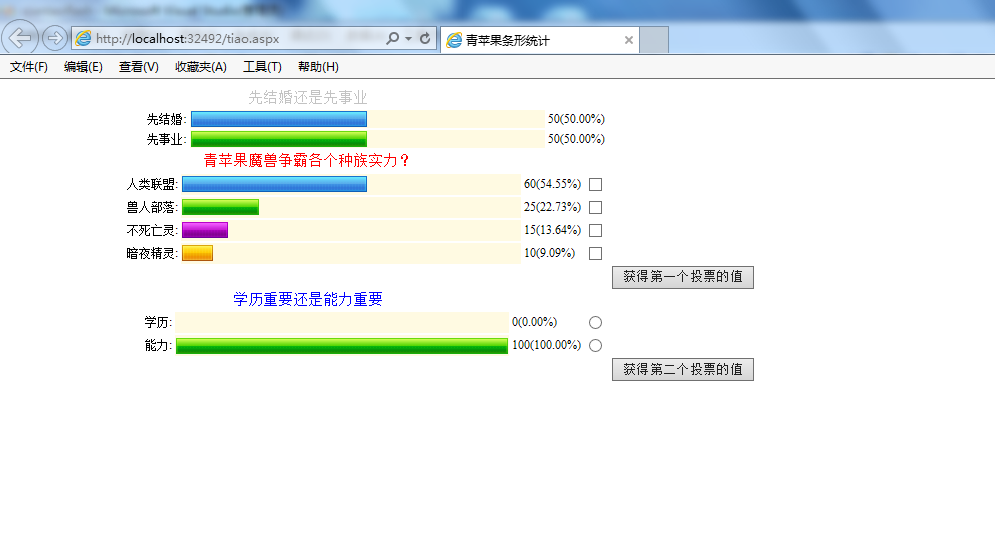
思路:前台JS實現動態數據效果,後台可以拼接字符串或者用JSON加載數據
代碼:
<%@ Page Language="C#" AutoEventWireup="true" CodeBehind="tiao.aspx.cs" Inherits="qiantaoflash.tiao" %>

<!DOCTYPE html PUBLIC "-//W3C//DTD XHTML 1.0 Transitional//EN" "http://www.w3.org/TR/xhtml1/DTD/xhtml1-transitional.dtd">

<html xmlns="http://www.w3.org/1999/xhtml" >
<head runat="server">
 <title>青蘋果條形統計</title>
 <link href="css/jQuery.spider.poll.css" rel="stylesheet" type="text/css" />
<script type="text/javascript" src="js/jquery-1.4.3.min.js"></script>
<script type="text/javascript" src="js/jQuery.spider.poll-min.js"></script>

<script type="text/javascript">
var data="{root:[{id:'10000',name:'先結婚',value:'50'},{id:'10002',name:'先事業',value:'50'}]}";
var data1="{root:[{id:'10000',name:'人類聯盟',value:'60'},{id:'10001',name:'獸人部落',value:'25'},{id:'10003',name:'不死亡靈',value:'15'},{id:'10004',name:'暗夜精靈',value:'10'}]}";
var data2="{root:[{id:'10000',name:'學歷',value:'0'},{id:'10001',name:'能力',value:'100'}]}";

$(document).ready(function (){
 $("#poll_a").poll("poll1",{
 title:'先結婚還是先事業',
 width:'600px',
 data:data
 });

 $("#poll_b").poll("poll2",{
 title:'青蘋果魔獸爭霸各個種族實力?',
 titleColor:'red',
 width:'600px',
 data:data1,
 showPoll:true,
 multiple:true
 });

 $("#poll_c").poll("poll3",{
 title:'學歷重要還是能力重要',
 titleColor:'blue',
 width:'600px',
 data:data2,
 multiple:false
 });

 $("#getPollData1").click(function (){
 $("#poll_b").getChecked().each(function (i,n){
  alert($(n).val());
 });
 });
 $("#getPollData2").click(function (){
 $("#poll_c").getChecked().each(function (i,n){
  alert($(n).val());
 });
 });
});

</script>
</head>
<body>
 <div id="poll_a"></div>
<div id="poll_b"></div>
<div style="text-align:center;"><input type="button" id="getPollData1" value="獲得第一個投票的值"/></div>
<div id="poll_c"></div>
<div style="text-align:center;"><input type="button" id="getPollData2" value="獲得第二個投票的值"/></div>
</body>
</html>
jquery實現動態的條形統計圖
代碼如下:
頁面布局如下:
<html xmlns="http://www.w3.org/1999/xhtml">
<head runat="server">
 <title></title>
 <style type="text/css">
 *
 {
  margin: 0 0 0 0;
  padding: 0 0 0 0;
 }
 .container
 {
  width: 300;
  height: 300;
  margin: 50 0 0 50;
  border: 1px solid green;
  float: left;
  background-image: url('/images/mubk.jpg');
 }
 .control
 {
  width: 280;
  height: 80;
  float: left;
  margin: 50 0 0 10;
  border: 1 solid #000000;
 }
 .item
 {
  height: 98%;
  width: 30px;
  border: 1 sollid green;
  background-color: #191970;
  display: inline-block;
  display: inline;
  margin-left: 10px;
  margin-top: 10px;
  text-align: center;
 }
 </style>
 <script src="Scripts/jquery-1.4.1.js" type="text/javascript"></script>
 <script type="text/javascript">

 $(function () {
  var timer1;
  $("#slide>div:odd").css({ 'background-color': '#308014' });
  $("#slide>div:even").css({ 'background-color': '#4169e1' });
  $("#bnt2").click(function () {
  timer1 = setInterval(initDance, 500);
  });
  $("#btn1").click(function () {
  timer1 && clearInterval(timer1);
  });

 });

 function initDance() {

  var height = parseInt(280 * Math.random()) + 5;
  var box = parseInt(7 * Math.random());
  dance(box, height);
 }

 function dance(box, height) {
  if (height) {
  $(".item").eq(box).css({ height: height });
  var obj = {};
  obj["box"] = box;
  obj["height"] = height;
  return obj;
  } else {
  return {};
  }
 }
 </script>
</head>
<body>
 <div id="slide" class="container">
 <div class="item">
  1
 </div>
 <div class="item">
  2
 </div>
 <div class="item">
  3
 </div>
 <div class="item">
  4
 </div>
 <div class="item">
  5
 </div>
 <div class="item">
  6
 </div>
 <div class="item">
  7
 </div>
 <div class="item" style="width: 1; border: 0; background-color: White">
 </div>
 </div>
 <div class="control">
 <p style="display: none; position: relative">
  這是一個段落標記</p>
 <input type="button" value="停下來" id="btn1" />
 <input type="button" value="跳起來" id="bnt2" />
 </div>
</body>
</html>
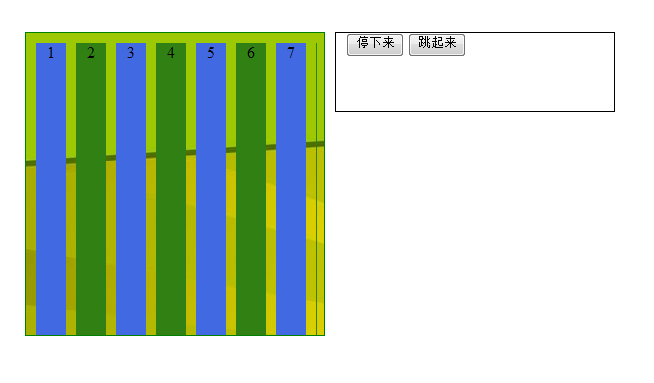
運行效果圖:
點擊跳起來按鈕效果:
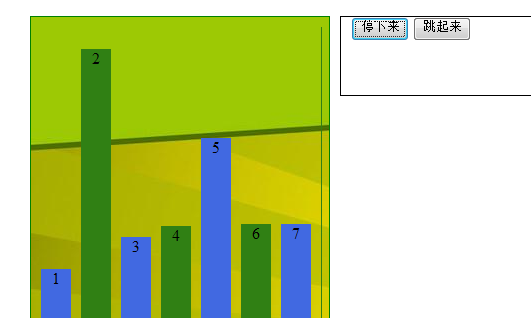
以上內容是本文給大家分享的jquery實現動靜態條形統計圖,希望大家喜歡本文內容。
小編推薦
熱門推薦