大家在做些頁面的時候,很多都是用ajax實現的,在顯示的時候有很多表單提交的add或者update操作,顯然這樣很煩,突然想到了一個比較好的方法,下面給大家分享下如何用js 實現依賴注入的思想,後端框架思想搬到前端來。
應用場景: 前後端一一對應、表單內容保存、列表陳述等。
架構思路: 分發器、依賴注入等。
基本代碼陳述:
j.extend({
 dispatcher: (function () {
  var _route = {},
   // default module
   _module = {
    // 授權
    authenticate: true,
    // 驗證
    validation: true,
    // 數據轉換
    dataTransform: true,
   },
   _state = {
    error: function () { }
   },
    _ajax = function () {
     j.ajax(this)
    }
  ;
  function _container() {
   // initializer.
   return _route;
  }
  function _configuration(config, _tmp_route) {
   if (config) {
    config.module && (_module = $.extend(_module, config.module))
    config.state && (_state = $.extend(_state, config.state))
    config.post && config.post.queryString && (function () {
     if (!/^\?/.test(config.post.queryString)) {
      _tmp_route += "?";
     }
     _tmp_route += config.post.queryString;
    })()
    config.list && (function () {
     config.list = $.extend({
      pageSize: 15,
      wrapped: $('#list-container'),
      searchForm: $('#form-post'),
      searchButton: $('#search-button'),
      post: {}
     }, config.list);
    })()
   }
   return _tmp_route;
  }
  return {
   ajax: new _container(),
   intercept: {
    module: function (module) {
     $.extend(true, _module, module);
    },
    route: function (route) {
     if (!$.isEmptyObject(_route)) return;
      $.extend(true, _route, route);
     for (var i in _route) {
      if (_route.hasOwnProperty(i)) {
       var _controller = _route[i];
       for (var k in _controller) {
        if (_controller.hasOwnProperty(k) && j.utils.isFunction(_controller[k])) {
         (function () {
          var clone = j.clone(_controller[k]), _tmp_route = '/' + i + "/" + k;
         _controller[k] = function (config) {
          var url = _configuration(config, _tmp_route);
          if (j.utils.isFunction(clone)) {
           clone.apply(_module, config);
          }
          // todo modules
          if (!(_module.authenticate && j.utils.isFunction(_module.authenticate)) && _module.authenticate() || _module.authenticate === true) {
           console.log('j.ajax.' + i + "." + k + " authenticate failed.");
           config.state.error();
           return false;
          }
          if (config.validation) {
           _module.validation.init(config.validation);
           config.validation.fireTarget.on('click', function () {
            if (!_module.validation || !config.validation.formTarget.valid())
             return false;
            var data = _module.dataTransform(!config.post.data ? config.validation.formTarget.serializeJson() : config.post.data)
            var ajax_data = {
             url: url,
             data: data,
             fireTarget: config.validation.fireTarget
            }
            ajax_data = $.extend(ajax_data, config.post);
            _ajax.call(ajax_data);
            return false;
           })
          }
          if (config.list) {
           if (!$.fn.pagination) {
            throw new Error('j.dispatcher.intercept.list need jQuery.pagination,please load jQuery.pagination before this file.')
           }
           config.list.onChange = function (pageIndex) {
            var $this = this;
            this.showLoading();
            var formData = config.list.searchForm.serializeJson();
            formData.pageIndex = pageIndex;
            formData.pageSize = $this.pageSize;
            var data = _module.dataTransform(!config.list.post.data ? formData : config.list.post.data)
            var ajax_data = {
             url: url,
             data: data,
            }
             $.extend(true, ajax_data, config.list.post);
            ajax_data.success = function () {
             $this.generateData(this.totalRecords, this.list);
            }
            j.jsonp(ajax_data)
           }
           j.list.table(config.list);
           config.list.searchButton.on('click', function () {
            config.list.wrapped.empty();
            j.list.table(config.list);
           })
          }
         }
         }())
        }
       }
      }
     }
    }
   }
  }
 })()
})
var global = {
 dataTransform: {
  "default": function () {
   if (typeof (arguments[0]) == "object" && Object.prototype.toString.call(arguments[0]).toLowerCase() == "[object object]" && !arguments[0].length) {
    return j.json.toKeyValString(arguments[0],true);
   }
   else if (j.utils.isString(arguments[0])) {
    return arguments[0];
   }
   else {
    return {};
   }
  },
  "objectData": function () {
   if (typeof (arguments[0]) == "object" && Object.prototype.toString.call(arguments[0]).toLowerCase() == "[object object]" && !arguments[0].length) {
    return { data: j.json.toString(arguments[0]) }
   }
   else if (j.utils.isString(arguments[0])) {
    return arguments[0];
   }
   else {
    return {};
   }
  }
 }
}
j.dispatcher.intercept.module({
 authenticate: function () {
 },
 validation: (function () {
  var hasCongfig = false;
  function _config() {
   if (!$.fn.validate) {
    throw new Error('j.dispatcher.intercept.module.validation need jQuery.validate,please load jQuery.validate before this file.')
   }
   jQuery.validator.addMethod("isPassword", function (value, element) {
    return j.config.reg_phone.test(value);
   }, "請輸入6-20密碼建議由數字、字母和符號組成!");
   jQuery.validator.addMethod("isMobile", function (value, element) {
    return j.config.reg_phone.test(value);
   }, "請正確填寫您的手機號碼");
   jQuery.validator.addMethod("isEamil", function (value, element) {
    return j.config.reg_email.test(value);
   }, "請填寫正確的郵箱地址");
   jQuery.validator.addMethod("isUserName", function (value, element) {
    return j.config.reg_login_name.test(value);
   }, "4-32位字符.支持漢字、字母、數字\"-\"\"_\"組合");
  }
  function _getRequired(parms, filters) {
   if (parms instanceof jQuery && parms.length > 0 && parms[0].tagName == 'FORM') {
    var config = {};
    parms.find('[name]').each(function () {
     if (!filters || filters.indexOf(this.name) == -1) {
      config[this.name] = { required: true };
     }
    })
    return config;
   }
   else {
    for (var i in parms) {
     if (parms[i]) {
      parms[i]['required'] = true;
     }
     else {
      parms[i] = { required: true };
     }
    }
    return parms;
   }
  }
  function _getMessage(parms, filters) {
   if (parms instanceof jQuery && parms.length > 0 && parms[0].tagName == 'FORM') {
    var config = {};
    parms.find('[name]').each(function () {
     if (!filters || filters.indexOf(this.name) == -1) {
      config[this.name] = { required: $(this).attr("data-required-message") };
     }
    })
    return config;
   }
  }
  function _init(config) {
   if (!hasCongfig) {
    hasCongfig = true;
    _config();
   }
   !config.formTarget && $('#form-post').length > 0 && (config.formTarget = $('#form-post'))
   !config.fireTarget && $('#post-button').length > 0 && (config.fireTarget = $('#post-button'))
   if (!(config.fireTarget && config.fireTarget instanceof jQuery && config.fireTarget[0].type.toUpperCase() == 'SUBMIT'))
    throw new Error("j.validator.init needs config.submitTarget param, its type is submit");
   if (!(config.formTarget && config.formTarget instanceof jQuery && config.formTarget[0].tagName == 'FORM'))
    throw new Error("j.validator.init needs config.formTarget param, its type is form");
   var rules = _getRequired(config.formTarget, config.filters), messages = _getMessage(config.formTarget, config.filters);
   config.rulesCallBack && config.rulesCallBack(rules);
   config.messagesCallBack && config.messagesCallBack(messages);
   config.formTarget.validate({
    debug: true,
    rules: rules,
    messages: messages
   });
  }
  return {
   init: function (config) {
    _init(config);
   },
   validate: function () {
    return config.formTarget.valid();
   }
  }
 })(),
 dataTransform: global.dataTransform.objectData
})
j.dispatcher.intercept.route({
 passport: {
  signin: function () {
   this.dataTransform = global.dataTransform.default;
  },
  signout: function () { },
  reg: function () { },
  cpwd: function () {
   this.dataTransform = global.dataTransform.default;
  }
 },
 company: {
  save: function () { },
  getList: function () { }
 },
 account: {
  save: function () { },
  saveProfile: function () { },
  getList: function () {
  }
 },
 partnership: {
  signup: function () {
  },
  getList: function () { }
 },
 venue: {
  getList: function () {
  save: function () { },
 },
 show: {
  save: function () { },
 }
});
比如list使用:
j.dispatcher.ajax.account.getList({
 list: {
  header: ['編號', '用戶名', '賬戶類型', '公司類型', '注冊時間', '最後登錄時間', '是否啟用', '操作'],
  rowField: ['AccountCode', 'AccountName', 'AccountType', 'CompanyType', 'RegisterTime', 'LastActivityTime', 'IsAvailable', function (item) {
   var html = '<a href="/account/sub?type=edit&id=' + item.Id + '" class="k-table-icon fa-edit mr15" title="編輯信息" ></a>'
      + '<a href="javascript:;" class="k-table-icon fa-trash" title="刪除賬戶" onclick="operate(this,\'delete\',{ id : \'' + item.Id + '\' })"></a>'
   ;
   return html;
  }],
  formatColumn: function (item, data) {
   if (item.IsAvailable != undefined) {
    if (item.IsAvailable == true) {
     return '<a href="javascript:;" onclick="operate(this,\'set\',{ id : \'' + data.Id + '\',isEnable : 0 })" class="k-table-icon glyphicon glyphicon-ok-circle" title="已啟用"></a>';
    }
    else
     return '<a href="javascript:;" onclick="operate(this,\'set\',{ id : \'' + data.Id + '\',isEnable : 1 })" class="k-table-icon c-error glyphicon glyphicon-ban-circle" title="已禁用"></a>';
   }
   else if (item.LastActivityTime) {
    var now = moment(item.LastActivityTime);
    return now.format('YYYY-MM-DD HH:mm:SS');
   }
   else if (item.RegisterTime) {
    var now = moment(item.RegisterTime);
    return now.format('YYYY-MM-DD HH:mm:SS');
   }
  },
  rowClick: function () {
   window.location = '/account/detail?accountName=' + encodeURIComponent(this.AccountName);
  }
 }
})
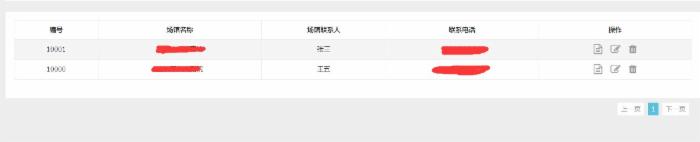
效果圖:
比如表單內容保存,那就更簡單了:
j.dispatcher.ajax.company.save({
validation: {
rulesCallBack: function (rules) {
rules.Name.remote = {
url: '/handler/validation.ashx?type=cn',
type: "post", //提交方式
data: {
CompanyName: function () {
return encodeURIComponent($("#Name").val()); //編碼數據
}
}
}
rules.ConfirmParssword.equalTo = "#Password";
rules.AccountName.remote = {
url: '/handler/validation.ashx?type=an',
type: "post", //提交方式
data: {
AccountName: function () {
return encodeURIComponent($("#AccountName").val()); //編碼數據
}
}
}
},
messagesCallBack: function (messages) {
messages.Name.remote = '該公司已經被注冊!';
messages.AccountName.remote = '該用戶名已經存在!';
messages.ConfirmParssword.equalTo = '兩次密碼不一致';
},
filters: ['Cellphone', 'Email']
},
post: {
success: function () {
alert(this.message);
window.location ='/company/list';
}
}
});
後端:後端其實很簡單類,只要有這樣分發器的實現地址就可以了,比如上面的:/company/save
PS: 前端管理框架我是用於基於bootsrap的一個後台框架.

有同學問,js什麼什麼,這個只是自己封裝的一個js庫,後續會跟大家分享
以上內容就是本文的全部敘述,希望對大家有所幫助。