JS仿淘寶搜索框用戶輸入事件的實現
編輯:關於JavaScript
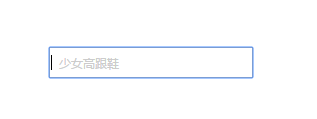
淘寶是我們經常用的一個網上購物平台,打開淘寶網首頁,找到淘寶首頁的搜索框,如下如所示:

大家可以看到,當頁面一打開,搜索框中就可以看到灰色字體“少女高跟鞋”,還有閃爍的光標。當用戶點擊輸入的時候,灰色字消失。當用戶清空文本框的所有內容的時候,灰色字自動恢復。
接下來,這個小案例就是要介紹如何實現這種效果,即用戶輸入事件。
判斷用戶輸入的事件有 oninput 和onpropertychange 。當然,想必你能想到,由於浏覽器兼容的問題,他們出現的場合有所不同。 正常浏覽器支持oninput ,而 IE6、IE7、IE8 支持的 onpropertychange 。
為了節省時間,不再模仿淘寶CSS樣式。
代碼及解析 :
<!DOCTYPE html>
<html lang="en">
<head>
  <meta charset="UTF-8">
  <title>判斷用戶輸入事件第2遍oninput 和onpropertychange 的用法</title>
</head>
 <style>
    .search {
      width:300px;
      height: 30px;
      margin: 100px auto;
      position: relative;
    }
    .search input {
      width:200px;
      height:25px;
    }
    .search label {
      font-size: 12px;
      color:#ccc;
      position: absolute;
      top:8px;
      left:10px;
      cursor: text;
    }
  </style>
  <script type="text/javascript">
  業務邏輯分析:
//      1.內容為空時,光標和默認字顯示在搜索框。自動獲取焦點
//      2.當輸入內容時,默認字消失。用oninput事件
    window.onload = function () {
      function $(id){ return document.getElementById(id);}
      $("txt").focus();//自動獲取光標方法
      $("txt").oninput = $("txt").onpropertychange = function () {
      //oninput 大部分浏覽器支持 檢測用戶表單輸入內容
      //onpropertychange ie678 檢測用戶表單輸入內容
        if ( this.value == ""){
          // 首先判斷文本框裡的值是否為空。注意用雙等號!
          $("message").style.display = "block";
        } else {
          $("message").style.display = "none";
        }
      }
    }
  </script>
<body>
<div class="search">
  <input type="text" id="txt">
  <label for="txt" id="message">仿淘寶搜索框</label>
  <!-- 注意label 中for屬性 值指向 input 的id值 ,意思是把label標簽和input表單相關聯。
  label 元素不會向用戶呈現任何特殊效果。當用戶在label元素內點擊文本, 浏覽器就會自動將焦點轉到和標簽相關聯的表單控件上。 -->
</div>
</body>
</html>
效果:
小編推薦
熱門推薦