目前在做一個java web頁面,沒有使用到框架的分頁,所以需要自己實現分頁,就想到了用angularjs來實現分頁,數據通過ajax從後台獲取。
插件
百度了一下,看到一個比較漂亮的插件,就直接用該插件,並修改了部分細節,使得適合我的項目,該插件地址是:(https://github.com/miaoyaoyao/AngularJs-UI)
效果圖

使用方法
1、在網頁的頭部引入angularjs、bootstarp以及該插件,該分頁插件主要是ng-pagination.css以及ng-pagination.js
<link rel="stylesheet" href="/nutz-test/static/bootstrap/bootstrap.min.css" rel="external nofollow" >
<link rel="stylesheet" href="/nutz-test/static/angular/ng-pagination.css" rel="external nofollow" >
<script src="/nutz-test/static/jquery/jquery.min.js"></script>
<script src="/nutz-test/static/angular/angular.min.js"></script>
<script src="/nutz-test/static/angular/ng-pagination.js"></script>
<script src="/nutz-test/static/bootstrap/bootstrap.min.js"></script>
2、表格代碼以及分頁代碼
<div id="app" ng-app="myApp" ng-controller="myCtrl">
 <div style="overflow: auto; width: 100%;">
   <table class="table table-hover table-striped table-bordered" id="j-table">
     <thead>
       <tr>
         <th>姓名</th>
         <th>年齡</th>
         <th>電話</th>
         <th>職位</th>
       </tr>
     </thead>
     <tbody>
       <tr ng-repeat="item in list">
         <th title="{{item.name}}">{{item.name}}</th>
         <th title="{{item.age}}">{{item.age}}</th>
         <th title="{{item.tel}}">{{item.tel}}</th>
         <th title="{{item.position}}">{{item.position}}</th>
       </tr>
     </tbody>
   </table>
 </div>
<!-- 這裡引用插件的分頁-->
 <div class="pager">
  <pager page-count="pageCount" current-page="currentPage" on-page-change="onPageChange()" first-text="首頁" next-text="下一頁" prev-text="上一頁" last-text="尾頁" show-goto="true" goto-text="跳轉到"></pager>
 </div>
</div>
3、javascript代碼部分
分頁的重點是從後台獲取數據,只需把pageSize(每頁顯示數目),以及pageIndex(當前頁數)通過post請求傳到後台即可。後台返回實際的數據以及pageCount(頁數)給前台即可。其中,onPageChange()方法是點擊頁碼後去通過ajax從後台獲取數據,myinit()方法是第一次請求該頁面時進行初始化。$scope.currentPage就是頁數,例如當你點擊下一頁的時候,它就會加一,然後就可以通過post請求去後台取下一頁的數據了。
<script type="text/javascript">
var app = angular.module('myApp', ['ng-pagination']);
app.controller('myCtrl', ['$scope', function ($scope) {
  $scope.onPageChange = function() {
     // ajax request to load data
     console.log($scope.currentPage);
     //這裡是post請求去後台取數據
     $.ajax({
       type:"post",
       url:'/nutz-test/show/pagination',
       data:{
         "pageSize":5,
         "pageIndex":$scope.currentPage
       },
       dataType:"json",
       success:function(data){
         $scope.$apply(function () {
           $scope.list = data.list;
           $scope.pageCount = data.pageCount;
          });

       }
     })
    };
    //初始化,設置為第一頁,每頁顯示5條
    $scope.myinit = function(){
      $.ajax({
         type:"post",
         url:'/nutz-test/show/pagination',
         data:{
           "pageSize":5,
           "pageIndex":1
         },
         dataType:"json",
         success:function(data){
           $scope.$apply(function () {
             $scope.list = data.list;
             $scope.pageCount = data.pageCount;
            });

         }
       })
    };
    $scope.myinit();
}]);
</script>
注意事項
1、該插件在只有一頁的情況會出現分頁插件加載不出來的情況,因此需要修改ng-pagination.js的代碼。
打開ng-pagination.js,定位到最後的template,修改pageCount>=1,如下圖所示。

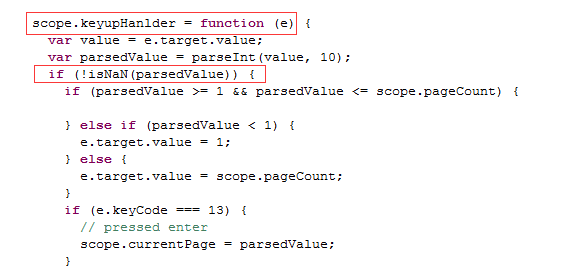
2、在ie浏覽器和360浏覽器不支持跳轉功能,原因是ie和360沒有number.isNaN()方法,因此需要修改分頁插件的該方法,改為isNaN()。
定位到ng-pagination.js的Number.isNaN()方法,把該方法修改為下圖所示。
- 上一頁:詳解vue服務端渲染(SSR)初探
- 下一頁:Web制作驗證碼功能實例代碼