輪播圖是電商與門戶頁面的標配。不依賴任何插件,用原生 JS 也能把它寫清楚。先把原理講透,再上代碼。
一、實現原理
1. 父元素作為顯示窗口,尺寸固定,超出部分隱藏,即設置 overflow:hidden。
2. 子元素用 ul 存放圖片列表,ul 定位為 absolute,父元素定位為 relative,形成定位參照。
3. 一個 li(一張圖)的寬度等於父元素的顯示寬度。
4. 初始時 ul 的 left 為 0,此時第一張圖可見。
5. 點擊「下一張」,整個 ul 左移,讓第二個 li 對齊父元素左邊框,此時 ul 的 left 等於負的一個 li 寬度。
6. 點擊「上一張」,整個 ul 右移。
7. 處理首尾循環:第一張時點上一張,跳到最後一張(left 設為負的 n-1 倍寬度);最後一張時點下一張,回到第一張(left 設為 0)。
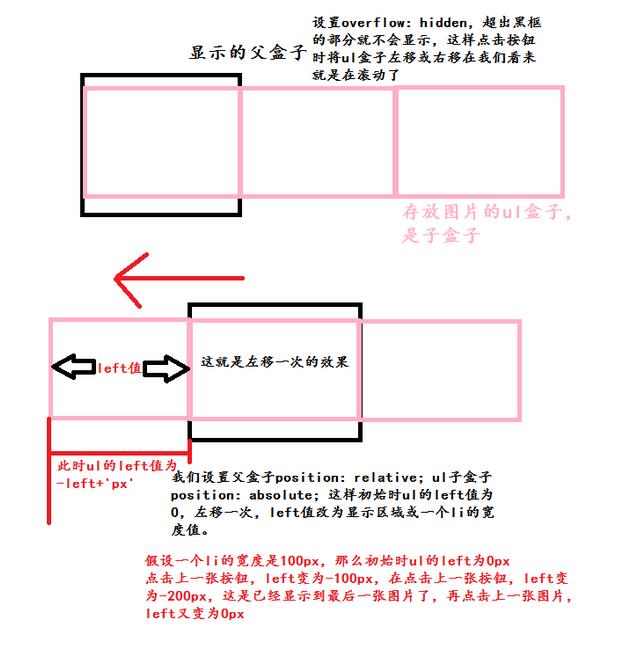
改 ul 的 left 值本身很簡單,ul.style.left=設定值 即可。但為了得到平滑的滑動效果,需要用 setInterval 做逐步遞減的動畫。
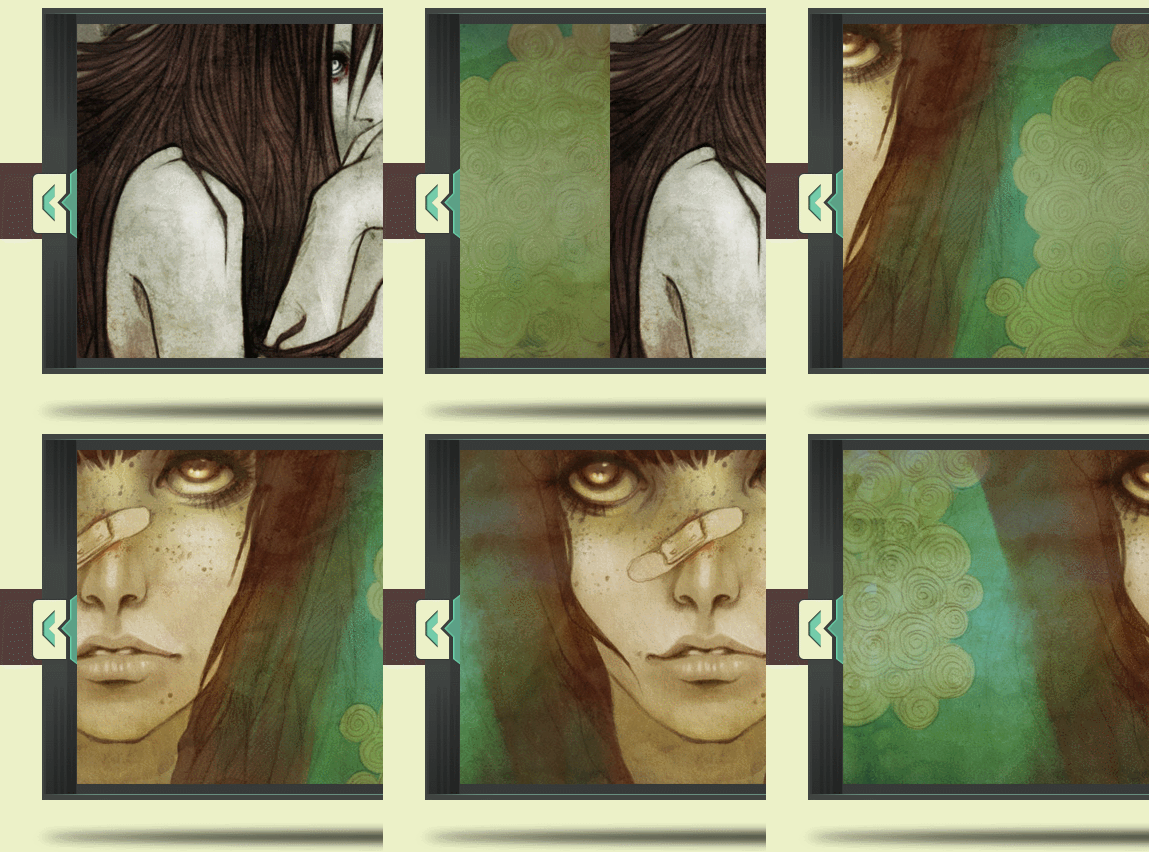
二、效果預覽
三、JavaScript 代碼
 <script>
 window.onload= function () {
 var nav=document.getElementById("nav").getElementsByTagName("li");
 var img=document.getElementById("imgList");
 var prev=document.getElementById("prev");
 var next=document.getElementById("next");
 var index=0;//當前圖片序列號
 var timer;//定時器名字
 var iSpeed=-10;//滾動的速度
 function goRoll(){
 timer=setInterval(function () {
 img.style.left=img.offsetLeft+iSpeed+'px';
 var stop=-index*870+'px';//當達到目標位置時停止定時器
 if(img.style.left==stop){
 iSpeed=-10;
 clearInterval(timer);
 }
 },10)
 }
 // 上一張和下一張點擊效果
 prev.onclick= function () {
 if(index==0){
 index=2;
 iSpeed=-20;
 }else{
 index--;
 iSpeed=10;
 }
 goRoll();
 };
 next.onclick= function () {
 if(index==2){
 index=0;
 iSpeed=20;
 }else{
 index++;
 iSpeed=-10;
 }
 goRoll();
 };
 }
 </script>
這裡的關鍵設計是 iSpeed 的正負:負值讓 ul 向左移動(看下一張),正值向右移動(看上一張)。而首尾切換時把速度加倍(±20),是為了在跳過更長距離的情況下保持相近的動畫時長,視覺節奏才不會突兀。
四、HTML 結構
 <div class="panel center-panel bc_rice">
 <div class="panel-box">
 <a class="prev-btn" id="prev"></a>
 <div class="img-box">
 <div class="list-box">
 <ul class="img-list" id="imgList">
 <li>
 <img src="img/c1.jpg"/>
 </li>
 <li>
 <img src="img/c2.jpg"/>
 </li>
 <li>
 <img src="img/c3.jpg"/>
 </li>
 </ul>
 </div>
 </div>
 <a class="next-btn" id="next"></a>
 <img class="mT20" src="img/shadow1.png"/>
 </div>
 <div class="center-line bc_brown"></div>
 </div>
注意這裡有兩層 overflow:hidden:外層 img-box 負責裁掉陰影以外的部分,內層 list-box 才是真正決定可視寬度的窗口。分層的好處是陰影、按鈕等裝飾元素可以獨立定位,不受裁切影響。
五、CSS 樣式
 .fb{font-weight:bold;}
 .c_fff{color:#fff;}
 .f24{font-size:24px;}
 .f72{font-size:72px;}
 .lh40{line-height:40px;}
 .bc_brown{background:#533d3b;}
 .bc_green{background:#74cdab;}
 .bc_rice{background:#ecf1c8;}
 .bc_beige{background:#d1d5b0;}
 .mT10{margin-top:10px;}
 .mT20{margin-top:20px;}
 .mT30{margin-top:30px;}
 .mT40{margin-top:40px;}
 .tc{text-align:center;}
 .dblock{display:block;}
 .clearfix:after{content:'';display:block;visibility:hidden;clear:both;line-height:0;font-size:0;}
 .clearfix{zoom:1;}
 html,body{width:100%;height:100%;font-size:14px;font-family:Myriad Pro;color:#433c3c;}
 div,p,a,span,ul,li,em{margin:0;padding:0;}
 ul li{list-style-type:none;}
 a:hover{cursor:pointer;}
 /*main-panel*/
 .main-panel{width:100%;min-width:1030px;margin:0 auto;}
 .main-panel .panel{width:100%;}
 .main-panel .panel .line{width:100%;height:23px;background:url('../img/line.png');}
 .main-panel .panel .panel-box{width:960px;height:100%;margin:0 auto;overflow:hidden;position:relative;}
 .center-panel{height:510px;position:relative;}
 .center-panel .panel-box{width:990px;z-index:1000;}
 .center-panel .center-line{height:76px;position:absolute;width:100%;top:200px;z-index:10;}
 .center-panel .panel-box a{width:51px;height:82px;display:block;position:absolute;top:200px;}
 .center-panel .prev-btn{background:url('../img/Button-left.png');left:0;}
 .center-panel .next-btn{background:url('../img/Button-right.png');right:0;}
 .center-panel .img-box{width:940px;height:366px;background:url('../img/shadow.png');margin-top:45px;margin-left:10px;overflow:hidden;}
 .center-panel .list-box{width:870px;height:334px;margin:16px auto;overflow:hidden;position:relative;}
 .center-panel .img-list{width:4000px;height:334px;position:absolute;left:0;}
 .center-panel .img-list li{width:870px;height:100%;float:left;}
ul 的寬度要寫成能容納所有 li 的值(這裡是 4000px),否則 float 的 li 會折行;li 寬度則必須與 list-box 的可視寬度嚴格一致(870px),這也是 JS 裡 index*870 的由來。
六、待優化的點
目前版本還有兩個明顯短板:
一是快速連續點擊會出問題。前一個動畫還沒跑完,新的 goRoll 又啟動了一個定時器,兩個定時器同時改 left 就會互相打架。修復方式是在 goRoll 開頭先 clearInterval(timer)。
二是用 img.style.left==stop 做終止條件太脆弱。浮點與字符串比較容易出現永遠不相等導致定時器停不下來,改成 Math.abs(img.offsetLeft - 目標值) < 步長 更穩健。
如果想再進一步,可以把 870 抽成變量、用 offsetWidth 動態獲取,這樣輪播就能適配任意寬度;再補上自動播放與鼠標移入暫停,一個完整可用的輪播組件就成了。