使用 Bootstrap 字體圖標時,你是否遇到過這樣的情況:引用本地 Bootstrap 文件時圖標不顯示,改用 CDN 上的 Bootstrap 卻一切正常?
比如下面這段代碼,本意是在按鈕裡放一個「√」圖標:
<!doctype html>
<html lang="en">
<head>
<meta charset="UTF-8">
<title>bootstrap字體圖標</title>
<link rel="stylesheet" href="../libs/bootstrap.css">
</head>
<body>
<div class="container">
  <button class="btn">
    <span class="glyphicon glyphicon-ok"></span>
  </button>
</div>
</body>
</html>
實際渲染出的卻是一個方框或空白:

排查過程
改用 CDN 引入後圖標正常,說明問題出在本地文件引入環節。跟蹤 .glyphicon 的樣式定義,可以看到這樣一段:
@font-face {
  font-family: 'Glyphicons Halflings';
  src: url('../fonts/glyphicons-halflings-regular.eot');
  src: url('../fonts/glyphicons-halflings-regular.eot?#iefix') format('embedded-opentype'),
       url('../fonts/glyphicons-halflings-regular.woff2') format('woff2'),
       url('../fonts/glyphicons-halflings-regular.woff') format('woff'),
       url('../fonts/glyphicons-halflings-regular.ttf') format('truetype'),
       url('../fonts/glyphicons-halflings-regular.svg#glyphicons_halflingsregular') format('svg');
}

.glyphicon {
  position: relative;
  top: 1px;
  display: inline-block;
  font-family: 'Glyphicons Halflings';
  font-style: normal;
  font-weight: normal;
  line-height: 1;
  -webkit-font-smoothing: antialiased;
  -moz-osx-font-smoothing: grayscale;
}
在 IDE 中會看到 @font-face 這一段報紅,提示找不到 glyphicons-halflings-regular.eot 等文件——這正是癥結所在:圖標本質是字體,必須關聯到 fonts 目錄下的那批字體文件才能正常顯示。
查看完整的壓縮包目錄 bootstrap-3.3.7-dist\fonts:
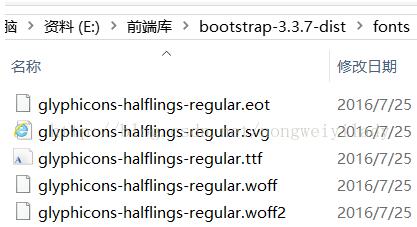
而我的 libs 目錄是這樣的:
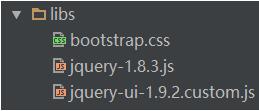
問題一目了然:只拷了一個 bootstrap.css 進來,../fonts/ 相對路徑下根本沒有字體文件。
解決辦法
平時只用 Bootstrap 的常規樣式時,單獨引入 bootstrap.css 確實夠了,這樣項目也更精簡。但一旦用到字體圖標,就必須保證在相對於 bootstrap.css 的 ../fonts/ 路徑下能找到那些字體文件。
最省事的做法是把整個 bootstrap-3.3.7-dist 目錄結構完整引進來,然後按真實路徑引用:
<link rel="stylesheet" href="../libs/bootstrap-3.3.7/css/bootstrap.css">
此時圖標即恢復正常:

當然也可以只引需要的部分,前提是把該功能相關的所有文件都放齊、目錄層級保持不變。
總結
關鍵就一句話:字體圖標的實現依賴 glyphicons 相關字體文件,引入 bootstrap.css 時必須確保它通過相對路徑能定位到這些文件。CDN 之所以一直正常,正是因為服務器上的目錄結構是完整的。遇到「CSS 引了但圖標不顯示」的情況,優先檢查字體資源的相對路徑,而不是反覆折騰 CSS 本身。