JS 實現仿 51job 多級地區選擇器(含拖拽與移動遮罩)
編輯:關於JavaScript
本文分享一個仿 51job 的地區選擇效果:多層級切換、多選、已選項實時預覽,彈窗支持鼠標拖拽並自帶半透明遮罩。
<!DOCTYPE html>
<html xmlns="https://www.w3.org/1999/xhtml">
<head>
<title>地區選擇效果</title>
<meta http-equiv="Content-Type" content="text/html; charset=utf-8" />
<style type="text/css">
BODY { font-size:12px; padding-top:50px }
h2 { padding:0; font-weight:bold; font-size:12px; margin:0 }
.cont { padding:10px }
#main { margin:0 auto; width:400px }
#selectItem { position:absolute; top:0; border:1px solid #000; margin-top:10px; z-index:2;
  background:#fff; overflow:hidden; width:400px }
#preview { border:1px solid #ccc; margin:1px }
#result { border:1px solid #ccc; margin-top:10px }
.tit { padding-left:10px; margin:1px; line-height:20px; height:20px }
.bgc_ccc { background:#ccc } .bgc_eee { background:#eee }
.c_999 { color:#999 } .pointer { cursor:pointer }
.left { float:left } .right { float:right }
.cls { clear:both; font-size:0; overflow:hidden; height:0 }
#bg { display:none; position:absolute; top:0; left:0; width:100%; z-index:1;
  background:#ccc; opacity:0.7; filter:alpha(opacity=70) }
.move { cursor:move }
</style>
</head>
<body>
<div id="main">
  <input class="pointer" onclick="openBg(1);openSelect(1)" type="button" value="請選擇" />
  <div id="result">
    <div class="bgc_eee"><h2>您已選擇的城市匯總</h2></div>
    <div id="makeSureItem"></div>
  </div>
</div>
<div id="bg"></div>
<div id="selectItem">
  <div class="bgc_ccc move" onmousedown="drag(event,this)">
    <h2><span class="right" onclick="openBg(0);openSelect(0);">[取消]</span>
       <span class="right" onclick="makeSure();">[確定]</span></h2>
  </div>
  <div id="selectSub">
    <select style="margin-bottom:10px" onchange="showSelect(this.value)">
      <option value="0" selected="selected">第0層</option>
      <option value="1">第1層</option>
      <option value="2">第2層</option>
      <option value="3">第3層</option>
    </select>
    <div id="c00">
      <input onclick="addPreItem()" type="checkbox" value="北京" />北京
      <input onclick="addPreItem()" type="checkbox" value="福建" />福建
      <input onclick="addPreItem()" type="checkbox" value="四川" />四川
    </div>
    <div id="c01">
      <input onclick="addPreItem()" type="checkbox" value="上海" />上海
      <input onclick="addPreItem()" type="checkbox" value="雲南" />雲南
    </div>
    <div id="c02">
      <input onclick="addPreItem()" type="checkbox" value="黑龍江" />黑龍江
      <input onclick="addPreItem()" type="checkbox" value="吉林" />吉林
    </div>
    <div id="c03">
      <input onclick="addPreItem()" type="checkbox" value="美國" />美國
      <input onclick="addPreItem()" type="checkbox" value="日本" />日本
    </div>
  </div>
</div>
<div id="preview">
  <div class="bgc_eee c_999"><h2>您已選擇的城市</h2></div>
  <div id="previewItem"></div>
</div>

<script type="text/javascript">
/* ------ 使用說明 ------
   添加城市方法:
   1. 找到 id 為 selectSub 的 select,添加 option,value 遞增;
   2. 在 selectSub 下按原有格式添加 div,id 遞增;
   3. 增加二級選項:複製 selectSub 下任意 input 標簽,粘貼到需要的位置。
------------------------- */
var grow = $("selectSub").getElementsByTagName("option").length; // 組數
var showGrow = 0;   // 已打開組
var items = $("selectSub").getElementsByTagName("input");

function $(o) {
  if (typeof (o) == "string") return document.getElementById(o);
  return o;
}

function openBg(state) {           // 遮罩開關
  if (state == 1) {
    $("bg").style.display = "block";
    var h = document.body.offsetHeight > document.documentElement.offsetHeight
      ? document.body.offsetHeight : document.documentElement.offsetHeight;
    $("bg").style.height = h + "px";
  } else {
    $("bg").style.display = "none";
  }
}

function openSelect(state) {       // 彈窗開關
  if (state == 1) {
    $("selectItem").style.display = "block";
    $("selectItem").style.left = ($("bg").offsetWidth - $("selectItem").offsetWidth) / 2 + "px";
    $("selectItem").style.top = document.body.scrollTop + 100 + "px";
  } else {
    $("selectItem").style.display = "none";
  }
}

function showSelect(id) {          // 切換分組
  for (var i = 0; i < grow; i++) $("c0" + i).style.display = "none";
  $("c0" + id).style.display = "block";
  showGrow = id;
}

function addPreItem() {            // 同步預覽區
  $("previewItem").innerHTML = "";
  for (var i = 0; i < items.length; i++) {
    if (items[i].checked == true) {
      $("previewItem").innerHTML +=
        "<input type='checkbox' checked='true' value='" + items[i].value +
        "' onclick='same(this);'>" + items[i].value;
    }
  }
}

function makeSure() {              // 確定,寫回結果區
  openBg(0); openSelect(0);
  copyItem("previewItem", "makeSureItem");
}

function copyItem(id1, id2) {      // 複製已勾選項
  var mes = "";
  var items2 = $(id1).getElementsByTagName("input");
  for (var i = 0; i < items2.length; i++) {
    if (items2[i].checked == true) {
      mes += "<input type='checkbox' checked='true' value='" + items2[i].value +
        "' onclick='copyItem(\"" + id2 + "\",\"" + id1 + "\");same(this);'>" + items2[i].value;
    }
  }
  $(id2).innerHTML = mes;
}

function same(ck) {                // 預覽區取消勾選時同步源列表
  for (var i = 0; i < items.length; i++) {
    if (ck.value == items[i].value) items[i].checked = ck.checked;
  }
}

/* ---- 鼠標拖動 ---- */
var oDrag = "", ox, oy, nx, ny;
function drag(e, o) {
  var e = e ? e : event;
  var mouseD = document.all ? 1 : 0;
  if (e.button == mouseD) { oDrag = o.parentNode; ox = e.clientX; oy = e.clientY; }
}
function dragPro(e) {
  if (oDrag != "") {
    var e = e ? e : event;
    var dx = parseInt($(oDrag).style.left);
    var dy = parseInt($(oDrag).style.top);
    nx = e.clientX; ny = e.clientY;
    $(oDrag).style.left = (dx + (nx - ox)) + "px";
    $(oDrag).style.top = (dy + (ny - oy)) + "px";
    ox = nx; oy = ny;
  }
}
document.onmouseup = function () { oDrag = ""; };
document.onmousemove = function (event) { dragPro(event); };
</script>
</body>
</html>
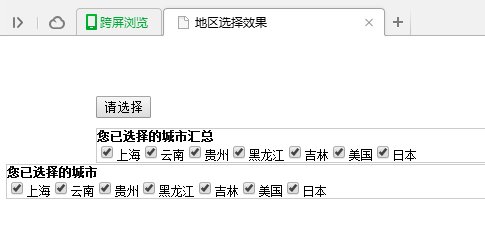
運行效果圖:
幾處實現思路說明
分組切換用 select 的 value 對應 c0N 容器的 id,一次只顯示一組,group 數量由 option 個數動態得出,後續增刪分組不必改 JS。
遮罩高度取 body 與 documentElement 中的較大值,避免內容滾動後遮罩露白。
雙向同步是這個組件的關鍵:源列表勾選會反映到預覽區,預覽區取消勾選也會通過 same() 回寫源列表,兩邊始終一致。
拖動用「當前鼠標坐標 - 上次坐標」的增量方式累加,比每次重算 offsetLeft 更穩,也不受元素初始定位方式影響。
可改進的地方:拖動初始化時最好先把 left/top 顯式設為當前 offset,否則首次拖動會有跳躍;另外這份代碼依賴 document.all 判斷鼠標左右鍵,在現代瀏覽器中建議改用 e.button 或 Pointer Events 重寫。
以上就是本文的全部內容,希望對大家的學習有所幫助。