封裝可複用的 JS 三級聯動選單(呼叫只要一行)
編輯:關於JavaScript
實務專案裡三級聯動幾乎是標配:省市區選擇、商品三級分類等等。但網路上找到的範例大多不完整,只講了思路,能不能直接用是另一回事。
這裡分享一份在工作中實際使用的封裝,特色如下:
1. 呼叫簡單,一行程式碼搞定。
2. 可選擇是否顯示「--請選擇--」項。
3. 支援回呼,三級資料載入完成後觸發。
4. 支援同一頁面放多個聯動選單。
效果預覽:

封裝原理
把 select 標籤與相關 HTML 用 JS 物件組裝起來,再依選擇結果逐層請求子資料。
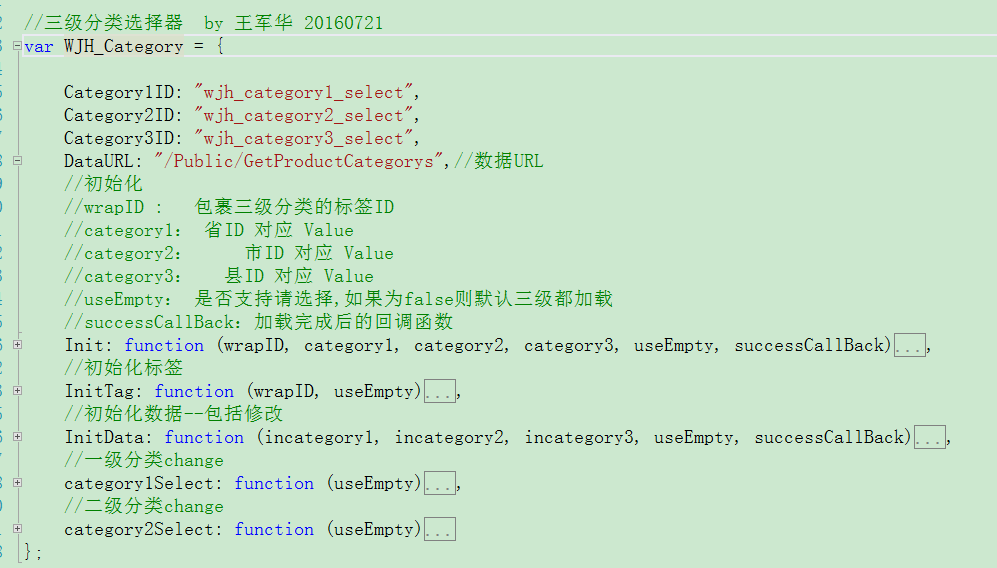
主程式碼:
//三級分類選擇器
var WJH_Category = {
    Category1ID: "wjh_category1_select",
    Category2ID: "wjh_category2_select",
    Category3ID: "wjh_category3_select",
    DataURL: "/Public/GetProductCategorys",   //資料來源

    //初始化
    // wrapID         : 包裹三級選單的容器 id
    // category1/2/3  : 一級/二級/三級的初始值(對應 Value),傳 0 表示新增模式
    // useEmpty       : 是否顯示「請選擇」
    // successCallBack: 載入完成後的回呼
    Init: function (wrapID, category1, category2, category3, useEmpty, successCallBack) {
        WJH_Category.InitTag(wrapID, useEmpty);
        WJH_Category.InitData(category1, category2, category3, useEmpty, successCallBack);
        WJH_Category.category1Select(useEmpty);
        WJH_Category.category2Select(useEmpty);
    },

    //組出三個 select 標籤
    InitTag: function (wrapID, useEmpty) {
        var tmpInit = "<span class='wjh_category1_span'>一級分類:</span>";
        tmpInit += useEmpty
            ? "<select id='" + WJH_Category.Category1ID + "' name='" + WJH_Category.Category1ID
              + "'><option value='0'>--請選擇--</option></select>"
            : "<select id='" + WJH_Category.Category1ID + "' name='" + WJH_Category.Category1ID + "'></select>";

        tmpInit += "<span class='wjh_category2_span'>二級分類:</span>";
        tmpInit += useEmpty
            ? "<select id='" + WJH_Category.Category2ID + "' name='" + WJH_Category.Category2ID
              + "'><option value='0'>--請選擇--</option></select>"
            : "<select id='" + WJH_Category.Category2ID + "' name='" + WJH_Category.Category2ID + "'></select>";

        tmpInit += "<span class='wjh_category3_span'>三級分類:</span>";
        tmpInit += useEmpty
            ? "<select id='" + WJH_Category.Category3ID + "' name='" + WJH_Category.Category3ID
              + "'><option value='0'>--請選擇--</option></select>"
            : "<select id='" + WJH_Category.Category3ID + "' name='" + WJH_Category.Category3ID + "'></select>";

        $("#" + wrapID).html(tmpInit);
    },

    //載入資料:category1 為 0 走新增模式,否則走修改模式(帶初始值)
    InitData: function (incategory1, incategory2, incategory3, useEmpty, successCallBack) {
        if (incategory1 == 0) {
            $.get(WJH_Category.DataURL, {}, function (category1) {
                var firstcategory1Guid = category1[0].Value;
                for (var i = 0; i < category1.length; i++) {
                    $("#" + WJH_Category.Category1ID).append(
                        "<option value='" + category1[i].Value + "'>" + category1[i].Display + "</option>");
                }
                if (useEmpty) { successCallBack(); return; }   //有「請選擇」就不自動往下載

                $.get(WJH_Category.DataURL, { pid: firstcategory1Guid }, function (category2) {
                    var firstcategory2Guid = category2[0].Value;
                    for (var i = 0; i < category2.length; i++) {
                        $("#" + WJH_Category.Category2ID).append(
                            "<option value='" + category2[i].Value + "'>" + category2[i].Display + "</option>");
                    }
                    $.get(WJH_Category.DataURL, { pid: firstcategory2Guid }, function (category3) {
                        for (var i = 0; i < category3.length; i++) {
                            $("#" + WJH_Category.Category3ID).append(
                                "<option value='" + category3[i].Value + "'>" + category3[i].Display + "</option>");
                        }
                        successCallBack();
                    }, "json");
                }, "json");
            }, "json");
        } else {
            //修改模式:三層都帶入初始值,命中者加 selected
            $.get(WJH_Category.DataURL, {}, function (category1) {
                for (var i = 0; i < category1.length; i++) {
                    var sel = (category1[i].Value == incategory1) ? " selected='selected'" : "";
                    $("#" + WJH_Category.Category1ID).append(
                        "<option" + sel + " value='" + category1[i].Value + "'>" + category1[i].Display + "</option>");
                }
                $.get(WJH_Category.DataURL, { pid: incategory1 }, function (category2) {
                    for (var i = 0; i < category2.length; i++) {
                        var sel = (category2[i].Value == incategory2) ? " selected='selected'" : "";
                        $("#" + WJH_Category.Category2ID).append(
                            "<option" + sel + " value='" + category2[i].Value + "'>" + category2[i].Display + "</option>");
                    }
                    $.get(WJH_Category.DataURL, { pid: incategory2 }, function (category3) {
                        for (var i = 0; i < category3.length; i++) {
                            var sel = (category3[i].Value == incategory3) ? " selected='selected'" : "";
                            $("#" + WJH_Category.Category3ID).append(
                                "<option" + sel + " value='" + category3[i].Value + "'>" + category3[i].Display + "</option>");
                        }
                        successCallBack();
                    }, "json");
                }, "json");
            }, "json");
        }
    },

    //一級改變 → 重載二級與三級
    category1Select: function (useEmpty) {
        $("#" + WJH_Category.Category1ID).change(function () {
            var optionHtml = useEmpty ? "<option value='0'>--請選擇--</option>" : "";
            $("#" + WJH_Category.Category2ID).html(optionHtml);
            $("#" + WJH_Category.Category3ID).html(optionHtml);

            var tmpSelectedcategory1 = $("#" + WJH_Category.Category1ID + " option:selected").val();
            $.get(WJH_Category.DataURL, { pid: tmpSelectedcategory1 }, function (category2) {
                var firstcategory2Guid = category2[0].Value;
                for (var i = 0; i < category2.length; i++) {
                    $("#" + WJH_Category.Category2ID).append(
                        "<option value='" + category2[i].Value + "'>" + category2[i].Display + "</option>");
                }
                if (useEmpty) { return; }
                $.get(WJH_Category.DataURL, { pid: firstcategory2Guid }, function (category3) {
                    for (var i = 0; i < category3.length; i++) {
                        $("#" + WJH_Category.Category3ID).append(
                            "<option value='" + category3[i].Value + "'>" + category3[i].Display + "</option>");
                    }
                }, "json");
            }, "json");
        });
    },

    //二級改變 → 重載三級
    category2Select: function (useEmpty) {
        $("#" + WJH_Category.Category2ID).change(function () {
            var optionHtml = useEmpty ? "<option value='0'>--請選擇--</option>" : "";
            $("#" + WJH_Category.Category3ID).html(optionHtml);

            var tmpSelectedcategory2 = $("#" + WJH_Category.Category2ID + " option:selected").val();
            $.get(WJH_Category.DataURL, { pid: tmpSelectedcategory2 }, function (category3) {
                for (var i = 0; i < category3.length; i++) {
                    $("#" + WJH_Category.Category3ID).append(
                        "<option value='" + category3[i].Value + "'>" + category3[i].Display + "</option>");
                }
            }, "json");
        });
    }
};
後端只需提供一個依 pid 過濾的介面,回傳 [{ Value, Display }] 的陣列即可。
使用方式
這個外掛依賴 jQuery,先引入 jQuery 與 product_category_select.js:
<!DOCTYPE html>
<html>
<head>
<meta name="viewport" content="width=device-width" />
<title>GetProductCategorys</title>
<script src="~/Scripts/jquery-1.10.2.js"></script>
<script src="~/Scripts/extjs/product_category_select.js"></script>
</head>
<body>
<script>
$(function () {
    //新增模式
    WJH_Category.Init("DIV1", 0, 0, 0, true);
});
</script>
<div id="DIV1"></div>
<div id="DIV2"></div>
</body>
</html>
1. 帶「請選擇」的新增模式


2. 不帶「請選擇」的新增模式


此模式下三層會自動選好第一筆,不必使用者操作。
3. 帶「請選擇」的修改模式
給三層傳入初始值即可(應用情境:修改收貨地址、修改商品所屬分類):


4. 不帶「請選擇」的修改模式


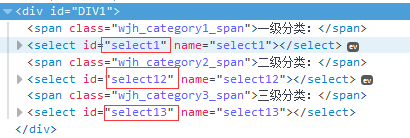
5. 自訂 select 的 name 與 id
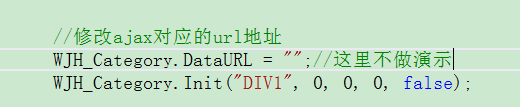
6. 自訂資料來源 URL
7. 回呼函式的用途
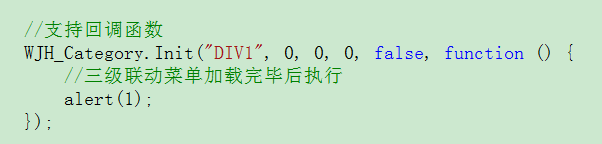
回呼最大的價值是:三級資料都就位之後才執行後續動作。例如頁面載入時就要拿選單裡的值去後端查資料,若沒有回呼,很可能在選單還空著的時候就查了。
8. 同頁多組聯動選單
上面這版用物件實作,id 是固定名稱,因此同頁只能有一組。要支援多組,得改成建構函式,讓每個實例各自持有自己的 id:
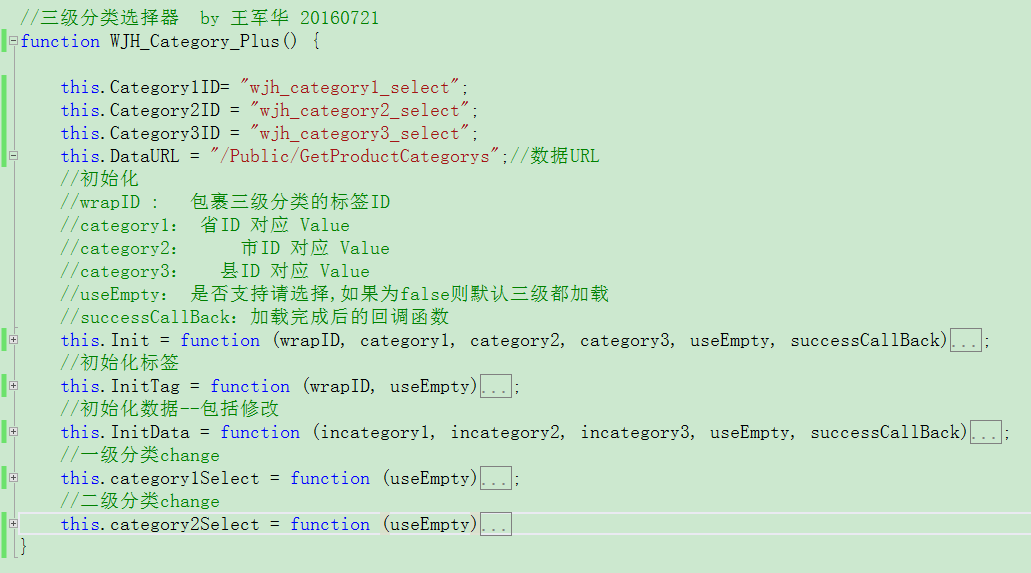
改動後的程式碼(重點是全部改用 this.XXX,並在每個方法開頭把 this 的值暫存到區域變數,避免在回呼函式中 this 指向改變):
//三級分類選擇器(支援同頁多組)
function WJH_Category_Plus() {
    this.Category1ID = "wjh_category1_select";
    this.Category2ID = "wjh_category2_select";
    this.Category3ID = "wjh_category3_select";
    this.DataURL = "/Public/GetProductCategorys";

    this.Init = function (wrapID, category1, category2, category3, useEmpty, successCallBack) {
        this.InitTag(wrapID, useEmpty);
        this.InitData(category1, category2, category3, useEmpty, successCallBack);
        this.category1Select(useEmpty);
        this.category2Select(useEmpty);
    };

    this.InitTag = function (wrapID, useEmpty) {
        //組出三個 select,邏輯同上一版,此處省略重複的 HTML 拼接
        $("#" + wrapID).html(tmpInit);
    };

    this.InitData = function (incategory1, incategory2, incategory3, useEmpty, successCallBack) {
        //關鍵:先把 this 的屬性存成區域變數,回呼內才能正確取用
        var c1 = this.Category1ID;
        var c2 = this.Category2ID;
        var c3 = this.Category3ID;
        var dataUrl = this.DataURL;

        if (incategory1 == 0) {
            $.get(dataUrl, {}, function (category1) {
                var firstcategory1Guid = category1[0].Value;
                for (var i = 0; i < category1.length; i++) {
                    $("#" + c1).append("<option value='" + category1[i].Value + "'>"
                        + category1[i].Display + "</option>");
                }
                if (useEmpty) { successCallBack(); return; }
                $.get(dataUrl, { pid: firstcategory1Guid }, function (category2) {
                    var firstcategory2Guid = category2[0].Value;
                    for (var i = 0; i < category2.length; i++) {
                        $("#" + c2).append("<option value='" + category2[i].Value + "'>"
                            + category2[i].Display + "</option>");
                    }
                    $.get(dataUrl, { pid: firstcategory2Guid }, function (category3) {
                        for (var i = 0; i < category3.length; i++) {
                            $("#" + c3).append("<option value='" + category3[i].Value + "'>"
                                + category3[i].Display + "</option>");
                        }
                        successCallBack();
                    }, "json");
                }, "json");
            }, "json");
        } else {
            $.get(dataUrl, {}, function (category1) {
                for (var i = 0; i < category1.length; i++) {
                    var sel = (category1[i].Value == incategory1) ? " selected='selected'" : "";
                    $("#" + c1).append("<option" + sel + " value='" + category1[i].Value + "'>"
                        + category1[i].Display + "</option>");
                }
                $.get(dataUrl, { pid: incategory1 }, function (category2) {
                    for (var i = 0; i < category2.length; i++) {
                        var sel = (category2[i].Value == incategory2) ? " selected='selected'" : "";
                        $("#" + c2).append("<option" + sel + " value='" + category2[i].Value + "'>"
                            + category2[i].Display + "</option>");
                    }
                    $.get(dataUrl, { pid: incategory2 }, function (category3) {
                        for (var i = 0; i < category3.length; i++) {
                            var sel = (category3[i].Value == incategory3) ? " selected='selected'" : "";
                            $("#" + c3).append("<option" + sel + " value='" + category3[i].Value + "'>"
                                + category3[i].Display + "</option>");
                        }
                        successCallBack();
                    }, "json");
                }, "json");
            }, "json");
        }
    };

    this.category1Select = function (useEmpty) {
        var c1 = this.Category1ID, c2 = this.Category2ID, c3 = this.Category3ID;
        var dataUrl = this.DataURL;
        $("#" + c1).change(function () {
            var optionHtml = useEmpty ? "<option value='0'>--請選擇--</option>" : "";
            $("#" + c2).html(optionHtml);
            $("#" + c3).html(optionHtml);
            var tmpSelectedcategory1 = $("#" + c1 + " option:selected").val();
            $.get(dataUrl, { pid: tmpSelectedcategory1 }, function (category2) {
                var firstcategory2Guid = category2[0].Value;
                for (var i = 0; i < category2.length; i++) {
                    $("#" + c2).append("<option value='" + category2[i].Value + "'>"
                        + category2[i].Display + "</option>");
                }
                if (useEmpty) { return; }
                $.get(dataUrl, { pid: firstcategory2Guid }, function (category3) {
                    for (var i = 0; i < category3.length; i++) {
                        $("#" + c3).append("<option value='" + category3[i].Value + "'>"
                            + category3[i].Display + "</option>");
                    }
                }, "json");
            }, "json");
        });
    };

    this.category2Select = function (useEmpty) {
        var c1 = this.Category1ID, c2 = this.Category2ID, c3 = this.Category3ID;
        var dataUrl = this.DataURL;
        $("#" + c2).change(function () {
            var optionHtml = useEmpty ? "<option value='0'>--請選擇--</option>" : "";
            $("#" + c3).html(optionHtml);
            var tmpSelectedcategory2 = $("#" + c2 + " option:selected").val();
            $.get(dataUrl, { pid: tmpSelectedcategory2 }, function (category3) {
                for (var i = 0; i < category3.length; i++) {
                    $("#" + c3).append("<option value='" + category3[i].Value + "'>"
                        + category3[i].Display + "</option>");
                }
            }, "json");
        });
    }
}
使用時多一個 new,並各自指定不同的 id:
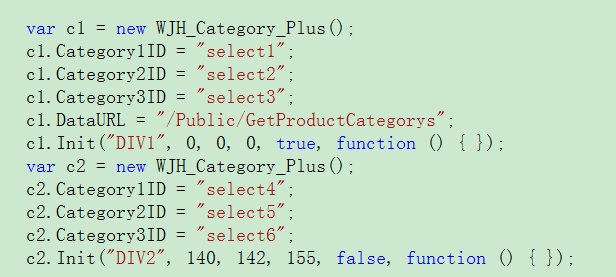

要注意的是:同頁多組時,每組的三個 select 一定要各自換名,否則 id 衝突會互相干擾。
以上就是這個三級聯動選單封裝的分享,若有錯誤或更好的做法,歡迎留言指正。