Bootstrap Table 使用經驗總結(含後端整合與事件處理)
編輯:關於JavaScript
本文整理實際專案中使用 Bootstrap Table 的一些經驗,涵蓋 jQuery 的 $.map 用法、後端資料格式整合,以及表格事件與方法的呼叫方式。
$.map 的用途
在使用 bootstrap table 時,若想從當前行資料中只取出 id 等特定欄位,$.map 非常好用。它能遍歷陣列,並依回傳的計算方式組裝出一個全新陣列:
var b = $.map( [55,1,2], function( item,index ) { return { "label": item, "value": index } }); alert(b[0].label +" "+ b[0].value); // 輸出 55 0後端資料格式整合
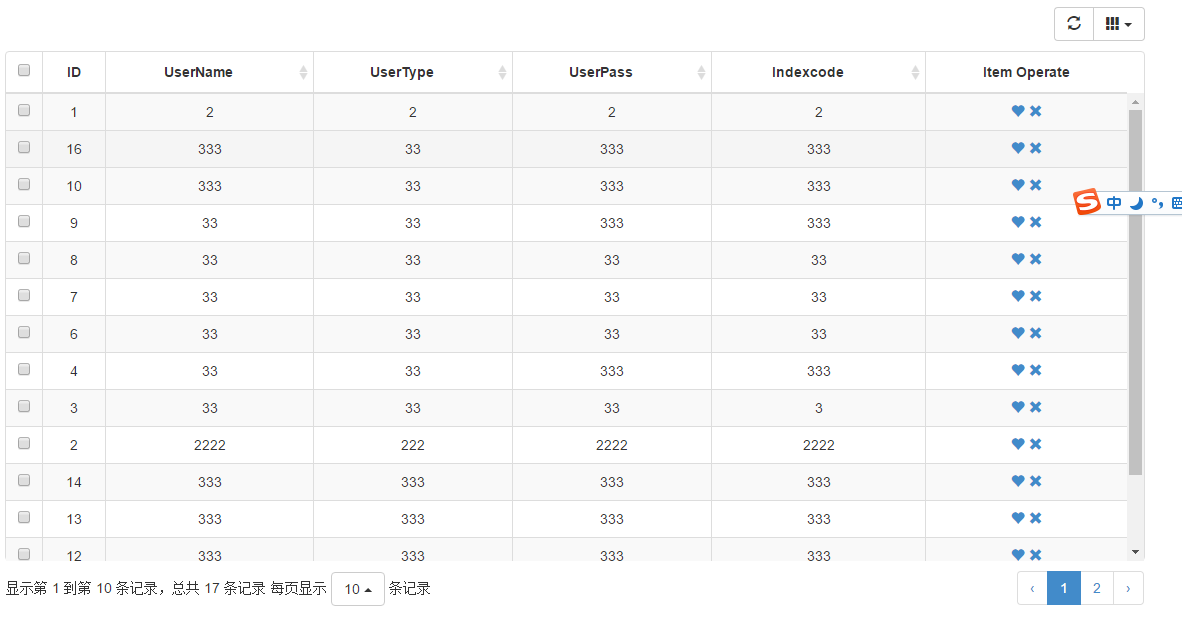
後端(此例使用 SpringMVC)回傳的資料格式若與 Bootstrap Table 預設不同,可透過統一的外層結構來組織,方便前端處理:
{ "success": true, "message": null, "data": { "pageSize": 15, "rows": [ { "userName": "333", "userType": 333, "password": "333", "id": 11, "indexcode": "333" } ], "total": 17, "totalPage": 2, "page": 0 } }前端頁面只需在容器中放一個 table,並透過 data-url 指定後端請求路徑即可:
<div class="container"> <table id="table" data-url="/cms/UserInfo/userInfoPage"></table> </div>
初始化設定與事件
function initTable() { $table.bootstrapTable({ striped: true, //表格顯示條紋 pagination: true, //啟動分頁 pageSize: 15, //每頁顯示的記錄數 pageNumber:1, //當前第幾頁 pageList: [10, 15, 20, 25], //記錄數可選列表 search: false, //是否啟用查詢 showColumns: true, //顯示下拉框勾選要顯示的列 showRefresh: true, //顯示刷新按鈕 sidePagination: "server", //表示服務端請求 responseHandler:function(res){ //遠程數據加載之前,處理程序響應數據格式 return res.data; }, queryParamsType : "undefined", queryParams: function queryParams(params) { //設置查詢參數 var param = { pageNo: params.pageNumber, pageSize: params.pageSize }; return param; }, onLoadSuccess: function(data){ alert("加載成功"+data); }, columns: [ { field: 'state', checkbox: true }, { title: 'ID', field: 'id' }, { field: 'userName', title: 'UserName', sortable: true, footerFormatter: totalNameFormatter }, { field: 'operate', title: 'Item Operate', events: operateEvents, formatter: operateFormatter } ] }); }其中 formatter 用來處理欄位顯示,footerFormatter 則處理表格底部的彙總顯示。若想在一個單元格外放多個操作按鈕,可以這樣寫:
function operateFormatter(value, row, index) { return [ '<a class="like" href="javascript:void(0)" title="Like">', '<i class="glyphicon glyphicon-heart"></i>', '</a> ', '<a class="remove" href="javascript:void(0)" title="Remove">', '<i class="glyphicon glyphicon-remove"></i>', '</a>' ].join(''); }再搭配事件綁定,就能針對這些按鈕做對應處理:
window.operateEvents = { 'click .like': function (e, value, row, index) { alert('You click like action, row: ' + JSON.stringify(row)); }, 'click .remove': function (e, value, row, index) { $table.bootstrapTable('remove', { field: 'id', values: [row.id] }); } };至於取得選取列、全選、刪除等方法,則透過 $('#table').bootstrapTable('method', parameter) 呼叫,例如 getSelections 取得勾選列、remove 刪除資料等。掌握這些設定與事件,就能靈活打造功能完整的資料表格。
以上就是 Bootstrap Table 的使用經驗總結,希望對大家有所幫助。
- 上一篇文章: JavaScript 中常見的型別與物件檢測方法總結
- 下一篇文章: 用 JS 與 HTML5 Canvas 實作手機刮刮樂