看完一支 AngularJS 教學影片後,主題是如何做出一個 TODO List 形式的 SPA(單頁面應用)。為了加深理解,這裡把整個流程重新實作並記錄下來。
準備:引入 AngularJS
所謂「下載」,其實只要能讓頁面載入到 AngularJS 即可。
CDN 加速
<script src="https://code.angularjs.org/angular-1.0.1.min.js"></script>
npm 方式
用 Node 的套件管理工具也很快,兩步搞定。先進入專案目錄:
•安裝:npm install angular
•頁面中引入:
<!-- src 路徑依實際情況調整 -->
<script src="node_modules/angular/angular.js"></script>
常規方式就是手動下載檔案再自行引入,較繁瑣,這裡不展開。
準備:Bootstrap
作為近幾年最流行、現代化的前端框架之一,Bootstrap 的佈局能力能省下大量樣式工作。
知識儲備
MVC 架構
AngularJS 核心採用 MVC,事件驅動。理解不到位的地方,歡迎指正。
ng-app
它是整個單頁面的「大管家」,app 即 application。一般來說 ng-app 應作為 ng-controller 的父容器來嵌套,否則可能得不到預期結果。
ng-controller
控制器是頁面的左右手,把邏輯集中管理,降低模組間的耦合,讓程式碼更規範。
ng-model
模型綁定,通常與頁面元素雙向連動,實現無刷新更新。
ng-click
宣告了這個屬性的元素就具備點擊能力,具體呼叫哪個函式,取決於它所在容器對應的控制器。
完整程式碼
main.js
 (function (window) {
 // 註冊應用主模組
 var todoapp = window.angular.module('todoapp', []);
 // 註冊控制器
 todoapp.controller('maincontroller', ['$scope', function ($scope) {
 // $scope 負責往視圖中暴露資料
 $scope.text = ''; // 雙向綁定的輸入值
 // 為了展示效果,先手動塞兩筆資料
 $scope.todolist = [
 { text: 'Angularjs', done: false },
 { text: 'Bootstrap', done: false }
 ];
 // 新增
 $scope.add = function () {
 var text = $scope.text.trim();
 if (text) {
 $scope.todolist.push({ text: text, done: false });
 $scope.text = '';
 }
 };
 // 刪除
 $scope.delete = function (todo) {
 var index = $scope.todolist.indexOf(todo);
 $scope.todolist.splice(index, 1);
 };
 // 已完成數量:因為頁面是動態變化的,所以用函式而非固定值
 $scope.doneCount = function () {
 var temp = $scope.todolist.filter(function (item) {
 return item.done; // 回傳 true 代表已完成
 });
 return temp.length;
 };
 }]);
})(window)
todolist.html
<!DOCTYPE html>
<html>
<head>
<meta charset="utf-8">
<title>Angularjs 整合 Bootstrap 實現任務清單</title>
<link href="https://apps.bdimg.com/libs/bootstrap/3.3.0/css/bootstrap.min.css" rel="stylesheet">
<style>
.container { max-width: 720px; }
.done { color: #cca; }
.checkbox { margin-right: 12px; margin-bottom: 0; }
.done > .checkbox > label > span { text-decoration: line-through; }
</style>
<script src="node_modules/angular/angular.js"></script>
<script src="myjs/app.js"></script>
</head>
<body>
<div class="container" ng-app="todoapp">
<header>
<h1 class="display-3">TODO LIST</h1>
<hr>
</header>
<section ng-controller="maincontroller">
<form class="input-group input-group-lg">
<input type="text" class="form-control" ng-model="text" name="">
<span class="input-group-btn">
<button class="btn btn-secondary" ng-click="add()">Add</button>
</span>
</form>
<ul class="list-group" style="padding:12px;">
<li class="list-group-item" ng-class="{'done':item.done}" ng-repeat="item in todolist">
<button type="button" class="close" aria-label="close" ng-click="delete(item)">
<span aria-hidden="true">×</span>
<span class="sr-only">Close</span>
</button>
<div class="checkbox">
<label>
<input type="checkbox" ng-model="item.done">
<span>{{item.text }}</span>
</label>
</div>
</li>
</ul>
<p>總共 <strong>{{todolist.length }}</strong> 個任務,已完成 <strong>{{doneCount()}}</strong> 個</p>
</section>
</div>
</body>
</html>
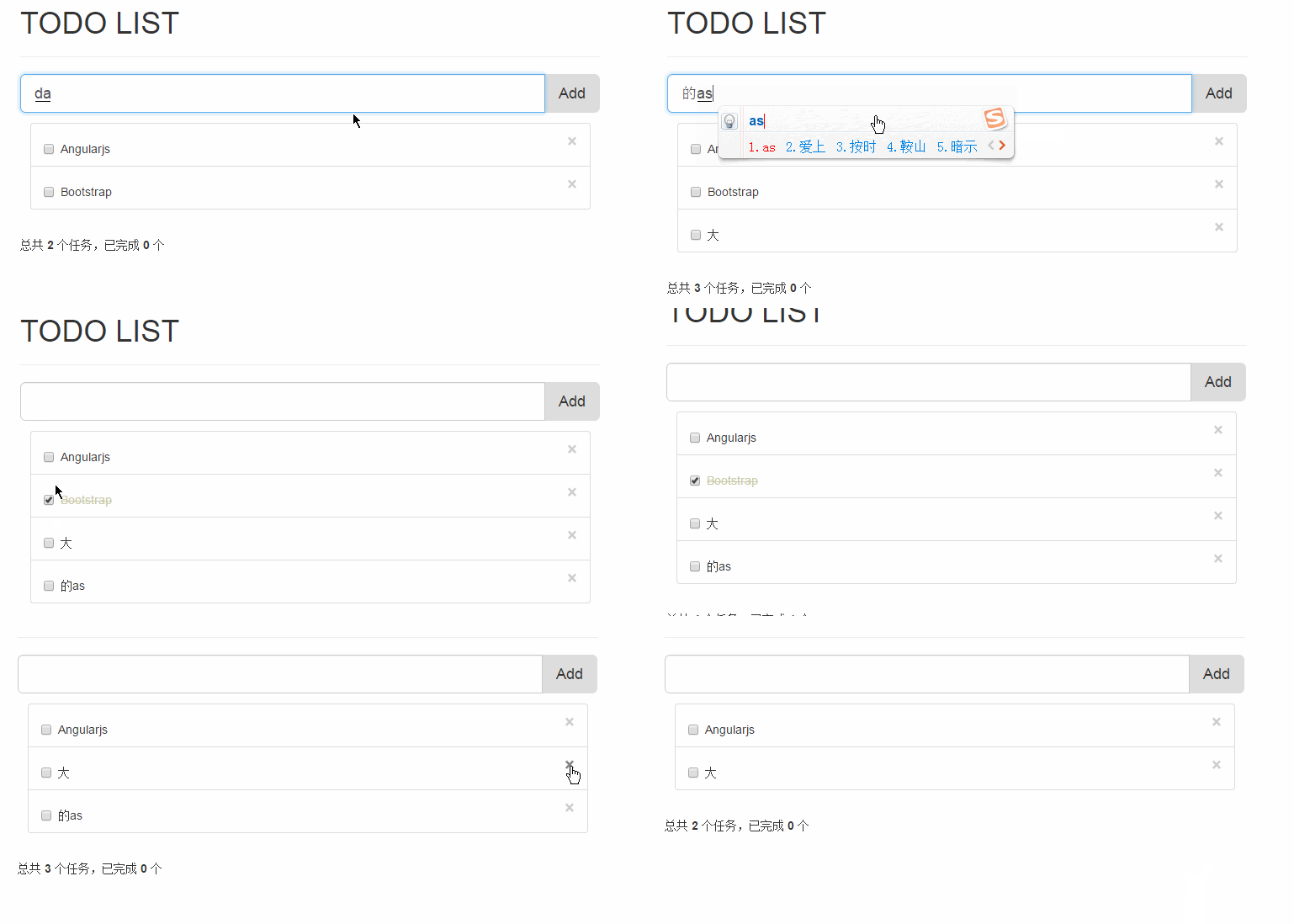
頁面效果
程式碼詳解
最外層包一層 IIFE,可以隔絕命名空間,避免污染全域。
 (function (window) {
 // do something
})(window)
注意最後的 (window) 不可省略。
建立應用與控制器
 var todoapp = window.angular.module('todoapp', []);
todoapp.controller('maincontroller', ['$scope', function ($scope) {
 $scope.text = '';
 $scope.todolist = [{ text: 'Angularjs', done: false }, { text: 'Bootstrap', done: false }];
}]);
功能函式
 $scope.add = function () {
 var text = $scope.text.trim();
 if (text) { $scope.todolist.push({ text: text, done: false }); $scope.text = ''; }
}
$scope.delete = function (todo) {
 var index = $scope.todolist.indexOf(todo);
 $scope.todolist.splice(index, 1);
}
$scope.doneCount = function () {
 return $scope.todolist.filter(function (item) { return item.done; }).length;
}
總結
程式碼量很少,但把雙向綁定、依賴注入、ng-repeat、ng-class 這些 AngularJS 的核心觀念都串起來了。想繼續深入的話,建議接著看 Bootstrap 的元件與外掛相關教學,把樣式層面也補齊。
相關文章
-
後台郵箱頁面實作:修改、批量刪除、排序與分頁整合示例 用 AngularJS 動手做一個互動式工資計算器 AngularJS ng-repeat 遍歷輸出的用法與內建變數說明 AngularJS ng-click 傳參的正確寫法與常見錯誤 AngularJS 動態插入的 HTML 中 ng-click 失效怎麼辦?用 $compile 解決 深入理解 AngularJS:scope 的髒檢查機制(一) AngularJS + Bootstrap 自製分頁元件實例 AngularJS 自訂指令與控制器之間的資料傳遞 AngularJS 下拉選單渲染 HTML 的三種做法 在 Bootstrap 專案中以 Vue.js 取代 jQuery