15 格數字拼圖是練習前端框架的好題目:規則單純,卻同時用到陣列操作、事件處理、條件渲染與響應式資料更新。以下用 Vue 完整實作一遍。
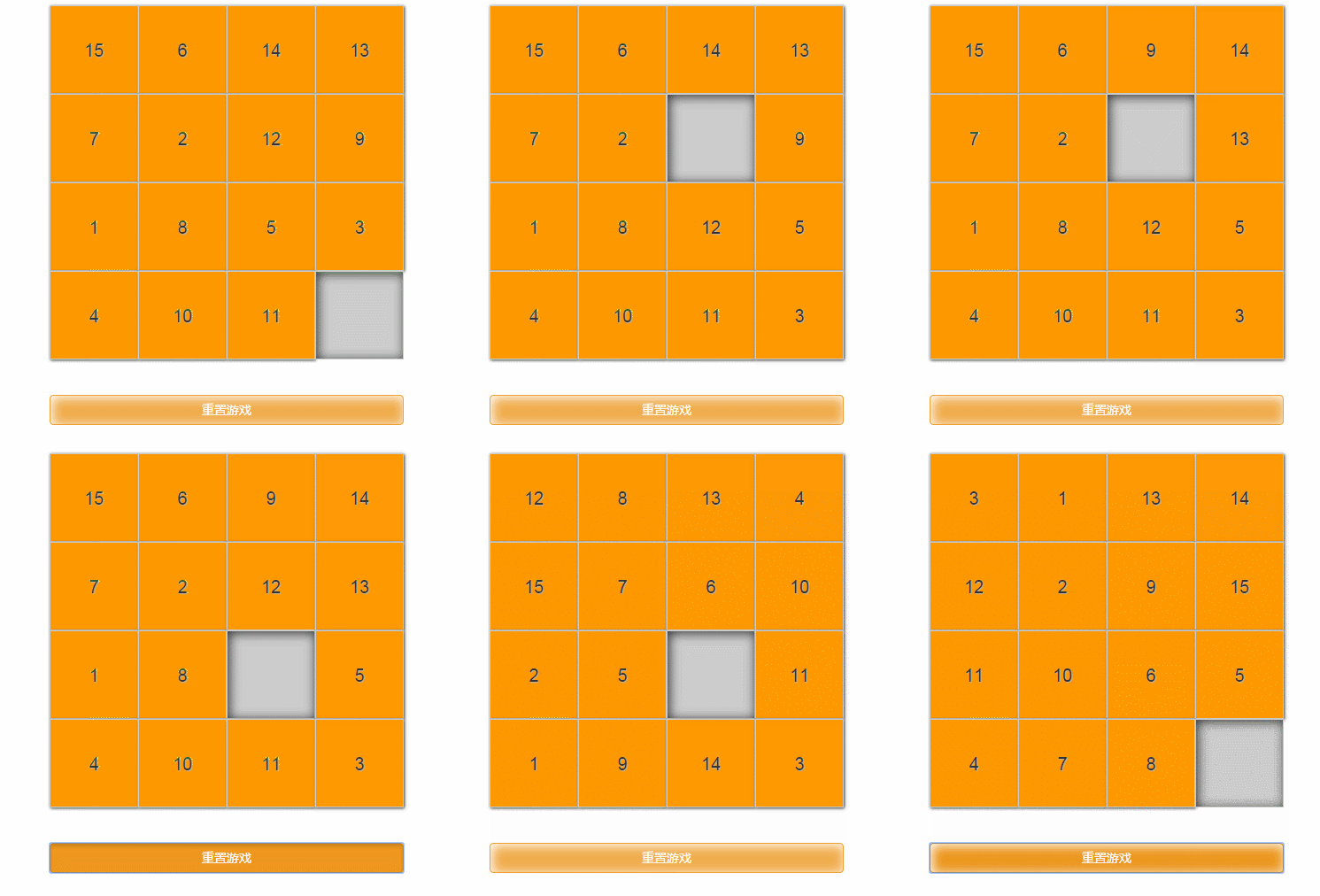
功能拆解
動手之前先把需求列清楚:
- 隨機產生 1~15 的數字格,每個數字出現且僅出現一次,另有一格空白
- 點擊某個數字方塊時,若其上下左右有一格為空,兩者交換位置
- 每次移動後檢查是否已完成通關
- 按下「重置遊戲」重新洗牌
完整程式碼
<template>
  <div class="box">
    <ul class="puzzle-wrap">
      <li :class="{'puzzle': true, 'puzzle-empty': !puzzle}"
          v-for="(puzzle, index) in puzzles"
          :key="index"
          v-text="puzzle"
          @click="moveFn(index)"></li>
    </ul>
    <button class="btn btn-warning btn-block btn-reset" @click="render">重置遊戲</button>
  </div>
</template>

<script>
export default {
  data () {
    return { puzzles: [] }
  },
  methods: {
    // 產生並隨機排序棋盤
    render () {
      const puzzleArr = [];
      for (let i = 1; i < 16; i++) puzzleArr.push(i);

      // 隨機打亂(Fisher–Yates 較均勻,sort 版實務夠用)
      puzzleArr.sort(() => Math.random() - 0.5);

      // 最後一格留空
      this.puzzles = puzzleArr.concat('');
    },

    // 點擊方塊:與空白格交換
    moveFn (index) {
      const cur = this.puzzles[index];
      if (cur === '') return;   // 點到空白不需動作

      const left   = this.puzzles[index - 1];
      const right  = this.puzzles[index + 1];
      const top    = this.puzzles[index - 4];
      const bottom = this.puzzles[index + 4];

      if (left === '') {
        this.puzzles.$set(index - 1, cur);
        this.puzzles.$set(index, '');
      } else if (right === '') {
        this.puzzles.$set(index + 1, cur);
        this.puzzles.$set(index, '');
      } else if (top === '') {
        this.puzzles.$set(index - 4, cur);
        this.puzzles.$set(index, '');
      } else if (bottom === '') {
        this.puzzles.$set(index + 4, cur);
        this.puzzles.$set(index, '');
      } else {
        return;   // 四周都沒有空白,點了也不動
      }
      this.passFn();
    },

    // 通關檢核
    passFn () {
      if (this.puzzles[15] === '') {
        const first15 = this.puzzles.slice(0, 15);
        const isPass = first15.every((e, i) => e === i + 1);
        if (isPass) alert('恭喜,闖關成功!');
      }
    }
  },
  ready () {
    this.render()
  }
}
</script>

<style>
@import url('./assets/css/bootstrap.min.css');
body { font-family: Arial, "Microsoft JhengHei"; }
.box { width: 400px; margin: 50px auto 0; }
.puzzle-wrap {
  width: 400px; height: 400px; margin-bottom: 40px;
  padding: 0; background: #ccc; list-style: none;
}
.puzzle {
  float: left; width: 100px; height: 100px; font-size: 20px;
  background: #f90; text-align: center; line-height: 100px;
  border: 1px solid #ccc; box-shadow: 1px 1px 4px;
  text-shadow: 1px 1px 1px #B9B4B4; cursor: pointer;
}
.puzzle-empty { background: #ccc; box-shadow: inset 2px 2px 18px; }
.btn-reset { box-shadow: inset 2px 2px 18px; }
</style>
幾個技術要點
1. 為什麼要用 $set?Vue 2 基於 Object.defineProperty 實作響應式,無法偵測「直接用索引指定元素」與「修改陣列長度」這兩種變更。所以 this.puzzles[0] = x 不會觸發畫面更新,必須改用 this.puzzles.$set(0, x)。若使用 Vue 3,Proxy 已能正確攔截索引賦值,直接寫 this.puzzles[index] = cur 即可。
2. sort 隨機的均勻性問題。Math.random() - 0.5 作為比較函式並非均勻分佈,元素多時偏差明顯。要更公平可改用 Fisher–Yates;不過對遊戲來說,重點其實是產生的盤面必須可解——隨機洗牌有一半機率會產生無解的盤面,實務做法是從「已完成狀態」反向走 n 步合法移動來產生初始盤面,保證一定有解。
3. 邊界判斷的漏洞。用 index - 1 判斷左邊時,index 為 0 會取到 undefined、index 為 4 會取到上一列的最後一格(視覺上不是「左邊」)。嚴謹寫法要加上列別判斷:
const row = Math.floor(index / 4);
const col = index % 4;

if (col > 0 && this.puzzles[index - 1] === '') { /* 左 */ }
if (col < 3 && this.puzzles[index + 1] === '') { /* 右 */ }
if (row > 0 && this.puzzles[index - 4] === '') { /* 上 */ }
if (row < 3 && this.puzzles[index + 4] === '') { /* 下 */ }
4. slice 與 every 的組合。slice(0, 15) 取前 15 格產生新陣列(不影響原資料),every 則是「全部符合才回傳 true」,正好對應「每一格都等於 index + 1」的通關條件,比寫 for 迴圈宣告旗標乾淨。
5. ready 與 mounted。 Vue 2 用 ready、Vue 3 已改名為 mounted,查範例時注意版本,否則會遇到「程式寫了卻沒執行」的窘境。
這個遊戲程式碼量不大,但寫一遍能實際體會 Vue 資料驅動的精神:我們只負責改 puzzles 陣列,畫面怎麼更新交給框架。反過來說,棋盤邏輯(可解性、移動合法性)仍要自己想清楚,框架不會替你處理規則。