上一篇把 ko + bootstrapTable 的增刪改查封裝了一遍,確實省下了大量 js 代碼。但既然模式是固定的,那能不能連頁面都讓工具生成,一句代碼都不用寫?MVC 本身「添加視圖」時能自動產出增刪改查頁面,靠的就是 T4 模板。順著這條線研究下去,就有了這篇文章。
一、T4 模板在哪裡
MVC 內置的增刪改查模板用的就是 T4 語法,但不同版本的存放路徑差別不小:
- MVC4 及以下:VS 安裝目錄 +
\ItemTemplates\CSharp\Web\MVC 2\CodeTemplates,例如D:\Program Files (x86)\Microsoft Visual Studio 12.0\Common7\IDE\ItemTemplates\CSharp\Web\MVC 4\CodeTemplates。找到 cshtml 對應目錄,裡面就是各個 tt 文件。
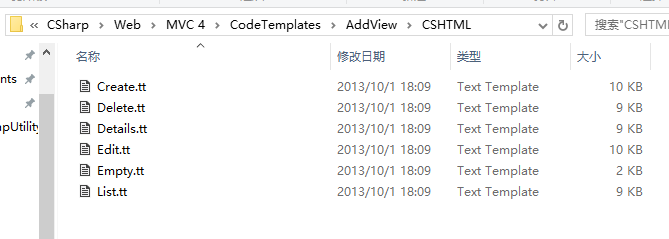
- MVC5 及以上:
D:\Program Files (x86)\Microsoft Visual Studio 12.0\Common7\IDE\Extensions\Microsoft\Web\Mvc\Scaffolding\Templates。
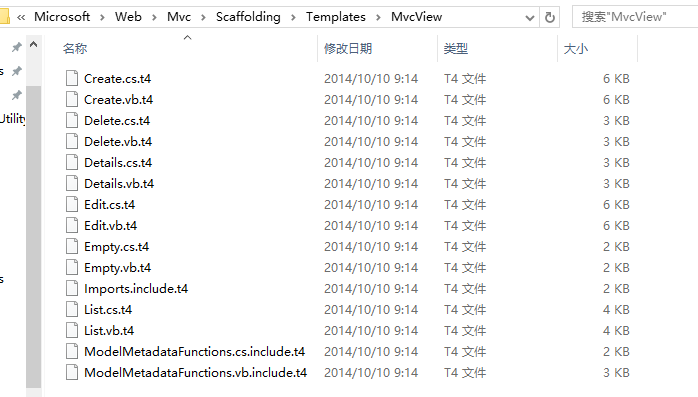
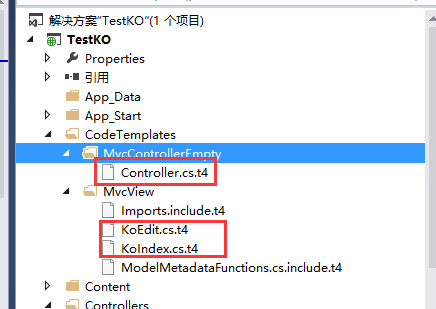
可以直接把 List、Edit 模板拷出來改,但更乾淨的做法是不動內置文件,自己建一套。在 Web 項目根目錄新建 CodeTemplates 文件夾,把 MvcControllerEmpty 與 MvcView 兩個文件夾拷進去,清空原始模板後放入自己的 t4 文件:
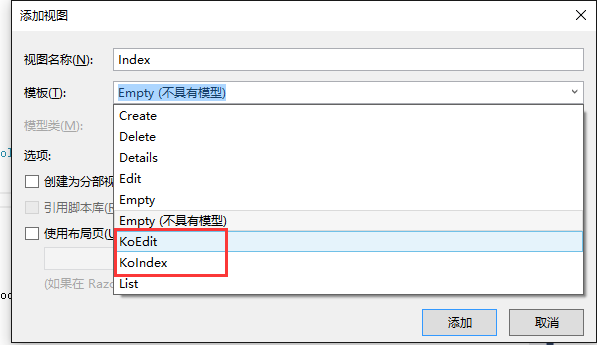
之後添加控制器或視圖時,下拉列表裡就能看到自定義模板:
二、三個核心模板
T4 語法展開講能寫一整篇,這裡直接看模板內容。順帶一提,MVC5 之後模板後綴統一改成了 t4,早期是 tt,語法差異不大。
1. Controller.cs.t4
重寫空控制器模板的理由很簡單:增刪改查的固定方法每次都要手敲實在沒必要。
<#@ template language="C#" HostSpecific="True" #>
<#@ output extension="cs" #>
<#@ parameter type="System.String" name="ControllerName" #>
<#@ parameter type="System.String" name="ControllerRootName" #>
<#@ parameter type="System.String" name="Namespace" #>
<#@ parameter type="System.String" name="AreaName" #>
<# var index = ControllerName.LastIndexOf("Controller");
   var ModelName = ControllerName.Substring(0, index); #>
using System;
using System.Collections.Generic;
using System.Linq;
using System.Web;
using System.Web.Mvc;
using TestKO.Models;

namespace <#= Namespace #>
{
    public class <#= ControllerName #> : Controller
    {
        public ActionResult Index()
        {
            return View();
        }

        public ActionResult Edit(<#= ModelName #> model)
        {
            return View(model);
        }

        [HttpGet]
        public JsonResult Get(int limit, int offset)
        {
            return Json(new { }, JsonRequestBehavior.AllowGet);
        }

        //新增實體
        [HttpPost]
        public JsonResult Add(<#= ModelName #> oData)
        {
            <#= ModelName #>Model.Add(oData);
            return Json(new { }, JsonRequestBehavior.AllowGet);
        }

        //更新實體
        [HttpPost]
        public JsonResult Update(<#= ModelName #> oData)
        {
            <#= ModelName #>Model.Update(oData);
            return Json(new { }, JsonRequestBehavior.AllowGet);
        }

        //刪除實體
        [HttpPost]
        public JsonResult Delete(List<<#= ModelName #>> oData)
        {
            <#= ModelName #>Model.Delete(oData);
            return Json(new { }, JsonRequestBehavior.AllowGet);
        }
    }
}
生成的 UserController 就是常規形態:
using System;
using System.Collections.Generic;
using System.Linq;
using System.Web;
using System.Web.Mvc;
using TestKO.Models;

namespace TestKO.Controllers
{
    public class UserController : Controller
    {
        public ActionResult Index()
        {
            return View();
        }

        public ActionResult Edit(User model)
        {
            return View(model);
        }

        [HttpGet]
        public JsonResult Get(int limit, int offset)
        {
            return Json(new { }, JsonRequestBehavior.AllowGet);
        }

        [HttpPost]
        public JsonResult Add(User oData)
        {
            UserModel.Add(oData);
            return Json(new { }, JsonRequestBehavior.AllowGet);
        }

        [HttpPost]
        public JsonResult Update(User oData)
        {
            UserModel.Update(oData);
            return Json(new { }, JsonRequestBehavior.AllowGet);
        }

        [HttpPost]
        public JsonResult Delete(List<User> oData)
        {
            UserModel.Delete(oData);
            return Json(new { }, JsonRequestBehavior.AllowGet);
        }
    }
}
2. KoIndex.cs.t4
列表頁模板。這裡把上一篇的 ViewModel 直接搬到頁面上,從此不必再從 controller 傳:
<#@ template language="C#" HostSpecific="True" #>
<#@ output extension=".cshtml" #>
<#@ include file="Imports.include.t4" #>
<# if(IsPartialView) { #>
<# } else if(IsLayoutPageSelected) { #>
@{
    ViewBag.Title = "<#= ViewName#>";
<# if (!String.IsNullOrEmpty(LayoutPageFile)) { #>
    Layout = "<#= LayoutPageFile#>";
<# } #>
}
<# } else { #>
@{
    Layout = null;
}
<!DOCTYPE html>
<html>
<head>
<meta name="viewport" content="width=device-width" />
<title><#= ViewName #></title>
<link href="~/Content/bootstrap/css/bootstrap.min.css" rel="stylesheet" />
<link href="~/Content/bootstrap-table/bootstrap-table.min.css" rel="stylesheet" />
<script src="~/scripts/jquery-1.9.1.min.js"></script>
<script src="~/Content/bootstrap/js/bootstrap.min.js"></script>
<script src="~/Content/bootstrap-table/bootstrap-table.min.js"></script>
<script src="~/Content/bootstrap-table/locale/bootstrap-table-zh-CN.js"></script>
<script src="~/scripts/knockout/knockout-3.4.0.min.js"></script>
<script src="~/scripts/knockout/extensions/knockout.mapping-latest.js"></script>
<script src="~/scripts/extensions/knockout.index.js"></script>
<script src="~/scripts/extensions/knockout.bootstraptable.js"></script>
<script type="text/javascript">
$(function () {
    var viewModel = {
        bindId: "div_index",
        tableParams : {
            url : "/<#=ViewDataTypeShortName#>/Get",
            pageSize : 2,
        },
        urls : {
            del  : "/<#=ViewDataTypeShortName#>/Delete",
            edit : "/<#=ViewDataTypeShortName#>/Edit",
            add  : "/<#=ViewDataTypeShortName#>/Edit",
        },
        queryCondition : { }
    };
    ko.bindingViewModel(viewModel);
});
</script>
</head>
<body>
<# PushIndent(" "); } #>
<div id="toolbar">
  <button data-bind="click:addClick" type="button" class="btn btn-default">
    <span class="glyphicon glyphicon-plus"></span>新增
  </button>
  <button data-bind="click:editClick" type="button" class="btn btn-default">
    <span class="glyphicon glyphicon-pencil"></span>修改
  </button>
  <button data-bind="click:deleteClick" type="button" class="btn btn-default">
    <span class="glyphicon glyphicon-remove"></span>刪除
  </button>
</div>
<table data-bind="bootstrapTable:bootstrapTable">
  <thead>
    <tr>
      <th data-checkbox="true"></th>
<# IEnumerable<PropertyMetadata> properties = ModelMetadata.Properties;
   foreach (PropertyMetadata property in properties) {
       if (property.Scaffold && !property.IsPrimaryKey && !property.IsForeignKey) { #>
      <th data-field="<#= GetValueExpression(property) #>"><#= GetValueExpression(property) #></th>
<#   }
   }#>
    </tr>
  </thead>
</table>
<# if(!IsPartialView && !IsLayoutPageSelected) { ClearIndent(); #>
</body>
</html>
<# } #>
<#@ include file="ModelMetadataFunctions.cs.include.t4" #>
添加 Index 視圖並選擇該模板:
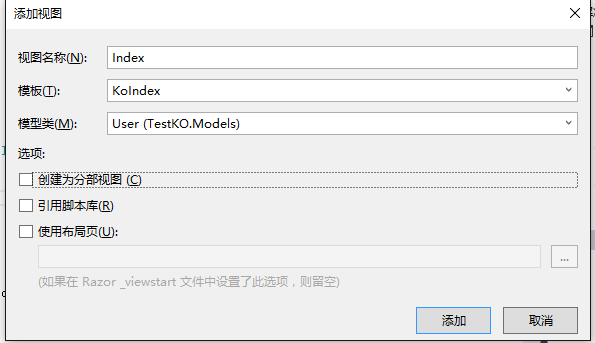
產出的頁面:
@{
    Layout = null;
}
<!DOCTYPE html>
<html>
<head>
<meta name="viewport" content="width=device-width" />
<title>Index</title>
<link href="~/Content/bootstrap/css/bootstrap.min.css" rel="stylesheet" />
<link href="~/Content/bootstrap-table/bootstrap-table.min.css" rel="stylesheet" />
<script src="~/scripts/jquery-1.9.1.min.js"></script>
<script src="~/Content/bootstrap/js/bootstrap.min.js"></script>
<script src="~/Content/bootstrap-table/bootstrap-table.min.js"></script>
<script src="~/Content/bootstrap-table/locale/bootstrap-table-zh-CN.js"></script>
<script src="~/scripts/knockout/knockout-3.4.0.min.js"></script>
<script src="~/scripts/knockout/extensions/knockout.mapping-latest.js"></script>
<script src="~/scripts/extensions/knockout.index.js"></script>
<script src="~/scripts/extensions/knockout.bootstraptable.js"></script>
<script type="text/javascript">
$(function () {
    var viewModel = {
        bindId: "div_index",
        tableParams : {
            url : "/User/Get",
            pageSize : 2,
        },
        urls : {
            del  : "/User/Delete",
            edit : "/User/Edit",
            add  : "/User/Edit",
        },
        queryCondition : { }
    };
    ko.bindingViewModel(viewModel);
});
</script>
</head>
<body>
<div id="toolbar">
  <button data-bind="click:addClick" type="button" class="btn btn-default">
    <span class="glyphicon glyphicon-plus"></span>新增
  </button>
  <button data-bind="click:editClick" type="button" class="btn btn-default">
    <span class="glyphicon glyphicon-pencil"></span>修改
  </button>
  <button data-bind="click:deleteClick" type="button" class="btn btn-default">
    <span class="glyphicon glyphicon-remove"></span>刪除
  </button>
</div>
<table data-bind="bootstrapTable:bootstrapTable">
  <thead>
    <tr>
      <th data-checkbox="true"></th>
      <th data-field="Name">Name</th>
      <th data-field="FullName">FullName</th>
      <th data-field="Age">Age</th>
      <th data-field="Des">Des</th>
      <th data-field="Createtime">Createtime</th>
      <th data-field="strCreatetime">strCreatetime</th>
    </tr>
  </thead>
</table>
</body>
</html>
稍改一下列名就能跑起來。目前仍有兩處可以加強:查詢條件尚未生成,可以通過字段特性標記哪些屬性需要參與查詢;表頭中文名稱同樣可以由特性驅動,而不是直接輸出屬性名。
3. KoEdit.cs.t4
<#@ template language="C#" HostSpecific="True" #>
<#@ output extension=".cshtml" #>
<#@ include file="Imports.include.t4" #>
@model <#= ViewDataTypeName #>
<# string boolType = "System.Boolean";
   Version requiredMvcVersion = new Version("5.1.0.0");
   bool isControlHtmlAttributesSupported = MvcVersion >= requiredMvcVersion;
   if(IsPartialView) { #>
<# } else if(IsLayoutPageSelected) { #>
@{
    ViewBag.Title = "<#= ViewName#>";
<# if (!String.IsNullOrEmpty(LayoutPageFile)) { #>
    Layout = "<#= LayoutPageFile#>";
<# } #>
}
<h2><#= ViewName#></h2>
<# } else { #>
@{
    Layout = null;
}
<!DOCTYPE html>
<html>
<head>
<meta name="viewport" content="width=device-width" />
<title><#= ViewName #></title>
</head>
<body>
<# PushIndent(" "); } #>
<form id="formEdit" class="form-horizontal">
@Html.HiddenFor(model => model.Id)
<div class="modal-body">
<# IEnumerable<PropertyMetadata> properties = ModelMetadata.Properties;
   foreach (PropertyMetadata property in properties) {
       if (property.Scaffold && !property.IsPrimaryKey && !property.IsForeignKey) { #>
  <div class="form-group">
    @Html.LabelFor(model => model.<#= GetValueExpression(property) #>, "<#= GetValueExpression(property) #>", new { @class = "control-label col-xs-2" })
    <div class="col-xs-10">
      @Html.TextBoxFor(model => model.<#= GetValueExpression(property) #>, new { @class = "form-control", data_bind = "value:editModel.<#= GetValueExpression(property) #>" })
    </div>
  </div>
<#   }
   } #>
</div>
<div class="modal-footer">
  <button type="button" class="btn btn-default" data-dismiss="modal"><span class="glyphicon glyphicon-remove"></span>關閉</button>
  <button type="submit" class="btn btn-primary"><span class="glyphicon glyphicon-floppy-disk"></span>保存</button>
</div>
</form>
<# var index = ViewDataTypeName.LastIndexOf(".");
   var ModelName = ViewDataTypeName.Substring(index + 1, ViewDataTypeName.Length - index - 1); #>
<script src="~/Scripts/extensions/knockout.edit.js"></script>
<script type="text/javascript">
$(function () {
    var model = @Html.Raw(Newtonsoft.Json.JsonConvert.SerializeObject(Model));
    var viewModel = {
        formId: "formEdit",
        editModel : model,
        urls : {
            submit : model.id == 0 ? "/<#= ModelName #>/Add" : "/<#= ModelName #>/Update"
        },
        validator: {
            fields: {
                Name: { validators: { notEmpty: { message: '名稱不能為空!' } } }
            }
        }
    };
    ko.bindingEditViewModel(viewModel);
});
</script>
<# if(!IsPartialView && !IsLayoutPageSelected) { ClearIndent(); #>
</body>
</html>
<# } #>
<#@ include file="ModelMetadataFunctions.cs.include.t4" #>
生成的 Edit.cshtml:
@model TestKO.Models.User
<form id="formEdit" class="form-horizontal">
@Html.HiddenFor(model => model.Id)
<div class="modal-body">
  <div class="form-group">
    @Html.LabelFor(model => model.Name, "Name", new { @class = "control-label col-xs-2" })
    <div class="col-xs-10">
      @Html.TextBoxFor(model => model.Name, new { @class = "form-control", data_bind = "value:editModel.Name" })
    </div>
  </div>
  <div class="form-group">
    @Html.LabelFor(model => model.FullName, "FullName", new { @class = "control-label col-xs-2" })
    <div class="col-xs-10">
      @Html.TextBoxFor(model => model.FullName, new { @class = "form-control", data_bind = "value:editModel.FullName" })
    </div>
  </div>
  <div class="form-group">
    @Html.LabelFor(model => model.Age, "Age", new { @class = "control-label col-xs-2" })
    <div class="col-xs-10">
      @Html.TextBoxFor(model => model.Age, new { @class = "form-control", data_bind = "value:editModel.Age" })
    </div>
  </div>
  <div class="form-group">
    @Html.LabelFor(model => model.Des, "Des", new { @class = "control-label col-xs-2" })
    <div class="col-xs-10">
      @Html.TextBoxFor(model => model.Des, new { @class = "form-control", data_bind = "value:editModel.Des" })
    </div>
  </div>
  <div class="form-group">
    @Html.LabelFor(model => model.Createtime, "Createtime", new { @class = "control-label col-xs-2" })
    <div class="col-xs-10">
      @Html.TextBoxFor(model => model.Createtime, new { @class = "form-control", data_bind = "value:editModel.Createtime" })
    </div>
  </div>
  <div class="form-group">
    @Html.LabelFor(model => model.strCreatetime, "strCreatetime", new { @class = "control-label col-xs-2" })
    <div class="col-xs-10">
      @Html.TextBoxFor(model => model.strCreatetime, new { @class = "form-control", data_bind = "value:editModel.strCreatetime" })
    </div>
  </div>
</div>
<div class="modal-footer">
  <button type="button" class="btn btn-default" data-dismiss="modal"><span class="glyphicon glyphicon-remove"></span>關閉</button>
  <button type="submit" class="btn btn-primary"><span class="glyphicon glyphicon-floppy-disk"></span>保存</button>
</div>
</form>
<script src="~/Scripts/extensions/knockout.edit.js"></script>
<script type="text/javascript">
$(function () {
    var model = @Html.Raw(Newtonsoft.Json.JsonConvert.SerializeObject(Model));
    var viewModel = {
        formId: "formEdit",
        editModel : model,
        urls : {
            submit : model.id == 0 ? "/User/Add" : "/User/Update"
        },
        validator: {
            fields: {
                Name: { validators: { notEmpty: { message: '名稱不能為空!' } } }
            }
        }
    };
    ko.bindingEditViewModel(viewModel);
});
</script>
只要後台實體建好,前端新建兩個自定義視圖,一套增刪改查就成型了,js 一行不用寫。
三、select 下拉框的綁定
上面生成的表單全是文本框,但真實項目裡下拉框幾乎不可避免。做法是把數據源掛在實體上帶到前端。
用戶實體:
[DataContract]
public class User
{
    [DataMember] public int id { get; set; }
    [DataMember] public string Name { get; set; }
    [DataMember] public string FullName { get; set; }
    [DataMember] public int Age { get; set; }
    [DataMember] public string Des { get; set; }
    [DataMember] public DateTime Createtime { get; set; }
    [DataMember] public string strCreatetime { get; set; }
    [DataMember] public string DepartmentId { get; set; }
    [DataMember] public object Departments { get; set; }
}
編輯時把部門列表塞進去:
public ActionResult Edit(User model)
{
    model.Departments = DepartmentModel.GetData();
    return View(model);
}
前端直接 options 綁定:
<div class="form-group">
  <label for="txt_des">所屬部門</label>
  <select id="sel_dept" class="form-control"
          data-bind="options: editModel.Departments, optionsText: 'Name', optionsValue: 'Id', value: editModel.DepartmentId"></select>
</div>
js 無需任何改動,新增與編輯時部門字段會自動進入 viewmodel。
換成 select2 之類的組件呢
原生 select 樣式確實難看,項目裡常用 select2、MultiSelect 這類增強組件。以 select2 為例,在初始化腳本末尾追加一句:
<script type="text/javascript">
$(function () {
    var model = @Html.Raw(Newtonsoft.Json.JsonConvert.SerializeObject(Model));
    var viewModel = {
        formId: "formEdit",
        editModel : model,
        urls : {
            submit : model.id == 0 ? "/User/Add" : "/User/Update"
        },
        validator: {
            fields: {
                Name: { validators: { notEmpty: { message: '名稱不能為空!' } } }
            }
        }
    };
    ko.bindingEditViewModel(viewModel);
    $("#sel_dept").select2({});
});
</script>
實測可行。原理是組件雖然替換了 DOM 結構,但最終選中值仍會回寫到原始 select 上。有一個前提要注意:select2 的初始化必須放在 ko.applyBindings() 之後,因為 options 需要先綁定好數據。其他 select 增強組件是否同理,還需另行驗證。
四、總結
至此,ko + bootstrapTable 的模板化生成與 select 控件處理基本可用,剩下的是打磨。後續若有時間,會繼續整理其他常用前端組件(比如日期控件)與 ko 的配合方式。