仿微博登入郵箱提示框:一個面向物件實戰案例
編輯:關於JavaScript
做登入表單時,那個「輸入 @ 之後自動提示郵箱後綴」的下拉框幾乎一定會遇到。它同時涉及正則匹配、鍵盤事件、滑鼠事件和 this 指向,是練習面向物件封裝的好題目。
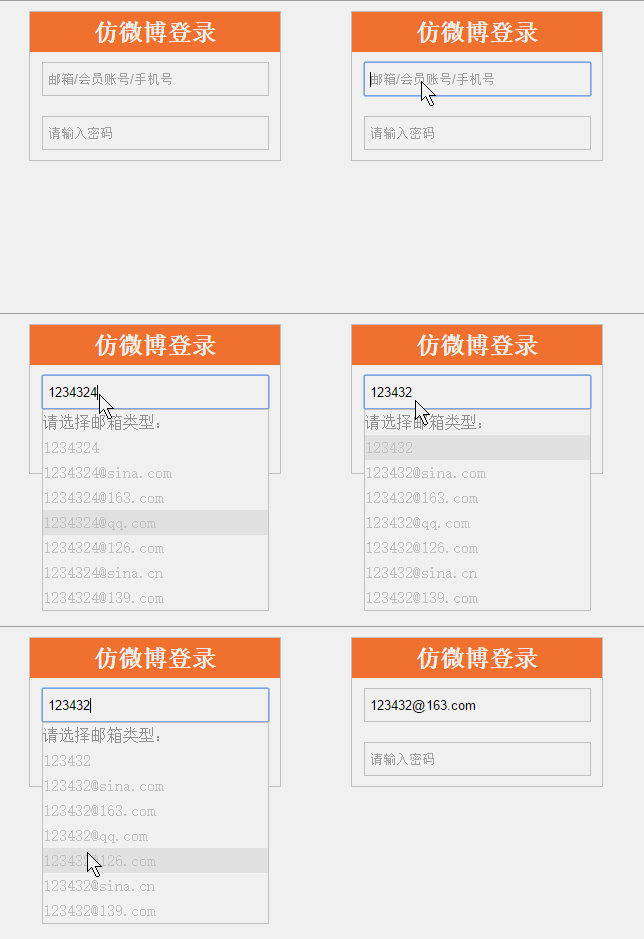
功能清單:正則匹配並過濾提示項、鍵盤上下鍵切換與回車確認、滑鼠移入與點擊選取、失焦自動收起。
一、頁面結構
<div id="login">
  <h2>仿微博登錄</h2>
  <div class="detail">
    <input type="text" placeholder="郵箱/會員賬號/手機號" autocomplete="off"
           class="name" id="nameInput" maxlength="18">
  </div>
  <div class="detail">
    <input type="password" placeholder="請輸入密碼" autocomplete="off" class="password">
  </div>
  <ul id="suggest">
    <li class="note">請選擇郵箱類型:</li>
    <li class="item" email=""></li>
    <li class="item" email="@sina.com">@sina.com</li>
    <li class="item" email="@163.com">@163.com</li>
    <li class="item" email="@qq.com">@qq.com</li>
    <li class="item" email="@126.com">@126.com</li>
    <li class="item" email="@sina.cn">@sina.cn</li>
    <li class="item" email="@139.com">@139.com</li>
  </ul>
</div>
二、樣式
body, ul, li, h2 { margin: 0; padding: 0; color: #ccc; }
ul { list-style-type: none; }
#login {
  width: 250px; background: #fff; border: 1px solid #ccc;
  text-align: center; margin: 10px auto; position: relative;
}
#login h2 { background: #FA7D3C; color: #fff; line-height: 40px; }
.detail input { width: 220px; height: 30px; margin: 10px auto; border: 1px solid #ccc; padding-left: 5px; }
#suggest {
  width: 225px; background: #fff; border: 1px solid #ccc;
  position: absolute; top: 84px; left: 12px; display: none;
}
#suggest li { width: 225px; height: 25px; line-height: 25px; text-align: left; cursor: pointer; }
#suggest li.note { color: #989090; }
#suggest li.active { background: #eee; }
三、封裝成 Suggest 類
把輸入框、提示列表、列表項都掛在實例上,方法掛在原型上,這是最典型的面向物件組織方式:
window.onload = function () {
  var s1 = new Suggest();
  s1.init();
};

function Suggest() {
  this.oInput = document.getElementById('nameInput');
  this.oUl    = document.getElementById('suggest');
  this.aLi    = this.oUl.getElementsByTagName('li');
}

Suggest.prototype = {
  init: function () {
    this.toChange();
    this.toBlur();
  },

  // 監聽輸入變化,兼容 IE 的 onpropertychange 與標準的 oninput
  toChange: function () {
    var ie = !-[1,];
    var This = this;   // 保存 this 指向

    if (ie) {
      this.oInput.onpropertychange = function () {
        if (This.oInput.value == '') {
          This.tips();   // 修正 IE 下清空後列表項內容未復位的問題
          return;
        }
        This.showUl();
        This.tips();
        This.sel(1);     // 預設選中第一條
      };
    } else {
      this.oInput.oninput = function () {
        This.showUl();
        This.tips();
        This.sel(1);
      };
    }
  },

  showUl: function () {
    this.oUl.style.display = 'block';
  },

  toBlur: function () {
    var This = this;
    this.oInput.onblur = function () {
      This.oUl.style.display = 'none';
    };
  },

  // 依輸入內容過濾提示項
  tips: function () {
    var value = this.oInput.value;
    var re = new RegExp('@' + value.substring(value.indexOf('@') + 1));

    for (var i = 1; i < this.aLi.length; i++) {
      this.aLi[i].style.display = 'block';   // 每次先全部還原
    }

    if (re.test(value)) {
      // 已輸入 @:只保留後綴匹配的項
      for (var i = 1; i < this.aLi.length; i++) {
        var oEmail = this.aLi[i].getAttribute('email');
        if (i == 1) {
          this.aLi[i].innerHTML = value;
        } else {
          this.aLi[i].style.display = re.test(oEmail) ? 'block' : 'none';
        }
      }
    } else {
      // 尚未輸入 @:拼出完整候選郵箱
      for (var i = 1; i < this.aLi.length; i++) {
        var oEmail = this.aLi[i].getAttribute('email');
        this.aLi[i].innerHTML = oEmail ? value + oEmail : value;
      }
    }
  },

  // 高亮當前項,並綁定滑鼠與鍵盤事件
  sel: function (iNow) {
    var This = this;

    for (var i = 1; i < this.aLi.length; i++) {
      this.aLi[i].className = 'item';
    }
    this.aLi[iNow].className = (this.oInput.value == '') ? 'item' : 'active';

    for (var i = 1; i < this.aLi.length; i++) {
      this.aLi[i].index = i;

      this.aLi[i].onmouseover = function () {
        for (var j = 1; j < This.aLi.length; j++) {
          This.aLi[j].className = 'item';
        }
        this.className = 'active';
        iNow = this.index;
      };

      this.aLi[i].onmousedown = function () {
        This.oInput.value = this.innerHTML;
      };
    }

    this.oInput.onkeydown = function (e) {
      var e = e || window.event;
      if (e.keyCode == 38) {          // 上
        iNow = (iNow == 1) ? This.aLi.length - 1 : iNow - 1;
        This.highlight(iNow);
      } else if (e.keyCode == 40) {   // 下
        iNow = (iNow == This.aLi.length - 1) ? 1 : iNow + 1;
        This.highlight(iNow);
      } else if (e.keyCode == 13) {   // 回車
        This.oInput.value = This.aLi[iNow].innerHTML;
        This.oInput.blur();
      }
    };
  },

  highlight: function (i) {
    for (var j = 1; j < this.aLi.length; j++) {
      this.aLi[j].className = 'item';
    }
    this.aLi[i].className = 'active';
  }
};
這個案例最值得記住的兩點
this 指向問題:事件處理函式內部的 this 預設指向觸發事件的元素,因此需要事先用 var This = this 快取實例引用,這是所有面向物件封裝的必經一步。
分支細節:提示框看似簡單,實際上要處理「未輸入 @」「已輸入 @ 且匹配」「已輸入 @ 但不匹配」「全部清空」等多種狀態,任何一個分支遺漏都會表現成看得見的 bug。把高亮邏輯抽成獨立方法,是讓 sel 函式保持可讀的關鍵。