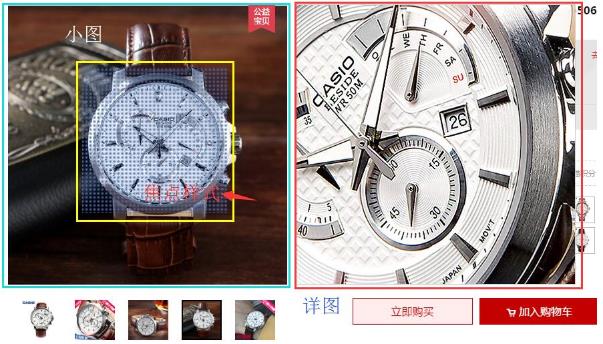
購物網站的商品頁幾乎都有一塊展示區,滑鼠移上去會出現一個方框,右側同步顯示該區域的放大細節。
做这个功能需要的技能並不多:取得頁面元素、幾個滑鼠事件、用 DOM 設定元素屬性。
原理拆解:
1. 焦點框跟著滑鼠移動;
2. 限制焦點框只能在縮圖範圍內移動;
3. 大圖區塊依焦點框位置顯示對應的局部。
一、先寫 CSS
幾個要點:焦點框相對定位、預設隱藏;右側大圖框預設隱藏,且內容溢出時要裁切(overflow: hidden)。
二、取得元素
 // 用 id 取得元素的小工具
 function getId(tag){
   return document.getElementById(tag);
 }
 var box  = getId("box");
 var small = getId("small");
 var mask  = getId("mask");
 var big   = getId("big");
 var pic   = big.children[0]; // 透過節點取得大圖
三、滑鼠移入移出
移入縮圖時焦點框與大圖框同時出現,移出時一起隱藏。
 small.onmouseover = function(){
   mask.style.display = "block";
   big.style.display  = "block";
 };
 small.onmouseout = function(){
   mask.style.display = "none";
   big.style.display  = "none";
 };
四、讓焦點框跟著滑鼠
這裡的事件要用 onmousemove,因為我們要的是持續追蹤。
最容易忽略的問題是:焦點框是相對誰在移動?由於 mask 放在 small 裡,它是相對於 small 定位的。因此用 clientX/clientY 取到的視窗座標必須減去父元素的偏移,還要再減掉焦點框寬高的一半,才能讓框的中心對齊游標。
 small.onmousemove = function(e){
   var marginL = box.offsetLeft;
   var marginT = box.offsetTop;
   var currentX = e.clientX;
   var currentY = e.clientY;
   var x = currentX - marginL - mask.offsetWidth / 2;
   var y = currentY - marginT - mask.offsetHeight / 2;
   mask.style.left = x + "px";
   mask.style.top  = y + "px";
 };
五、限制移動範圍
否則焦點框會跑到縮圖外面,體驗很差。做法很直接:超出範圍時就給它邊界值。x 的最小值為 0,最大值為「縮圖寬度減去焦點框寬度」,y 軸同理。
 small.onmousemove = function(e){
   var marginL = box.offsetLeft;
   var marginT = box.offsetTop;
   var x = e.clientX - marginL - mask.offsetWidth / 2;
   var y = e.clientY - marginT - mask.offsetHeight / 2;
   if (x < 0) { x = 0; }
   if (x > small.offsetWidth - mask.offsetWidth) { x = small.offsetWidth - mask.offsetWidth; }
   if (y < 0) { y = 0; }
   if (y > small.offsetHeight - mask.offsetHeight) { y = small.offsetHeight - mask.offsetHeight; }
   mask.style.left = x + "px";
   mask.style.top  = y + "px";
 };
注意順序:先算出範圍內的座標,再設定位置。
六、讓大圖顯示對應局部
大圖靠負的 margin 位移。位移量用比例換算:大圖寬度除以縮圖寬度得到比例,再乘上焦點框的偏移量。背後的邏輯是「焦點框左上角」與「大圖左上角顯示的內容」對應同一位置。
 var relativeX = mask.offsetLeft;
 var relativeY = mask.offsetTop;
 var proporationX = pic.offsetWidth / small.offsetWidth;
 var proporationY = pic.offsetHeight / small.offsetWidth;
 pic.style.marginLeft = -relativeX * proporationX + "px";
 pic.style.marginTop  = -relativeY * proporationY + "px";
到這裡功能就完成了。
CSS
 <style>
 * { margin: 0; padding: 0; }
 #box { margin: 50px; }
 #small {
   width: 229px; height: 250px;
   border: 1px solid black;
   text-align: center;
   position: relative;
   float: left;
 }
 #mask {
   width: 100px; height: 100px;
   background-color: rgba(214, 111, 193, 0.3);
   position: absolute;
   top: 0; left: 0;
 }
 #big {
   width: 350px; height: 350px;
   border: 1px solid black;
   float: left;
   overflow: hidden;
 }
 </style>
HTML
 <body>
 <div id="box">
 <div id="small">
 <img src="small_img.jpg" width="229" height="249" alt="" />
 <div id="mask"></div>
 </div>
 <div id="big">
 <img src="big_img.JPG" width="549" height="600" alt="" />
 </div>
 </div>
JavaScript
 <script>
 function getId(tag){
   return document.getElementById(tag);
 }
 var box  = getId("box");
 var small = getId("small");
 var mask  = getId("mask");
 var big   = getId("big");
 var pic   = big.children[0];

 small.onmouseover = function(){
   mask.style.display = "block";
   big.style.display  = "block";
 };
 small.onmouseout = function(){
   mask.style.display = "none";
   big.style.display  = "none";
 };

 small.onmousemove = function(e){
   var marginL = box.offsetLeft;
   var marginT = box.offsetTop;
   var x = e.clientX - marginL - mask.offsetWidth / 2;
   var y = e.clientY - marginT - mask.offsetHeight / 2;

   if (x < 0) { x = 0; }
   if (x > small.offsetWidth - mask.offsetWidth) { x = small.offsetWidth - mask.offsetWidth; }
   if (y < 0) { y = 0; }
   if (y > small.offsetHeight - mask.offsetHeight) { y = small.offsetHeight - mask.offsetHeight; }

   mask.style.left = x + "px";
   mask.style.top  = y + "px";

   var relativeX = mask.offsetLeft;
   var relativeY = mask.offsetTop;
   var proporationX = pic.offsetWidth / small.offsetWidth;
   var proporationY = pic.offsetHeight / small.offsetWidth;
   pic.style.marginLeft = -relativeX * proporationX + "px";
   pic.style.marginTop  = -relativeY * proporationY + "px";
 };
 </script>
兩個可以調整的地方
一是 proporationY 原本除以的是 small.offsetWidth,改成 small.offsetHeight 在長寬比不同的情況下會更精準。二是用 margin 位移大圖會改變元素在文件流中的位置,改用 transform: translate() 不僅不影響排版,還能交給 GPU 處理,動起來更順。
- 上一篇文章: JavaScript 邏輯運算子 !、&&、|| 全面解析
- 下一篇文章: JS 輪播圖實作(二):加上左右箭頭的點擊控制