hash 屬性是一段可讀可寫的字串,內容就是 URL 中從 # 開始的錨點部分。
語法
location.hash
問題場景
專案裡有大量「AJAX 查詢表單 + 結果列表」的頁面。由於結果是 AJAX 動態帶回的,使用者點進詳情頁後再按瀏覽器回退鍵,查詢頁的表單與列表就都回到了初始狀態。若每次返回都得重新輸入條件、甚至重新翻到第幾頁,這個體驗會讓人非常崩潰。
我們在專案裡寫了一個輕量的 JavaScript 基底類別來處理 location.hash,以此保存頁面狀態(本文涉及 JS 物件導向觀念,例如定義類別、繼承、虛方法與反射,初學者可能需要多讀兩次)。
需求
專案是一個基於微信的 H5 任務管理系統,頁面原型如下:
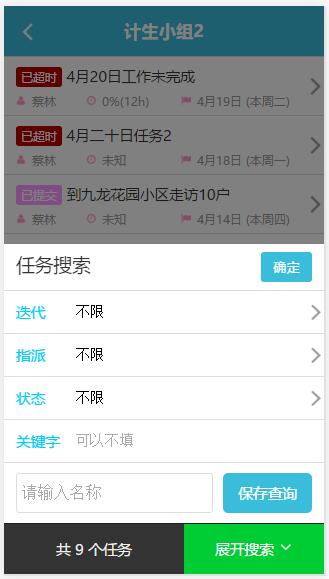
流程很單純:輸入條件 → AJAX 取回結果 → 點擊某筆任務進入詳情。專案經理往往要連續處理多個任務,會不斷在詳情頁與列表頁之間往返,一旦回退就清空條件,效率會被徹底打斷。
解決思路
保存頁面狀態的做法有很多,我們選擇 location.hash,理由是不佔用伺服器資源、也不會觸發請求。步驟是:
1. 使用者按下查詢後,把查詢條件序列化成字串,用 # 接在 URL 後面組成新網址,再呼叫 location.replace(新網址) 改寫地址欄。
2. 使用者回退到查詢頁(等同於頁面載入)時,把 location.hash 反序列化回查詢條件,回填表單並自動執行一次查詢。
關鍵在 location.replace:它不只是改寫地址欄,更重要的是會在 window.history 中「替換」當前記錄。若改用 location.href,每次回退都會退回上一組條件,反而更難用。
核心類別 HashQuery
 (function () {
  if (window.HashQuery) {
    return;
  }
  window.HashQuery = function () {};
  HashQuery.prototype = {
    parseFromLocation: function () {
      if (location.hash === '' || location.hash.length === 1) {
        return;
      }
      var properties = location.hash.substr(1).split('|');
      var index = 0;
      for (var p in this) {
        if (!this.hasOwnProperty(p) || typeof this[p] != 'string') {
          continue;
        }
        if (index < properties.length) {
          this[p] = properties[index];
          if (this[p] === '-') {
            this[p] = '';
          }
        }
        index++;
      }
    },
    updateLocation: function () {
      var properties = [];
      for (var p in this) {
        if (!this.hasOwnProperty(p) || typeof this[p] != 'string') {
          continue;
        }
        var value = this[p];
        properties.push(value === '' ? '-' : value);
      }
      var url = location.origin + location.pathname + location.search + "#" + properties.join('|');
      location.replace(url);
    }
  };
})();
這個類別只有兩個方法:parseFromLocation() 把 hash 反序列化回子類別的 instance;updateLocation() 把 instance 序列化後寫回 location。它本身刻意不定義任何屬性,因為具體有哪些查詢條件只有頁面自己知道,這正好符合現實。
序列化的規則是利用 JS 的反射機制,依序取出 instance 上所有「字串屬性」的值,用 | 串接;空字串則以 - 佔位,避免分隔數量錯位。反序列化時再依同樣的順序回填。
第一步:定義子類別
 (function () {
  window.TaskSearchHashQuery = function () {
    HashQuery.constructor.call(this);
    this.iterationId = '';
    this.assignedUserId = '';
    this.status = '';
    this.keyword = '';
  };
  TaskSearchHashQuery.constructor = TaskSearchHashQuery;
  TaskSearchHashQuery.prototype = new HashQuery();
})();
第二步:在查詢頁使用
 (function () {
  var urls = {
    list: "/app/task/list"
  };
  var hashQuery = null;
  var pager = null;
  $(document).ready(function () {
    hashQuery = new TaskSearchHashQuery();
    hashQuery.parseFromLocation(); // 從 location 反序列化
    updateFormByHashQuery();
    $("#btnSearch").click(function () {
      updateHashQueryByForm();
      hashQuery.updateLocation(); // 序列化後寫回 location.hash
      $("#lblCount").html("加載中...");
      pager.reload();
      page.hideSearch();
    });
    pager = new ListPager("#listTasks", urls.list);
    pager.getPostData = function (index) {
      return "pageIndex=" + index +
        "&pageSize=" + page.pageSize +
        "&projectId=" + page.projectId +
        "&iterationId=" + hashQuery.iterationId +
        "&assignedUserId=" + hashQuery.assignedUserId +
        "&status=" + hashQuery.status +
        "&keyword=" + hashQuery.keyword;
    };
    pager.onLoaded = function () {
      $("#lblCount").html("共 " + $("#hfPagerTotalCount").val() + " 個任務");
      $("#hfPagerTotalCount").remove();
    };
    pager.init();
  });
  function updateHashQueryByForm() {
    hashQuery.iterationId = $("#ddlIterations").val();
    hashQuery.assignedUserId = $("#ddlUsers").val();
    hashQuery.status = $("#ddlStatuses").val();
    hashQuery.keyword = $("#txtKeyword").val();
  }
  function updateFormByHashQuery() {
    $("#ddlIterations").val(hashQuery.iterationId);
    $("#ddlUsers").val(hashQuery.assignedUserId);
    $("#ddlStatuses").val(hashQuery.status);
    $("#txtKeyword").val(hashQuery.keyword);
  }
})();
小結
整套機制其實就三件事:查詢時把條件序列化進 hash、頁面載入時把 hash 反序列化回表單、用 location.replace 確保 history 不被塞滿重複記錄。實作成本低,但對使用體驗的提升非常明顯——使用者回退後,條件與結果都還在原位。
- 上一篇文章: JS 手寫 Base64 加解密:原理與完整範例
- 下一篇文章: 字串反轉的 10 種 JavaScript 寫法(面試常考)
相關文章
-
jQuery 如何接收後台返回的 List 集合數據 純靜態頁面之間傳遞與讀取參數的兩種 JavaScript 手法 以 JSON 打造更高階的 Ajax 資料傳輸層 基於 JSON 的 AJAX 高級開發技術 讓 Ajax 網頁記得住頁碼:用網址錨點補回後退功能 從改善架構著手,提升 ASP.Net 應用程式的效能 用 Ajax 開發新一代 Web 應用(三):遠端呼叫為什麼一定比較慢 為 Ajax 應用程式保留標準瀏覽器功能(三):用 AJax-URI 實作上一頁 C#類別的XML序列化:檔案與隱藏表單保存策略 .NET 中輕鬆處理 XML 資料:以 XmlTextWriter 序列化資料