有些設計稿要求標題使用特殊字型,但網頁安全字型的選擇有限。一個經典解法是「用伺服器端把文字渲染成圖片」——本文示範以 PHP 的 GD 函式庫搭配 JavaScript 完成這個轉換。
一、準備要素
1)替換字型的 js 檔
這支名為 replacement.js 的腳本,會搜尋頁面上符合指定選擇器的元素,把其中的文字替換成由伺服器端動態產生的圖片。
function com_stewartspeak_replacement() {
    /* Dynamic Heading Generator By Stewart Rosenberger
       https://www.stewartspeak.com/headings/ */
    replaceSelector("h1", "dynatext/heading.php", true); // 前兩個參數需要修改
    var testURL = "dynatext/loading.gif";                // 修改為對應的圖片路徑
    var doNotPrintImages = false;
    var printerCSS = "replacement-print.css";
    var hideFlicker = false;
    var hideFlickerCSS = "replacement-screen.css";
    var hideFlickerTimeout = 100;

    var items;
    var imageLoaded = false;
    var documentLoaded = false;

    function replaceSelector(selector, url, wordwrap) {
        if (typeof items == "undefined") items = new Array();
        items[items.length] = { selector: selector, url: url, wordwrap: wordwrap };
    }

    if (hideFlicker) {
        document.write('<link id="hide-flicker" rel="stylesheet" media="screen" href="' + hideFlickerCSS + '" />');
        window.flickerCheck = function () {
            if (!imageLoaded) setStyleSheetState('hide-flicker', false);
        };
        setTimeout('window.flickerCheck();', hideFlickerTimeout);
    }

    if (doNotPrintImages) {
        document.write('<link id="print-text" rel="stylesheet" media="print" href="' + printerCSS + '" />');
    }

    var test = new Image();
    test.onload = function () {
        imageLoaded = true;
        if (documentLoaded) replacement();
    };
    test.src = testURL + "?date=" + (new Date()).getTime();

    addLoadHandler(function () {
        documentLoaded = true;
        if (imageLoaded) replacement();
    });

    function replacement() {
        for (var i = 0; i < items.length; i++) {
            var elements = getElementsBySelector(items[i].selector);
            if (elements.length > 0) {
                for (var j = 0; j < elements.length; j++) {
                    if (!elements[j]) continue;
                    var text = extractText(elements[j]);
                    while (elements[j].hasChildNodes()) elements[j].removeChild(elements[j].firstChild);

                    var tokens = items[i].wordwrap ? text.split(' ') : [text];
                    for (var k = 0; k < tokens.length; k++) {
                        var url = items[i].url + "?text=" + escape(tokens[k] + ' ') + "&selector=" + escape(items[i].selector);
                        var image = document.createElement("img");
                        image.className = "replacement";
                        image.alt = tokens[k];
                        image.src = url;
                        elements[j].appendChild(image);
                    }

                    if (doNotPrintImages) {
                        var span = document.createElement("span");
                        span.style.display = 'none';
                        span.className = "print-text";
                        span.appendChild(document.createTextNode(text));
                        elements[j].appendChild(span);
                    }
                }
            }
        }
        if (hideFlicker) setStyleSheetState('hide-flicker', false);
    }

    function extractText(element) {
        if (typeof element == "string") return element;
        else if (typeof element == "undefined") return element;
        else if (element.innerText) return element.innerText;

        var text = "";
        var kids = element.childNodes;
        for (var i = 0; i < kids.length; i++) {
            if (kids[i].nodeType == 1) text += extractText(kids[i]);
            else if (kids[i].nodeType == 3) text += kids[i].nodeValue;
        }
        return text;
    }

    /* 依 CSS 選擇器找出符合的元素,部分複雜規則不相容 */
    function getElementsBySelector(selector) {
        var tokens = selector.split(' ');
        var currentContext = new Array(document);
        for (var i = 0; i < tokens.length; i++) {
            token = tokens[i].replace(/^\s+/, '').replace(/\s+$/, '');
            if (token.indexOf('#') > -1) {
                var bits = token.split('#');
                var element = document.getElementById(bits[1]);
                if (bits[0] && element.nodeName.toLowerCase() != bits[0]) return new Array();
                currentContext = new Array(element);
                continue;
            }
            if (token.indexOf('.') > -1) {
                var bits = token.split('.');
                var tagName = bits[0] || '*';
                var className = bits[1];
                var found = new Array();
                var foundCount = 0;
                for (var h = 0; h < currentContext.length; h++) {
                    var elements = tagName == '*'
                        ? (currentContext[h].all ? currentContext[h].all : currentContext[h].getElementsByTagName('*'))
                        : currentContext[h].getElementsByTagName(tagName);
                    for (var j = 0; j < elements.length; j++) found[foundCount++] = elements[j];
                }
                currentContext = new Array();
                var c = 0;
                for (var k = 0; k < found.length; k++) {
                    if (found[k].className && found[k].className.match(new RegExp('\\b' + className + '\\b'))) currentContext[c++] = found[k];
                }
                continue;
            }
            tagName = token;
            var found = new Array();
            var foundCount = 0;
            for (var h = 0; h < currentContext.length; h++) {
                var elements = currentContext[h].getElementsByTagName(tagName);
                for (var j = 0; j < elements.length; j++) found[foundCount++] = elements[j];
            }
            currentContext = found;
        }
        return currentContext;
    }
}

if (document.createElement && document.getElementsByTagName && !navigator.userAgent.match(/opera\/?6/i)) {
    com_stewartspeak_replacement();
}
2)產生圖片的 PHP 檔
這個腳本接收 text 參數,用指定的字型與大小產生 PNG 圖片回傳給瀏覽器,並可選擇是否快取結果。
<?php
/* Dynamic Heading Generator By Stewart Rosenberger
https://www.stewartspeak.com/headings/ */
$font_file = 'trebuc.ttf'; // 可做相應修改
$font_size = 23; // 可做相應修改
$font_color = '#000000';
$background_color = '#ffffff';
$transparent_background = true;
$cache_images = true;
$cache_folder = 'cache';
$mime_type = 'image/png';
$extension = '.png';
$send_buffer_size = 4096;
// 檢查 GD 支援
if (!function_exists('ImageCreate')) fatal_error('Error: Server does not support PHP image generation');
// 清理文字
if (empty($_GET['text'])) fatal_error('Error: No text specified.');
$text = $_GET['text'];
if (get_magic_quotes_gpc()) $text = stripslashes($text);
$text = javascript_to_html($text);
// 若有快取副本,直接送出
$hash = md5(basename($font_file) . $font_size . $font_color . $background_color . $transparent_background . $text);
$cache_filename = $cache_folder . '/' . $hash . $extension;
if ($cache_images && ($file = @fopen($cache_filename, 'rb'))) {
header('Content-type: ' . $mime_type);
while (!feof($file)) print(($buffer = fread($file, $send_buffer_size)));
fclose($file);
exit;
}
// 檢查字型可用性
if (!is_readable($font_file)) fatal_error('Error: The server is missing the specified font.');
// 建立圖片
$background_rgb = hex_to_rgb($background_color);
$font_rgb = hex_to_rgb($font_color);
$dip = get_dip($font_file, $font_size);
$box = @ImageTTFBBox($font_size, 0, $font_file, $text);
$image = @ImageCreate(abs($box[2] - $box[0]), abs($box[5] - $dip));
if (!$image || !$box) fatal_error('Error: The server could not create this heading image.');
// 配置顏色並繪製文字
$background_color = @ImageColorAllocate($image, $background_rgb['red'], $background_rgb['green'], $background_rgb['blue']);
$font_color = ImageColorAllocate($image, $font_rgb['red'], $font_rgb['green'], $font_rgb['blue']);
ImageTTFText($image, $font_size, 0, -$box[0], abs($box[5] - $box[3]) - $box[1], $font_color, $font_file, $text);
// 設定透明背景
if ($transparent_background) ImageColorTransparent($image, $background_color);
header('Content-type: ' . $mime_type);
ImagePNG($image);
// 存快取
if ($cache_images) @ImagePNG($image, $cache_filename);
ImageDestroy($image);
exit;
/* 嘗試判斷該字型在此大小下的「dip」(基線以下被裁掉的像素) */
function get_dip($font, $size) {
$test_chars = 'abcdefghijklmnopqrstuvwxyz' . 'ABCDEFGHIJKLMNOPQRSTUVWXYZ' . '1234567890' . '!@#$%^&*()\'"\\/;.,`~<>[]{}-+_-=';
$box = @ImageTTFBBox($size, 0, $font, $test_chars);
return $box[3];
}
/* 嘗試產生含錯誤訊息的圖片;若失敗則回傳 500 */
function fatal_error($message) {
if (function_exists('ImageCreate')) {
$width = ImageFontWidth(5) * strlen($message) + 10;
$height = ImageFontHeight(5) + 10;
if ($image = ImageCreate($width, $height)) {
$background = ImageColorAllocate($image, 255, 255, 255);
$text_color = ImageColorAllocate($image, 0, 0, 0);
ImageString($image, 5, 5, 5, $message, $text_color);
header('Content-type: image/png');
ImagePNG($image);
ImageDestroy($image);
exit;
}
}
header("HTTP/1.0 500 Internal Server Error");
print($message);
exit;
}
/* 將 HTML 十六進位色碼解碼為 R、G、B 陣列,接受 #ffffff、ffffff、#fff、fff */
function hex_to_rgb($hex) {
if (substr($hex, 0, 1) == '#') $hex = substr($hex, 1);
if (strlen($hex) == 3) {
$hex = substr($hex, 0, 1) . substr($hex, 0, 1)
. substr($hex, 1, 1) . substr($hex, 1, 1)
. substr($hex, 2, 1) . substr($hex, 2, 1);
}
if (strlen($hex) != 6) fatal_error('Error: Invalid color "' . $hex . '"');
$rgb['red'] = hexdec(substr($hex, 0, 2));
$rgb['green'] = hexdec(substr($hex, 2, 2));
$rgb['blue'] = hexdec(substr($hex, 4, 2));
return $rgb;
}
/* 將 JavaScript 的 unicode 逸出序列轉為 HTML 實體,例如 %u2018 → ‘ */
function javascript_to_html($text) {
$matches = null;
preg_match_all('/%u([0-9A-F]{4})/i', $text, $matches);
if (!empty($matches)) {
for ($i = 0; $i < sizeof($matches[0]); $i++) {
$text = str_replace($matches[0][$i], '&#' . hexdec($matches[1][$i]) . ';', $text);
}
}
return $text;
}
?>
3)需要的字型檔
把使用到的字型放在與 js、php 同一個目錄下即可(若要改放他處,對應的設定也要同步修改)。
4)PHP 的 GD2 函式庫
整個方案依賴 GD 的 TrueType 繪字能力(ImageTTFBBox、ImageTTFText),部署前請確認伺服器已啟用。
二、HTML 端的使用方式
<?php
// load the popup utils library
// require_once 'include/popup_utils.inc.php';
?>
<!DOCTYPE html PUBLIC "-//W3C//DTD XHTML 1.1//EN" "https://www.w3.org/TR/xhtml11/DTD/xhtml11.dtd">
<html>
<head>
<title>Professional Search Engine Optimization with PHP: Table of Contents</title>
<script type="text/javascript" language="javascript" src="dynatext/replacement.js"></script>
</head>
<body>
<h1>Professional Search Engine Optimization with PHP: Table of Contents</h1>
<ol>
<li>You: Programmer and Search Engine Marketer</li>
<li>A Primer in Basic SEO</li>
<li>Provocative SE-Friendly URLs</li>
<li>Content Relocation and HTTP Status Codes</li>
<li>Duplicate Content</li>
<li>SE-Friendly HTML and JavaScript</li>
<li>Web Syndication and Social Bookmarking</li>
<li>Black Hat SEO</li>
<li>Sitemaps</li>
<li>Link Bait</li>
<li>IP Cloaking, Geo-Targeting, and IP Delivery</li>
<li>Foreign Language SEO</li>
<li>Coping with Technical Issues</li>
<li>Site Clinic: So You Have a Web Site?</li>
<li>WordPress: Creating a SE-Friendly Weblog?</li>
<li>Introduction to Regular Expression</li>
</ol>
</body>
</html>
三、效果對比
使用前:

使用後:
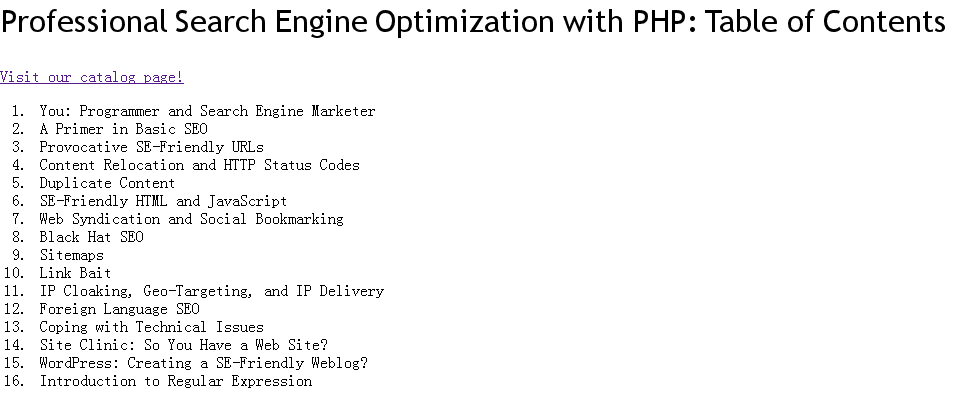
這個方案在今天還適用嗎
必須誠實說:這套做法在今日已顯得笨重,且存在幾個不容忽視的問題。
效能與快取。每個標題都是一次 PHP 請求,雖然程式碼已用 md5 雜湊做檔案快取,但首次載入仍需逐字產生圖片。頁面標題多時,請求數會很可觀。
SEO 與可讀性。把標題變成圖片,搜尋引擎雖然仍讀得到 HTML 中的原始文字(因為替換是前端進行的),但一旦 JavaScript 失效,使用者看到的就是 fallback 行為。程式中 doNotPrintImages 與隱藏文字節點的設計,正是為了處理列印與無障礙場景,但這類補丁越多,越說明方案本身在對抗 web 的本性。
無障礙。程式碼有為圖片設定 alt 屬性,這點做得不錯,但螢幕閱讀器的朗讀順序仍可能與視覺呈現不一致。
現代替代方案。若只是想用特殊字型,現在有遠比這更簡潔的選擇:以 @font-face 搭配 WOFF2 格式的網頁字型,幾行 CSS 就能完成,且文字仍是真正的文字——可選取、可搜尋、可被閱讀器朗讀、會隨縮放保持清晰。若確實需要「文字轉圖片」(例如分享卡片、浮水印),則可考慮 SVG 或 Canvas 在客戶端繪製,或直接串接圖片產生服務。
換句話說,這個範例的價值今天主要落在歷史理解與技術素養上:它示範了 GD 的文字排版原理、如何計算基線偏移(dip)以避免文字被裁切、以及如何用雜湊做內容快取。這些觀念在處理圖像相關問題時仍然管用。