前言
前兩天在网上翻組件,偶然撞見一個叫 SlotMachine 的傢伙——就是我們小時候遊戲機房裡那種拉桿老虎機的效果。翻了一遍文檔,童年回憶直接被勾了出來,於是決定動手玩一玩。
一、效果預覽
先來個最樸素的版本熱熱身:

覺得太簡單?別急,好戲在後頭,試試手氣再說。

還不夠過癮?那上真實項目裡的效果。

點了半天都不中獎,難怪小時候在遊戲機房從來贏不了。不死心,繼續戳開始,總算中了這麼一回,著實來之不易。
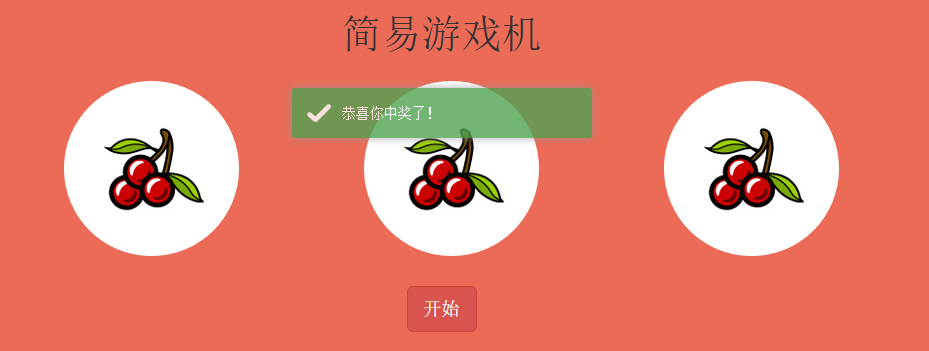
最後是我們年終會上用的抽獎效果:開始!停止!

二、代碼示例
既然是 JS 組件,第一步當然是去倉庫把源碼拉下來。
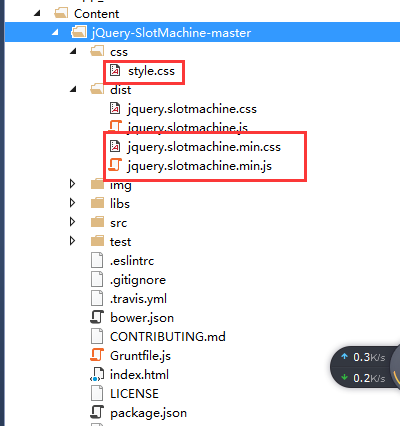
接著看文件引用。這裡同時用到了 Bootstrap 與 toastr:
 <link rel="stylesheet" href="https://maxcdn.bootstrapcdn.com/bootstrap/3.3.6/css/bootstrap.min.css" integrity="sha384-1q8mTJOASx8j1Au+a5WDVnPi2lkFfwwEAa8hDDdjZlpLegxhjVME1fgjWPGmkzs7" crossorigin="anonymous">
    <link href="~/Content/jQuery-SlotMachine-master/dist/jquery.slotmachine.css" rel="stylesheet" />
    <link href="~/Content/jQuery-SlotMachine-master/css/style.css" rel="stylesheet" />
    <link href="~/Content/toastr/toastr.min.css" rel="stylesheet" />

    <script type="text/javascript" src="//code.jquery.com/jquery-2.1.1.min.js"></script>
    <script src="https://maxcdn.bootstrapcdn.com/bootstrap/3.3.6/js/bootstrap.min.js" integrity="sha384-0mSbJDEHialfmuBBQP6A4Qrprq5OVfW37PRR3j5ELqxss1yVqOtnepnHVP9aJ7xS" crossorigin="anonymous"></script>
    <script src="~/Content/jQuery-SlotMachine-master/dist/jquery.slotmachine.js"></script>
    <script src="~/Content/toastr/toastr.min.js"></script>
幾個需要留神的地方:
1、jQuery 與 Bootstrap 都走 CDN 引入,好處是帶完整性校驗、加載快。
2、jQuery 是硬性依賴,而且版本要在 2.0 以上,太低會直接報 JS 異常。
3、Bootstrap 並非必須,只是本文的排版借用了它的一部分樣式類。
4、toastr 同樣可選,這裡用來彈出中獎提示。
1. 試試手氣
HTML 部分:
<div id="triky"> <div class="content" style="text-align: center"> <h1>請選擇你想吃的食物</h1> <div class="row"> <div style="margin: auto;"> <div id="triky1"> <div> <img src="/Content/jQuery-SlotMachine-master/img/cookie.png" /> </div> <div> <img src="/Content/jQuery-SlotMachine-master/img/food1.jpg" /> </div> <div> <img src="/Content/jQuery-SlotMachine-master/img/food2.jpg" /> </div> <div> <img src="/Content/jQuery-SlotMachine-master/img/food3.jpg" /> </div> </div> <div> <div class="btn-group btn-group-justified btn-group-triky" style="margin-left:-15px" role="group"> <div id="trikyShuffle" type="button" class="btn btn-primary btn-lg">試試手氣</div> </div> </div> </div> </div> </div> <div class="clearfix"></div> </div>
JS 部分:
$(function () { //試試手氣 var triky = $("#triky1").slotMachine({ active: 2, //初始化的時候顯示的項的索引 //delay: 150,//切換兩張圖片的間隔時間(毫秒單位) //randomize: function () { // return 0;//每次旋轉後選中值的索引(從0開始) //} }); $("#trikyShuffle").click(function () { triky.shuffle(8);//開始旋轉方法,參數8表示每次旋轉跳過8個圖標 }); });
常用配置項、方法與事件
初始化:var machine = $("#id").slotMachine({}); 會返回當前旋轉對象。可傳入的參數包括:
active:初始顯示項的索引,從 0 開始
delay:兩張圖片切換的間隔(毫秒)
auto:是否自動旋轉,true 或 false
spins:auto 為 true 時每次跳過的圖標個數
stohidden:是否顯示開始與停止的動畫
randomize: function(activeElementIndex){}:決定每次旋轉後命中的索引
direction:動畫方向,取值 up 或 down
常用方法:
machine.shuffle(repeat, onStopCallback):開始旋轉,repeat 為跳過的圖片數,onStopCallback 是停止後的回調
machine.prev() / machine.next():切換到上一項 / 下一項
machine.stop():停止旋轉
machine.active:當前選中項的索引
machine.running:是否正在旋轉
machine.stopping:是否已停止
machine.destroy():銷毀旋轉節點
2. 簡易遊戲機
HTML 部分:
<div id="randomize"> <div class="content container" style="text-align: center;max-width: 900px;"> <h1>簡易游戲機</h1> <div class="row"> <div class="col-xs-4"> <div> <div id="machine1" class="randomizeMachine"> <div><img src="/Content/jQuery-SlotMachine-master/img/slot1.png" /></div> <div><img src="/Content/jQuery-SlotMachine-master/img/slot2.png" /></div> <div><img src="/Content/jQuery-SlotMachine-master/img/slot3.png" /></div> <div><img src="/Content/jQuery-SlotMachine-master/img/slot4.png" /></div> <div><img src="/Content/jQuery-SlotMachine-master/img/slot5.png" /></div> <div><img src="/Content/jQuery-SlotMachine-master/img/slot6.png" /></div> </div> </div> </div> <div class="col-xs-4"> <div> <div id="machine2" class="randomizeMachine"> <div><img src="/Content/jQuery-SlotMachine-master/img/slot1.png" /></div> <div><img src="/Content/jQuery-SlotMachine-master/img/slot2.png" /></div> <div><img src="/Content/jQuery-SlotMachine-master/img/slot3.png" /></div> <div><img src="/Content/jQuery-SlotMachine-master/img/slot4.png" /></div> <div><img src="/Content/jQuery-SlotMachine-master/img/slot5.png" /></div> <div><img src="/Content/jQuery-SlotMachine-master/img/slot6.png" /></div> </div> </div> </div> <div class="col-xs-4"> <div> <div id="machine3" class="randomizeMachine"> <div><img src="/Content/jQuery-SlotMachine-master/img/slot1.png" /></div> <div><img src="/Content/jQuery-SlotMachine-master/img/slot2.png" /></div> <div><img src="/Content/jQuery-SlotMachine-master/img/slot3.png" /></div> <div><img src="/Content/jQuery-SlotMachine-master/img/slot4.png" /></div> <div><img src="/Content/jQuery-SlotMachine-master/img/slot5.png" /></div> <div><img src="/Content/jQuery-SlotMachine-master/img/slot6.png" /></div> </div> </div> </div> </div> <div> <div class="btn-group btn-group-justified btn-group-randomize" role="group"> <div id="ranomizeButton" type="button" class="btn btn-danger btn-lg">開始</div> </div> </div> </div> </div>
JS 部分:
$(function () { //簡易游戲機 var machine1 = $("#machine1").slotMachine({ active: 0, delay: 500 }); var machine2 = $("#machine2").slotMachine({ active: 1, delay: 500, direction: 'down' }); var machine3 = $("#machine3").slotMachine({ active: 2, delay: 500 }); var arr = []; function onComplete(active) { if (arr.length <= 1) { arr.push(active); } else if (arr.length > 1) { arr.push(active); if (arr[0] == arr[1] && arr[1] == arr[2]) { toastr.success("恭喜你中獎了!"); } else if (arr[0] == arr[1] || arr[0] == arr[2] || arr[1] == arr[2]) { toastr.success("還差一點,繼續加油"); } else { toastr.success("手氣不行"); } arr = []; } } $("#ranomizeButton").click(function () { machine1.shuffle(5, onComplete); setTimeout(function () { machine2.shuffle(5, onComplete); }, 500); setTimeout(function () { machine3.shuffle(5, onComplete); }, 1000); }) });
三個滾輪依次錯開啟動,停止順序拉開時間差,中獎判斷放在最後一個滾輪的回調裡收攏結果,這樣手感會真實很多。
3. 可單獨停止的抽獎
HTML 部分:
<div id="casino" style="padding-top:50px;"> <div class="content"> <h1>抽獎</h1> <div> <div id="casino1" class="slotMachine" style="margin-left: -65px;"> <div class="slot slot1"></div> <div class="slot slot2"></div> <div class="slot slot3"></div> <div class="slot slot4"></div> <div class="slot slot5"></div> <div class="slot slot6"></div> </div> <div id="casino2" class="slotMachine"> <div class="slot slot1"></div> <div class="slot slot2"></div> <div class="slot slot3"></div> <div class="slot slot4"></div> <div class="slot slot5"></div> <div class="slot slot6"></div> </div> <div id="casino3" class="slotMachine"> <div class="slot slot1"></div> <div class="slot slot2"></div> <div class="slot slot3"></div> <div class="slot slot4"></div> <div class="slot slot5"></div> <div class="slot slot6"></div> </div> <div class="btn-group btn-group-justified btn-group-casino" role="group"> <div id="slotMachineButtonShuffle" type="button" class="btn btn-primary btn-lg">開始</div> <div id="slotMachineButtonStop" type="button" class="btn btn-primary btn-lg">停止</div> </div> </div> </div> <div class="clearfix"></div> </div>
JS 部分:
$(function () { //單個停止 var machine4 = $("#casino1").slotMachine({ active: 0, delay: 500 }); var machine5 = $("#casino2").slotMachine({ active: 1, delay: 550 }); machine6 = $("#casino3").slotMachine({ active: 2, delay: 600 }); var started = 0; $("#slotMachineButtonShuffle").click(function () { started = 3; machine4.shuffle(); machine5.shuffle(); machine6.shuffle(); }); $("#slotMachineButtonStop").click(function () { switch (started) { case 3: machine4.stop(); break; case 2: machine5.stop(); break; case 1: machine6.stop(); break; } started--; }); });
用一個計數變量 started 記錄还剩幾個滾輪在轉,每按一次停止就依次定住一個,這種「一個一個停」的節奏感,正是抽獎環節最抓人的地方。
三、總結
整體看下來並不複雜,屬性、方法、事件對照文檔基本都能順手用起來,示例代碼也沒有太多需要解釋的地方。想在自己的活動頁裡加一點驚喜感,這個組件值得一試。
- 上一篇文章: 前端如何分辨用戶是在刷新頁面還是在關閉標籤頁
- 下一篇文章: JavaScript 取二維乃至多維數組最大值的幾種實現
相關文章
-
徹底搞懂 jQuery 的 $.extend()、$.fn 與 $.fn.extend() 封裝 jQuery placeholder 插件,讓舊版瀏覽器也有提示文字 Highcharts 氣泡圖實作:三維數據一圖呈現 從零學會寫 jQuery 插件:三種類型、七條規範與完整示例 用JS與CSS實作下拉刷新/上拉加載 jQuery 插件 用 jQuery 插件補足 CSS3 效果:11 個實用方案整理 jQuery.fn.extend 與 jQuery.extend 的用法區別詳解 《鋒利的 jQuery》讀書筆記:第 7、8 章插件與實戰 YesTop 插件:一行 jQuery 搞定返回頂部按鈕 拖曳滑塊驗證 jQuery 插件:告別扭曲的圖形驗證碼