剝離後端耦合:用 Ajax 獲取 wx.config 參數實現微信分享
編輯:關於JavaScript
做微信自定義分享時,最常見的寫法是把 PHP 和 HTML 混在一個文件裡:後端生成簽名包,前端直接輸出到 wx.config。這種方式耦合度太高,也不利於維護。更好的做法是讓 PHP 只提供一個接口,前端通過 Ajax 拉取配置。
傳統寫法的問題
<?php
require_once "jssdk.php";
$jssdk = new JSSDK("yourAppID", "yourAppSecret");
$signPackage = $jssdk->GetSignPackage();
?>
<!DOCTYPE html>
<html lang="en">
<head>
<meta charset="UTF-8">
<title>微信分享</title>
</head>
<body>
</body>
<script src="https://res.wx.qq.com/open/js/jweixin-1.0.0.js"></script>
<script>
wx.config({
    appId: '<?php echo $signPackage["appId"];?>',
    timestamp: <?php echo $signPackage["timestamp"];?>,
    nonceStr: '<?php echo $signPackage["nonceStr"];?>',
    signature: '<?php echo $signPackage["signature"];?>',
    jsApiList: ['onMenuShareTimeline', 'onMenuShareAppMessage']
});
wx.ready(function () {
    wx.onMenuShareTimeline({
        title: '',   // 分享標題
        link: '',    // 分享鏈接
        imgUrl: '',  // 分享圖標
        success: function () {},
        cancel: function () {}
    });
    wx.onMenuShareAppMessage({
        title: '', desc: '', link: '', imgUrl: '',
        type: '',    // music、video 或 link,默認為 link
        dataUrl: '', // type 為 music/video 時需提供
        success: function () {},
        cancel: function () {}
    });
});
</script>
</html>
依賴關係其實很清晰:分享接口依賴 wx.config,wx.config 依賴 JS 庫和四個簽名參數。所以只要把「獲取簽名參數」這一步異步化,前後端就能徹底分離。
解決方案與文件結構
把獲取配置的 PHP 寫成獨立接口,前端用 Ajax 調用並轉成對象,再通過回調塞進 wx.config。
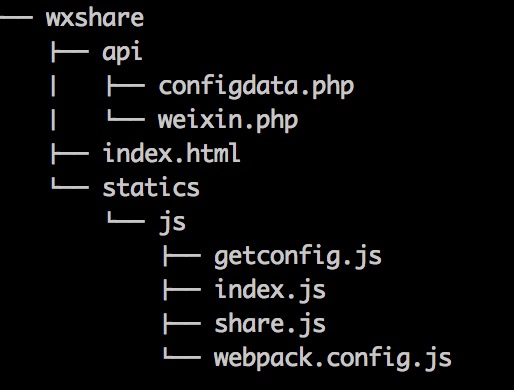
- index.html:頁面入口
- weixin.php:服務端獲取配置參數
- configdata.php:把配置輸出為接口
- getconfig.js:用 Ajax 拉取接口數據
- share.js:分享回調函數
- webpack.config.js:打包配置
- index.js:打包後最終被 HTML 引用的文件
index.html
<!DOCTYPE html>
<html lang="en">
<head>
<meta charset="UTF-8">
<title>靜態頁面微信分享測試</title>
</head>
<body>
<script src="https://res.wx.qq.com/open/js/jweixin-1.0.0.js"></script>
<script src="statics/js/index.js"></script>
</body>
</html>
weixin.php:簽名邏輯
注意 url 必須是「用戶實際打開的那個頁面地址」,否則會報 invalid signature。
<?php
class JSSDK {
private $appId;
private $appSecret;
public function __construct($appId, $appSecret) {
$this->appId = $appId;
$this->appSecret = $appSecret;
}
public function getSignPackage() {
$jsapiTicket = $this->getJsApiTicket();
$url = "https://$_SERVER[HTTP_HOST]$_SERVER[REQUEST_URI]";
$timestamp = time();
$nonceStr = $this->createNonceStr();
// 參數需按 key 的 ASCII 碼升序拼接
$string = "jsapi_ticket=$jsapiTicket&noncestr=$nonceStr×tamp=$timestamp&url=$url";
$signature = sha1($string);
return array(
"appId" => $this->appId,
"nonceStr" => $nonceStr,
"timestamp" => $timestamp,
"url" => $url,
"signature" => $signature,
"rawString" => $string
);
}
private function createNonceStr($length = 16) {
$chars = "abcdefghijklmnopqrstuvwxyzABCDEFGHIJKLMNOPQRSTUVWXYZ0123456789";
$str = "";
for ($i = 0; $i < $length; $i++) {
$str .= substr($chars, mt_rand(0, strlen($chars) - 1), 1);
}
return $str;
}
private function getJsApiTicket() {
// jsapi_ticket 應全局存儲與更新,此處以文件為例
$data = json_decode(file_get_contents("jsapi_ticket.json"));
if ($data->expire_time < time()) {
$accessToken = $this->getAccessToken();
$url = "https://api.weixin.qq.com/cgi-bin/ticket/getticket?type=jsapi&access_token=$accessToken";
$res = json_decode($this->httpGet($url));
$ticket = $res->ticket;
if ($ticket) {
$data->expire_time = time() + 7000;
$data->jsapi_ticket = $ticket;
$fp = fopen("jsapi_ticket.json", "w");
fwrite($fp, json_encode($data));
fclose($fp);
}
} else {
$ticket = $data->jsapi_ticket;
}
return $ticket;
}
private function getAccessToken() {
// access_token 同樣應全局存儲與更新
$data = json_decode(file_get_contents("access_token.json"));
if ($data->expire_time < time()) {
$url = "https://api.weixin.qq.com/cgi-bin/token?grant_type=client_credential&appid=$this->appId&secret=$this->appSecret";
$res = json_decode($this->httpGet($url));
$access_token = $res->access_token;
if ($access_token) {
$data->expire_time = time() + 7000;
$data->access_token = $access_token;
$fp = fopen("access_token.json", "w");
fwrite($fp, json_encode($data));
fclose($fp);
}
} else {
$access_token = $data->access_token;
}
return $access_token;
}
private function httpGet($url) {
$curl = curl_init();
curl_setopt($curl, CURLOPT_RETURNTRANSFER, true);
curl_setopt($curl, CURLOPT_TIMEOUT, 500);
curl_setopt($curl, CURLOPT_URL, $url);
$res = curl_exec($curl);
curl_close($curl);
return $res;
}
}
configdata.php:輸出 JSON 接口
<?php
require_once "weixin.php";
$jssdk = new JSSDK("appId", "appSecret");
$signPackage = $jssdk->GetSignPackage();

class Config {
    var $appId;
    var $timestamp;
    var $nonceStr;
    var $signature;
    var $url;
}

$config = new Config();
$config->appId     = $signPackage["appId"];
$config->timestamp = $signPackage["timestamp"];
$config->nonceStr  = $signPackage["nonceStr"];
$config->signature = $signPackage["signature"];
$config->url       = $signPackage["url"];

header('Content-Type: application/json');
echo json_encode($config);
?>
getconfig.js:拉取配置
var getConfig = function (callback) {
    $.ajax({
        url: "https://www.goxueche.com/api/configdata.php",
        type: "get",
        success: function (data) {
            callback(data);
        }
    });
};

module.exports = getConfig;
share.js:初始化與分享
var getWeixincofig = require("./getconfig.js");

getWeixincofig(shareweixin);

function shareweixin(data) {
    var config = typeof data === 'string' ? JSON.parse(data) : data;
    window.wx.config({
        debug: true,
        appId: config.appId,
        timestamp: config.timestamp,
        nonceStr: config.nonceStr,
        signature: config.signature,
        jsApiList: ['checkJsApi', 'onMenuShareTimeline', 'onMenuShareAppMessage']
    });
    wxShare();
}

function wxShare() {
    wx.ready(function () {
        // 檢測接口是否可用
        wx.checkJsApi({
            jsApiList: ['getNetworkType', 'previewImage'],
            success: function (res) { console.log(JSON.stringify(res)); }
        });

        // 分享給好友
        wx.onMenuShareAppMessage({
            title: '趣學車-有溫度的互聯網駕校',
            desc: '想去學車,就趣學車!',
            link: 'https://www.goxueche.com',
            imgUrl: 'https://www.goxueche.com/share.png'
        });

        // 分享到朋友圈
        wx.onMenuShareTimeline({
            title: '趣學車-有溫度的互聯網駕校',
            desc: '想去學車,就趣學車!',
            link: 'https://www.goxueche.com',
            imgUrl: 'https://www.goxueche.com/share.png'
        });
    });
}
webpack.config.js
var webpack = require('webpack');

module.exports = {
    entry: {
        index: './share.js'
    },
    output: {
        path: './',
        filename: '[name].js'
    }
};
幾個實踐提醒
access_token 與 jsapi_ticket 必須全局複用。微信對這兩個憑證有每日領取次數限制,示例中「按過期時間寫文件」的思路是對的,生產環境應換成 Redis 一類的共享存儲,避免多機各自領取。
簽名 URL 要用前端實際地址。如果是單頁應用(hash 路由除外),Ajax 拿到配置後頁面地址已經變化,簽名就會失效。此類場景需要把當前 URL 作為參數傳給接口,由後端參與簽名計算。
記得關掉 debug。示例中 debug: true 會在頁面彈出大量 alert,上線前務必改為 false。
經過這樣拆分,前端拿到的是一個純靜態頁面加一份打包腳本,後端只負責接口,雙方可獨立開發與部署。
- 上一篇文章: 用時間排序算法實現秒殺列表的動態排序與倒計時
- 下一篇文章: 仿支付寶多框密碼輸入:一個 input 加多個格子搞定